
This article was published in 2014 (original author: Tricia Allen) and rewritten in October 2026.
You do not need to be fluent to travel well, but a few good apps make a foreign country much easier: reading a menu, asking for directions, buying a train ticket or explaining a problem at a pharmacy. Today’s translation apps can read signs through your camera, translate a conversation out loud and work without mobile data, if you prepare them before you leave.
This guide shows which apps are worth installing for a trip, what each one does best, how to set them up for offline use, and how to learn a few phrases before you go.

What a translation app should do on a trip
On the road you need four things, and no single feature covers all of them:
- Read: point the camera at a sign, menu or timetable and see the translation on screen.
- Talk: speak a sentence and let the app say it in the other language, then translate the answer back.
- Work offline: abroad you may have no signal or expensive roaming, so the languages you need should be downloaded to the phone.
- Remember phrases: save the sentences you use every day (greetings, allergies, your hotel address) so you can show them in seconds.
Google Translate: the all-rounder
Google Translate (Android and iPhone, free) is the app most travellers should install first. It translates typed text in more than 200 languages, and the camera mode translates text in the live camera view or in photos you already took. Google bought Word Lens, the camera app that made instant sign translation famous, in 2014 and built it into Translate.
- Offline: select a language in the app and tap Download. Google recommends doing this on Wi-Fi. Once a language is downloaded, text and camera translation work without an internet connection, although fewer languages are available offline than online.
- Conversation: the conversation mode listens to both people and translates each side out loud.
- Phrasebook: tap the star on a translation to save it for later.
Apple Translate: built into the iPhone
On an iPhone, Apple’s Translate app is already installed. It translates text, speech and the camera view, and you can download languages so that translation runs entirely on the device, which also keeps your conversations off the internet. A conversation view shows both languages side by side on the screen, which is handy at a counter.
With iOS 26, Apple added Live Translation for AirPods: the other person’s speech is translated into your ear while you listen. It needs AirPods Pro 2, AirPods Pro 3 or AirPods 4 with noise cancellation, an iPhone 15 Pro or later with Apple Intelligence turned on, and downloaded languages. The list of supported languages is still short, so check Apple’s support page for your destination.
Microsoft Translator and DeepL
- Microsoft Translator (free) translates text, speech and images and is a good second opinion when another app’s result looks odd. Its multi-device conversation feature, which linked several phones in one translated chat, has been retired.
- DeepL is known for natural-sounding translations of longer text, for example an e-mail to a landlord or a message to a host. The app also translates speech and photos. It covers fewer languages than Google and needs an internet connection, so use it as an addition, not as your only translator.
Apps for specific regions
For Korea, many travellers prefer Papago by the Korean company Naver, which is particularly good with Korean and also handles Japanese and Chinese. It offers downloadable languages for offline text translation. In China, Google services are blocked without a VPN, so install a working alternative such as Apple Translate or Microsoft Translator and download its languages before you arrive. Our guide on using a VPN while travelling explains the background.
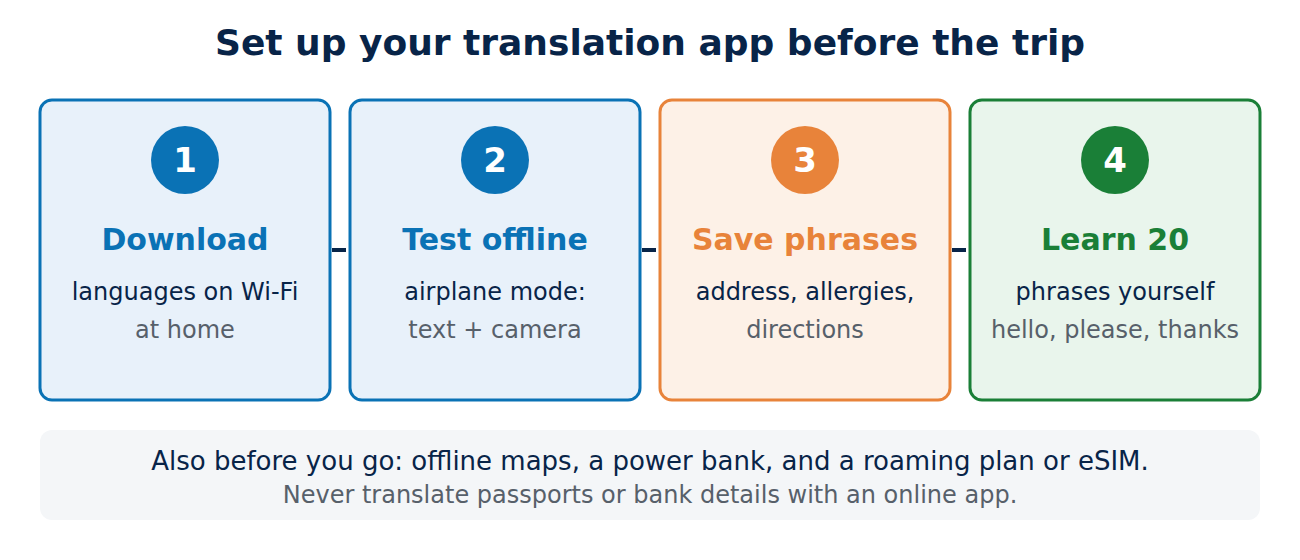
Before you leave: set up the apps
- Download the languages you need, plus English, on Wi-Fi at home.
- Test in airplane mode: translate a sentence and a photo of a sign while offline. If it fails, the language is not fully downloaded.
- Save your key phrases as favourites: your hotel address, allergies or diet, “Where is the station?”, “How much is this?”.
- Learn twenty phrases yourself. A greeting, please and thank you in the local language get a much warmer response than a phone held up to someone’s face.
Also download offline maps, keep a power bank in your bag and check your mobile plan before departure. See how to avoid international roaming charges, what an eSIM is and our essential apps for travellers.
Learn a few phrases before the trip
A translation app solves problems; a few phrases of your own start conversations. Two or three weeks before a trip, ten minutes a day in a course app is enough for greetings, numbers, ordering and directions. Audio courses such as Pimsleur train you to speak out loud, and Babbel and Duolingo have short lessons for everyday situations. Our guide to the best language learning apps compares them by goal and shows how to combine them.
Limits and privacy
- Apps make mistakes, especially with slang, dialects, long sentences and menus with local dish names. Keep sentences short and simple, and check the back-translation.
- Important situations need a human: for medical, legal or police matters, ask for an interpreter or use a phone interpretation service.
- Privacy: online translation sends your text, voice or photo to the provider’s servers. Do not photograph passports, contracts or bank details for translation, and prefer on-device or offline modes for personal conversations.
Which app should you use?
Install Google Translate on any phone and download your destination’s language. On an iPhone, Apple Translate is a strong, private alternative, and with recent AirPods it can translate speech straight into your ear. Add DeepL for longer written messages and Papago for Korea. Then learn a handful of phrases: the apps get you through the trip, but a few words of your own make it a better one.
Sources and further reading
- Translate with an offline language (Google Translate Help)
- Translate images (Google Translate Help)
- Use Live Translation with your AirPods (Apple Support)
- Microsoft Translator (App Store)



















Recent Comments