
Note: This article was published in 2011. Software versions, prices, settings, apps and services mentioned may have changed or been discontinued since then — please check current information before relying on it.
I am sure each and every one of us will have a USB device which helps in many ways. It is so easy to design your own custom flash drives that I can see everyone having them. If you have a USB device, then the most common use that you would experience is for transporting/storing data. However, with this small device you can also perform a myriad of tasks as well.
Find here some of the uses of these devices, which you would have not even thought of:
Suggested Reading: Advancements in computer technology
Run portable applications
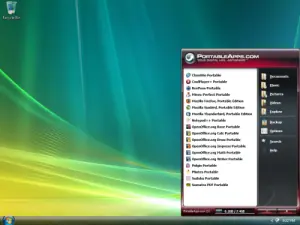
You can use your USB to run portable applications like Open Office other than for storing data. This application is a complete program of office suite, which include, word processor, spreadsheet, presentation tools, drawing package and database, all of which is stored in this small portable device, and can be executed on any system that you want to perform these vital tasks. Some of the other portable applications will include Mozilla Firefox and Thunderbird. In Simple Words, you can use USB to run any portable applications. If you want anything more then go ahead here, http://portableapps.com/.
Connect to a wireless Network
If you have a wireless network, then fear not that you will lose the network settings. With Windows XP it is possible to use as Wireless Network Setup Wizard and in Windows Vista, it is possible to use Windows Connect Now (WCN), both of which are means of saving wireless configuration to your USB drive. Using this it is possible to connect with other wireless or WCN compatible devices like a router or printer.
Suggested Reading: Home Networking- Set up a home network
Create a password reset disk
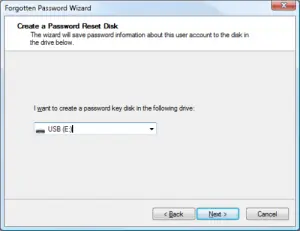
This is a vital component, which comes in handy when you lose the password of your user account on the Windows system, which is not on the domain. Your USB drive can act as a password reset disk to reset the password of your user account, and gain instant access to work on your computer. An USB drive is much more versatile than a password reset disk or a floppy disk.
Manage it
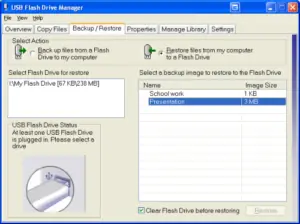
If you really want to do more with your USB flash drive other than transporting data, then using the option of Microsoft USB Flash Drive manager for windows XP, is one of the best and easiest ways to manage your files. Some of the options will include copying files to and from the flash drive, backing up files, restoring entire flash drive to and from your hard disk, changing the label and one can even create an autorun.inf file to launch a drive manager.
Password Protect-it
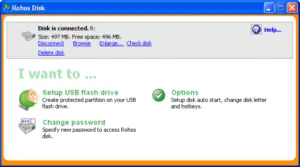
When you are transferring sensitive data, you might probably wanted to protect your date from the vicious eyes of hackers, at this instance the installation of Rohos Mini Drive (http://download.cnet.com/Rohos-Mini-Drive/3000-2092_4-10629845.html) will come in handy to safeguard the data. Using this tool you can create a secret partition on the drive for safeguarding the data, which is followed by encryption of data and protecting the documents which you copy using utility’s file manager.
Suggested Reading: Creating a new user account in Win XP
Lock Your PC
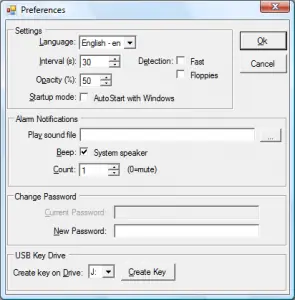
Have you seen a scene where people use an secret code impregnated card to lock and unlock the computer device, then this is a reality today that when you install Predator (http://www.montpellier-informatique.com/predator/en/index.php), you will find this little freeware utility which will allow you to turn your USB flash drive into a password key to lock and unlock your computer.
Comments are always appreciated!!
That’s all for now, stay tuned with Tech Crates.
Praveen is associated with a webhosting company which has very good website hosting reviews


















Dana
May 28. 2011
Thank you for your great tips collection about USB. It’s help me to know some more good tips.
admin
May 28. 2011
Good to know that ….
Amit
May 29. 2011
Nice tricks,Thanks
admin
May 29. 2011
You’re welcome and thanks for stopping by my blog…
Vishal
May 30. 2011
Nice tricks Man… I will give them a try
Thanks
admin
May 30. 2011
You’re welcome and thanks for stopping by my blog 🙂
Thomas
Jun 01. 2011
Hi
I have never really thinked about using an USB stick as a key card. That is pretty simple if you think about it. Thank you for the tips.
admin
Jun 01. 2011
You’re welcome buddy…… 🙂
TechChunks
Jun 01. 2011
Cool USB tricks. Thanks for sharing 🙂
admin
Jun 01. 2011
You’re welcome…
Techpakora
Jun 02. 2011
ummm nice sharing all tips are very helpful 🙂
admin
Jun 02. 2011
Thanks for stopping by and commenting…
P.S: Many thanks to Praveen for writing this wonderful post 🙂
xime
Jun 02. 2011
Great article, very useful and explained very well. I was using portable apps from etoolsonline.com/my-rig/ and it is very helpful. Security is great because no one has your own things everything is on your usb stick and you can use it on different computers. I will try others portable application which i can found on net also.
admin
Jun 02. 2011
Thanks for stopping by and commenting… 🙂
subhash chandra
Jun 14. 2011
cool tips man to play with the USB 🙂
admin
Jun 14. 2011
Yeah…. Thanks to Praveen again for the guest post 🙂
Sandeep Yadav
Jun 20. 2011
These tips are awesome and can help to peoples for do more with USB. Some Tricks are based on Security i think its good for security.
Hi, Admin please comment on my blog same like this please dont use small words. I hope you will do it next time.
Thanks.
admin
Jun 20. 2011
Thanks for stopping by and commenting … BTW whenever I hit the submit comment button, I’m redirected to other page.. why its like that ?? 🙂
hifu prostate cancer
Oct 15. 2011
Awesome tricks. I didn’t know that we can use flash drive as password reset disk. This is a useful tip that everyone should practice. There’s always a time in your life that you’ll forget your desktop’s password and it would be best to do this rather than reformatting your desktop completely. That would really be an inconvenience.
JerinJ
Nov 19. 2011
Useful article.Will try this out & thanks for sharing. 🙂
admin
Nov 19. 2011
You’re welcome … and thanks for stopping by my blog
DS
Dec 25. 2011
Nice Tips. Keep it up. 🙂
Alex
Mar 27. 2012
well, is it real that we can do these thing with our tiny usb??? awesome share admin, thank you very much!
admin
Mar 27. 2012
Yep its true … Thanks for the comment !
Harriet
Mar 27. 2012
Thanks for the tip of password protection. I have this awful habit of leaving my USB in the computer I was working at at uni and then panicking all night that someone might be stealing my work!
JamesW
Mar 28. 2012
These are some really good tricks, bookmarked it.
admin
Mar 29. 2012
Thanks for the comment …
saha
Mar 28. 2012
Good to read this informative post. Exactly most of the people are using USB device to transform and store data. I will definitely try to follow these trick to use USB device more effectively.
admin
Mar 29. 2012
Thanks for stopping by and commenting …
Puneet
Mar 28. 2012
Thats really nice tricks. Time to play with USb. Nice sharing.
admin
Mar 29. 2012
Thanks for your comment …
Ashok
Mar 28. 2012
Thanks for such a wonderful article! It helped me a lot in improving my knowledge about USB Flash.
john
Mar 29. 2012
Very helpful info. Thanks for sharing.
Julie
Mar 29. 2012
Wow! Thanks for sharing these useful tips, I haven’t heard about the most of them, so they are very helpful for me.
admin
Mar 30. 2012
Its my pleasure Julie… Thanks for stopping by !
Jason
Mar 31. 2012
Fantastic tricks, i dont really use my usb flash drive much, i should really start to use it a lot more, now i have seen these tips and tricks i will use it a lot more to be honest, i am going to try each one of them to see how great they work, thanks a lot
admin
Apr 01. 2012
You’re welcome Jason…Thanks for stopping by
Vestuves
Apr 01. 2012
Wow.. I wasn’t aware that USB can be useful for so many things. I’ve always used it for storing backup of my data only. I will explore on this.
Michael
Mar 20. 2014
Nice, I usually always want to bring important applications to my Flashdisk.
Btw do you a tutorial how to install windows from flashdisk?
Rahul
May 26. 2014
Cool tricks, especially last one using USB drive as a key of a computer.
Thanks for sharing this post.
Francine
Jul 16. 2016
I see awesome articles you’ve got here, you
should show your blog to much bigger audience and
make it go viral. I read about sneaky method to bring 1000s of visitors
to any website everyday , just search in google for; Coisin’s tips & tricks
Lisa
Jul 02. 2018
Hello,I read your blogs named “6 USB Flash Drive Tricks | Technology Review” daily.Your humoristic style is awesome, keep doing what you’re doing!