
Bored of the default startup tone on your windows OS ? What if you come to know that you can set a custom windows startup tone. Well as the title says, this tute is about setting a custom windows startup tone.
Procedure:
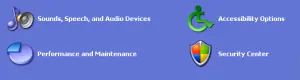
- Click Start button, select control panel and then click on Sounds, Speech and Audio Devices.
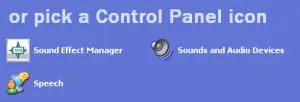
- Now click on Sounds and Audio Devices
- A new window opens, Under the Sounds tab head over to Program events.
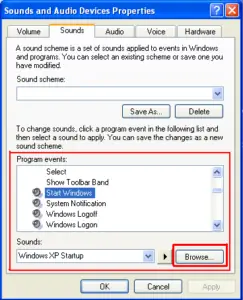
- Scroll down until you find “Start Windows”
- Click Browse and select the custom sound that you want windows to play during windows startup.
- Click Apply and then OK
Warning: This method is not applicable to Windows Vista. Method tested and implemented in Windows XP.
Setting a custom windows startup tone is simple, isn’t it ?
That’s all for now, stay tuned with Tech Crates.
Was this article helpful?

















Amit
Jun 15. 2011
Thanks ,This is really Great to set up tone
admin
Jun 15. 2011
you’re welcome .. and thanks for stopping by my blog 🙂
TechCrates
Jun 15. 2011
Nice, never knew you could change the default windows tone… This is really great
admin
Jun 15. 2011
Thanks Sandeep… 🙂
subhash chandra
Jun 15. 2011
coooooool….i kinda boared with my startup tone now..will change it right now..
in vista or windows 7 you can change the startup tone as well but in different way..hope to see a tutorial on it soon..
admin
Jun 15. 2011
Thanks for your comment :-)… I’ll surely publish a tute about changing windows startup tone in vista and windows 7.
Jennah Smith
Jun 24. 2011
hey when are you going to post that article.
waiting to know that.
Jennah Smith
admin
Jun 24. 2011
Very soon…. just be patient !! 🙂
Lakhyajyoti
Jun 15. 2011
Great tutorial.I was completely unaware about it.Thanks for sharing.
admin
Jun 15. 2011
You’re welcome … and BTW seeing you after a long time here 🙂
Ileane
Jun 27. 2011
Hi, thanks for the instructions. I’m using Windows 7 and I’ll give this one a try soon.
admin
Jun 27. 2011
You’re welcome and thanks for stopping by and commenting !! Hope to see you again…. 🙂
Carla
Jul 01. 2011
Hei, thanks a lot for the instructions I’ll try it to see how it’ll work.
admin
Jul 01. 2011
You’re welcome …..
Jenelia
Nov 08. 2011
Hi there,
Thanks for showing the ways to start up the windows tone
Thanks,
Jenelia
harshit
Sep 30. 2013
working… i set the my own recorded tone..
thank you admin for such a nice tip..