
This article was published in 2011 and updated in October 2026.
Looking for a harmless way to surprise a friend or colleague? These seven classic computer pranks need no special software, cause no damage and are easy to undo. We’ve updated them for Windows 10 and 11 — some of the original 2011 tricks relied on old downloads that are no longer available or safe.

Before you start: prank etiquette
- Only prank people who will laugh about it, and only on computers you’re allowed to use.
- Never prank a work machine during an important task — or a computer with unsaved work.
- Stay nearby, and undo the prank as soon as the joke has landed.
1. Frozen desktop icons
The icons look normal, but nothing happens when you click them.
- Show the desktop (Windows + D) and press Print Screen to copy a screenshot.
- Open Paint, paste the image (Ctrl + V) and save it as a PNG file.
- Right-click an empty area of the desktop, choose View and untick Show desktop icons.
- Right-click the saved screenshot and choose Set as desktop background.
Undo: tick Show desktop icons again and restore the original wallpaper.
2. Fake “virus” shutdown
This is not a real virus — it just shows a warning and starts a shutdown timer. Make sure no unsaved work is open.
- Right-click the desktop and choose New → Shortcut.
- As the location, enter:
shutdown /s /t 60 /c "Your PC is infected!" - Name the shortcut after a familiar program such as “Google Chrome” and, under Properties → Change Icon, pick a matching icon.
When your friend opens it, Windows warns that the PC will shut down in 60 seconds.
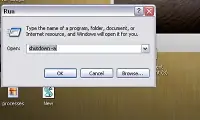
Undo: press Windows + R, type shutdown /a and press Enter to cancel the shutdown.
3. Swapped mouse buttons
Open Settings → Bluetooth & devices → Mouse and set the Primary mouse button to Right. Every left click now opens a context menu. To mix up the keyboard as well, Microsoft’s free PowerToys includes a Keyboard Manager that can remap keys — for example, swap two letters.
Undo: set the primary button back to Left and remove the remapping in PowerToys.
4. Upside-down screen
Go to Settings → System → Display and change Display orientation to Landscape (flipped), then confirm with Keep changes. On some computers with Intel graphics, Ctrl + Alt + Down arrow does the same.
Undo: set the orientation back to Landscape (or press Ctrl + Alt + Up arrow).
5. Disco keyboard lights
This small script makes the Caps Lock, Num Lock and Scroll Lock lights flash. It only works on keyboards that have those indicator lights. Open Notepad and type:
Set wshShell = WScript.CreateObject("WScript.Shell")
Do
  WScript.Sleep 100
  wshShell.SendKeys "{CAPSLOCK}"
  wshShell.SendKeys "{NUMLOCK}"
  wshShell.SendKeys "{SCROLLLOCK}"
Loop
Save it as disco.vbs (set Save as type to All files) and double-click it.
Undo: open Task Manager (Ctrl + Shift + Esc) and end the Windows Script Host (wscript.exe) process. Note: Microsoft is phasing out VBScript, so this and the next trick may not work on newer Windows 11 installations.
6. Never-ending pop-ups
Another short script. Save this in Notepad as popup.vbs:
MsgBox "Virus found!"
MsgBox "Press OK to remove it."
MsgBox "Can't remove the virus. Press OK to format the drive."
Do
  MsgBox "Formatting..."
Loop
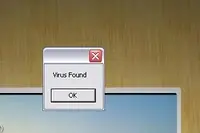
Every time your friend clicks OK, another “Formatting…” message appears. Nothing is actually formatted.
Undo: end the wscript.exe process in Task Manager.
7. Fake Windows update screen
Websites such as fakeupdate.net show a realistic full-screen “Working on updates” animation for different Windows versions. Open one on your friend’s computer, press F11 for full screen and wait for the reaction.
Undo: press Esc or F11 and close the browser tab.
Have fun — and clean up
All of these pranks are harmless as long as you undo them right away. Do you know a better computer prank? Share it in the comments.



















Vinayak
Jul 31. 2011
hahaha…. that’s really informative post… thanks buddy…!!!!
admin
Jul 31. 2011
Thanks to Karan for contributing this post …
karan
Jul 31. 2011
:O thanks for publishing my post salman. I am really excited about this one:D
Praveen
Jul 31. 2011
That’s cool and fun! Thanks for sharing it 🙂
admin
Aug 01. 2011
Thanks to Karan for the great post ….
shashank chinchli
Aug 01. 2011
Played pranks a lot with this small commands and terrorised many friends during high school days!I never used to understand what codes were and always used to play first on myself!!
Akhil
Aug 01. 2011
Its a really good share. will try dis.
Business logo design
Aug 01. 2011
Your post have the information that is helpful and very informative. I would like you to keep up the good work.Thanks for sharing.
fazal mayar
Aug 02. 2011
those are pretty funny pranks that we should all try. I think i will try the fake keyboard keys 😀
admin
Aug 02. 2011
Good to know that …
karan
Aug 02. 2011
thanks@ vinayak, praveen, shashank, akhil, ‘business logo’ and fazal for your awesome comments:D
Great to see you guys here and i am really happy that you liked the pranks. Tc..
Atish
Aug 02. 2011
Super cool pranks. thanks dude. I just loved them
admin
Aug 02. 2011
Good to know that ….
Martin
Aug 02. 2011
I can imagine the look on my friends’ faces. I admit these pranks are funny yet scary. You provided useful information in a way I can also be prepared in case someone pulls these pranks on me.
Ikenna
Aug 02. 2011
Lol! These are really funny pranks. I’ll the one on virus on my crazy friend. I’ll love to see the look on his face.
Will be tweeting..
admin
Aug 02. 2011
Sure … do share what happens !!
Maninder
Aug 02. 2011
Nice pranks. I have tried the shutdown thing already but some of these are quite new. Thanks for sharing this.
Olawale Daniel
Aug 03. 2011
Thanks Karan for the information that you just shared here. top computer’s pranks..Thanks 🙂
karan
Aug 03. 2011
thanks olawale bro:)
android phones review
Aug 03. 2011
really funny and interesting, a difference topic so get a punk
karan
Aug 03. 2011
glad you enjoyed it. And ya sometimes its better to go a bit off topic and write about things that people may enjoy:D
Priyangshu
Aug 04. 2011
Nice post Karan !!! Funny & Interesting !!!
plaban
Aug 09. 2011
Nice Pranks, I’ll try some of these on my friends pc.
rakesh
Aug 16. 2011
nice pranks, Thanks for posting them here
admin
Aug 16. 2011
Thanks for stopping by and commenting 🙂
Sandipan Mukherjee
Sep 12. 2011
Computer can even talk with the help of VB Script.
Very informative and nice article. Thanks for sharing.
Ana
Oct 01. 2011
I have all my work on this computer and if somebody pulled those frozen icons on me I think I’d just freak out!
I love the Clippy thing! I think I’d smash my computer myself 😀
hifu prostate cancer
Oct 15. 2011
Shutdown Virus seems like the best prank among the list. I can’t wait to see the look of my friend’s face.
prabhat
Mar 18. 2012
HI ADMIN…
i’ve tried many of the tips you mentioned here..and they all work perfectly..
and making a virus is really and undoubtedly my favorite one..
because once i made the virus (i mean the popup windows trick)in my friend’s computer and he thought that its a virus…and i couldn’t stop myself from laughing..
nice pranks…keep it up
admin
Mar 18. 2012
That’s really great … Thanks for your comment
Richmond
Mar 18. 2012
lol…these are some super cool pranks here, thanks for sharing man, i liked the first one best, just tried it on one of my friends lappi, waiting for him to come back to work. thanks again! 😀
admin
Mar 18. 2012
Thanks for your comment …
sham
Mar 19. 2012
That’s a nice list buddy. Love pranks like these. I actually have a separate category just for pranks in my old blog. Some of them went viral too 🙂
admin
Mar 19. 2012
Thanks for stopping by and commenting Sham 😉
Puneet
Mar 19. 2012
The best one is disco light. Superb. By the way I have already tried all except this disco light. Now I enjoyed this very much. thanks for sharing few cool pranks here.
admin
Mar 19. 2012
You’re most welcome ….
Puneet
Mar 21. 2012
Hey Buddy, I would love to see a list of internet pranks too. Please write a post for that too. I will be waiting for this post.
admin
Mar 21. 2012
Let me think about that ….
septem
Mar 19. 2012
these post have the information that is helpful and very informative to us . I would like you to keep up the good work.Thanks for sharing and i will follow these blog everytime you put new blog in here .
Atish
Mar 19. 2012
Tried all these pranks already. nice share dude. I loved the shutdown prank. its nice.
admin
Mar 20. 2012
🙂
marco
Mar 20. 2012
very funny, I used some on my girlfriends laptop, I can’t wait for the storys she has to telle me about todays work 😀
Damien
Mar 20. 2012
I did this pranks back in school. I once1 changed the color scheme of the desktop and change the locations of the keys in the keyboard, much to the anger of my teacher.
admin
Mar 20. 2012
You made me recollect those olden but golden days …
Dan
Mar 21. 2012
very cool pranks. I will share this with my 13 year old son, we wants to be a hacker (ethical of course) so we will love this.
admin
Mar 21. 2012
That’s great Dan …
Prakash
Mar 21. 2012
nice computer pranks…..i enjoyed all of these……
thanks for sharing it………….
admin
Mar 21. 2012
You’re welcome …
Shri
Jul 14. 2014
I admit these pranks are funny yet scary. You provided useful information in a way I can also be prepared in case someone pulls these pranks on me.