
You do not need an e-reader to read e-books: a phone or tablet with the right app is enough for the commute, the beach or bed. The best reading app depends less on features than on where your books come from: the store you buy from, your public library, or files you already own.
This guide compares the best e-book reading apps for Android and iPhone, explains what each one is good at, and shows how to read library books for free.
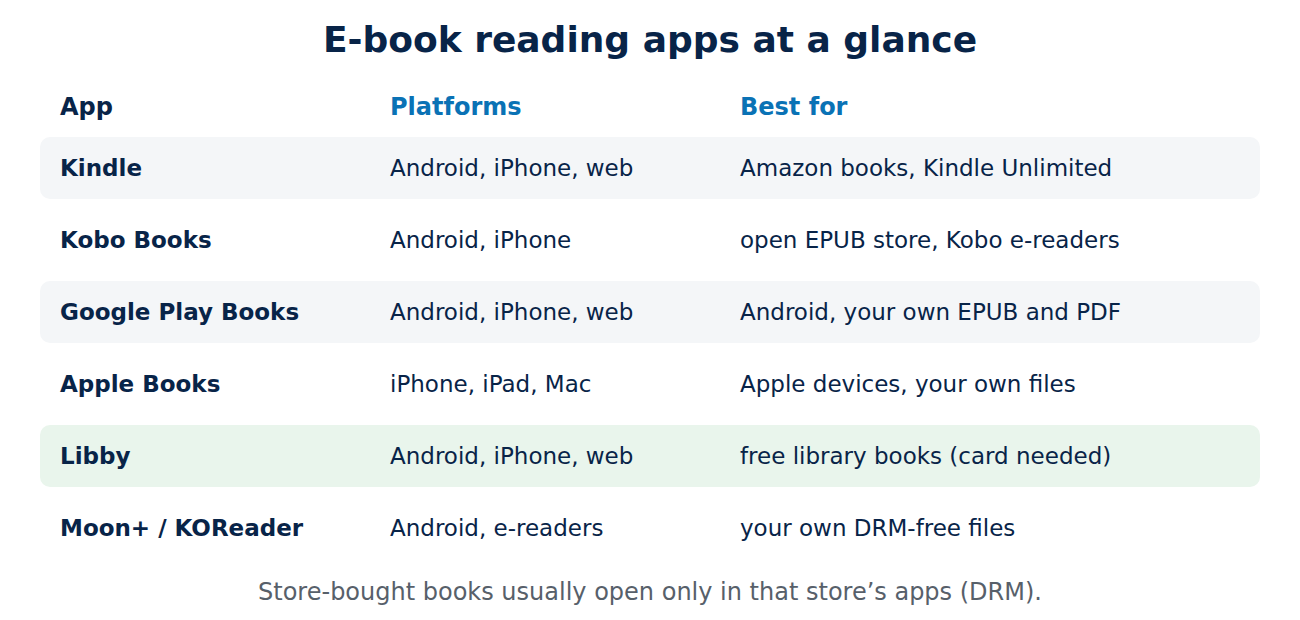
The best reading apps at a glance
- Kindle (Android, iPhone, web): for books bought from Amazon and the Kindle Unlimited subscription.
- Kobo Books (Android, iPhone): Rakuten Kobo’s store, a strong alternative to Amazon with EPUB books.
- Google Play Books (Android, iPhone, web): Google’s store, plus your own EPUB and PDF files uploaded to your library.
- Apple Books (iPhone, iPad, Mac): built into Apple devices, with its own store and support for your own EPUB and PDF files.
- Libby (Android, iPhone, web): free e-books and audiobooks from your public library.
- Moon+ Reader and KOReader (Android): highly customisable readers for your own DRM-free files.
Kindle: the biggest store
Amazon’s Kindle app syncs your library, highlights and reading position across phone, tablet, Kindle e-readers and the web. Kindle Unlimited, a monthly subscription, gives access to a large catalogue of included titles. You can send your own documents and EPUB files to your Kindle library with Amazon’s Send to Kindle service.
One quirk: for years you could not buy books inside the iPhone app. Since 2025, the US version of the app has a “Get book” button that opens Amazon’s website to complete the purchase; in other countries you may still need to buy in the browser first.
Kobo, Google Play Books and Apple Books
- Kobo Books uses the open EPUB format, works with Kobo e-readers and offers the Kobo Plus subscription in several countries. A good choice if you do not want to depend on Amazon.
- Google Play Books is the most practical choice on Android: books, audiobooks and your own EPUB or PDF files in one place, with night light, translation of words and offline reading.
- Apple Books needs no installation on iPhone and iPad, has a clean reading view and syncs with the Mac. You can open EPUB and PDF files from the Files app or e-mail directly in Books.
Libby: free e-books from your library
Many public libraries lend e-books and audiobooks through OverDrive’s Libby app. All you need is a library card. You borrow a title for a limited time, usually two or three weeks, and it returns itself automatically, so there are no late fees. Popular books can have waiting lists, just like printed ones. In the US, many libraries also offer Hoopla, which lends titles instantly without waiting lists.
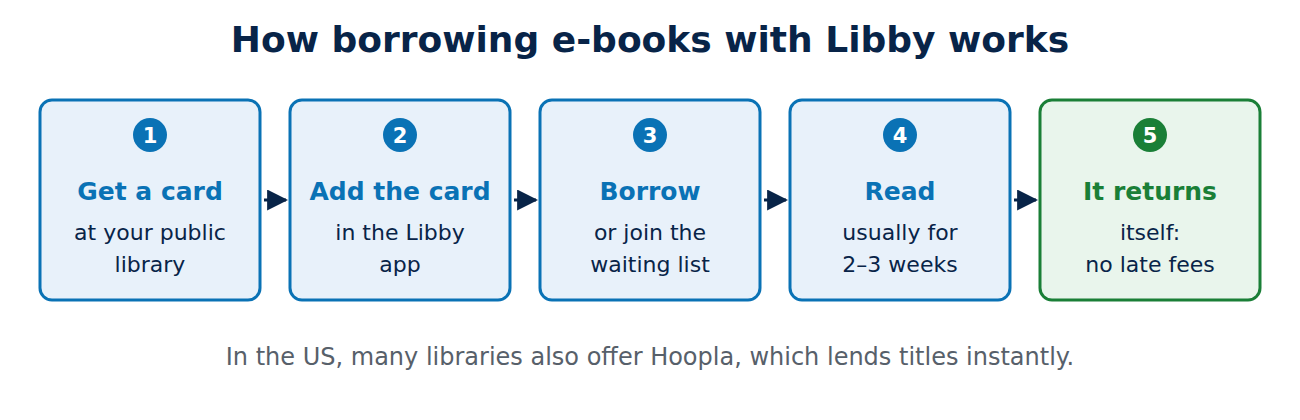
Libby is the most underrated reading app: before you pay for a subscription, check what your library offers.
Apps for your own e-book files
If you have DRM-free e-books, for example from publishers, Project Gutenberg or bundles, a dedicated reader gives you full control over fonts, margins, colours and page turns:
- Moon+ Reader (Android): very flexible display settings, a free version with ads and a paid Pro version.
- KOReader (Android, Kobo and other e-readers): free and open source, excellent for PDFs and scanned documents.
- Calibre (Windows, Mac, Linux): free software to organise your e-book collection, edit metadata and convert between formats before you copy books to a phone or e-reader.
What to look for in a reading app
- Where your books are: books bought in a store are usually protected by DRM and only open in that store’s apps. Choose the app that matches the store you use most.
- Formats: EPUB is the open standard; PDF is fine on tablets but awkward on small phone screens.
- Sync: reading position, highlights and notes should sync across your devices.
- Comfort: adjustable font size, line spacing, dark mode and a warm night colour make long sessions easier on the eyes.
- Offline reading: download books before you travel.
Tips for reading on a phone
- Turn on dark mode or a sepia theme in the evening, and lower the brightness.
- Use the built-in dictionary and highlights; most apps let you export your notes.
- Silence notifications with a focus mode while you read.
- For long reading sessions, a tablet or an e-ink reader is more comfortable; see which tablet is right for you.
Conclusion
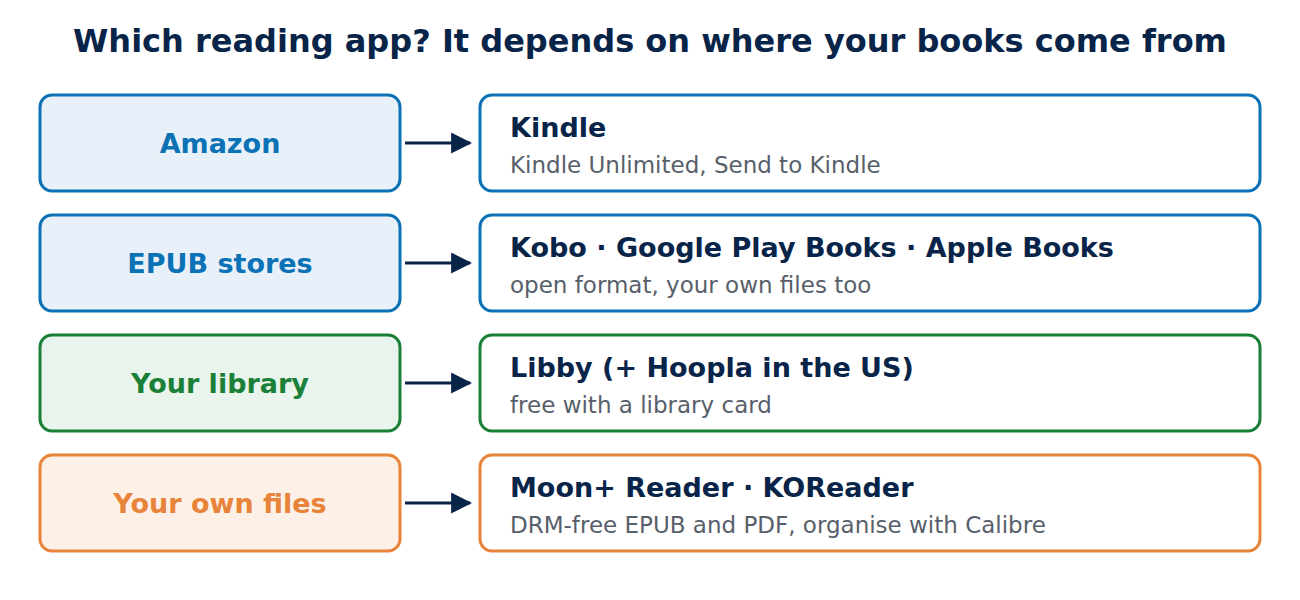
Pick the reading app that matches where your books come from: Kindle for Amazon, Kobo for an open EPUB store, Google Play Books on Android, Apple Books on the iPhone, and Libby for free library books. For your own DRM-free files, Moon+ Reader or KOReader with Calibre gives you the most control. Start with Libby: a library card may be all you need.
Sources and further reading
- Libby (OverDrive)
- Send to Kindle (Amazon)
- Calibre e-book management











Recent Comments