
A certificate is only as trustworthy as the organisation that signed it. So how does your browser know it can trust that organisation? The answer is the chain of trust: from a website’s certificate, a series of signatures leads up to a root certificate that is already stored on your device. This guide explains root, intermediate and end-entity certificates, shows the real chain behind techcrates.com, describes how a browser checks every link, and covers the mistakes that break chains.
Why one certificate is not enough
A certificate states that a public key belongs to a name; what is an X.509 certificate explains what is inside. It is signed by a certificate authority (CA). To check that signature, the browser needs the CA’s public key, which sits in another certificate that someone else signed. The chain has to stop somewhere: at a key the device trusts from the outset.
Root, intermediate and end-entity certificates
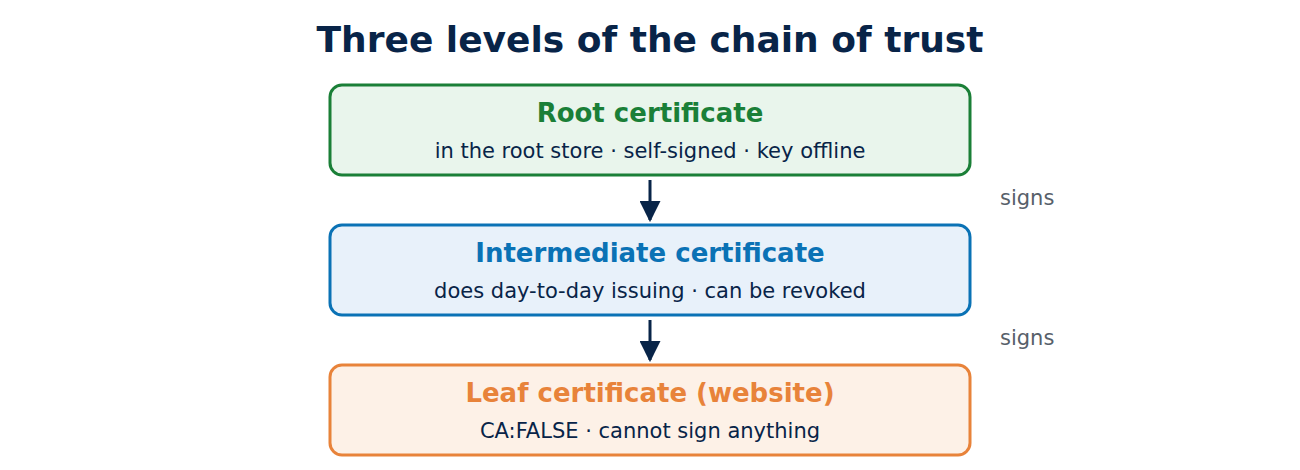
A typical chain has three levels:
- Root certificate: it is self-signed, meaning the CA signed it with its own key. Trust does not come from the signature but from the fact that your operating system or browser ships the certificate in its root store. The private key is usually kept offline in a hardware security module and used only rarely.
- Intermediate certificate: the root signs one or more intermediates, which the CA uses for day-to-day issuing. If an intermediate key is compromised, the CA can revoke it without replacing the root, which would take years.
- End-entity (leaf) certificate: the website’s own certificate, issued by the intermediate. It is marked as not being a CA and cannot sign other certificates.
When a connection starts, the server sends its leaf certificate and the intermediates, but not the root, because the browser already has it. Most CAs now issue leaf certificates automatically through the ACME protocol; see understanding the ACME protocol.
The real chain behind techcrates.com
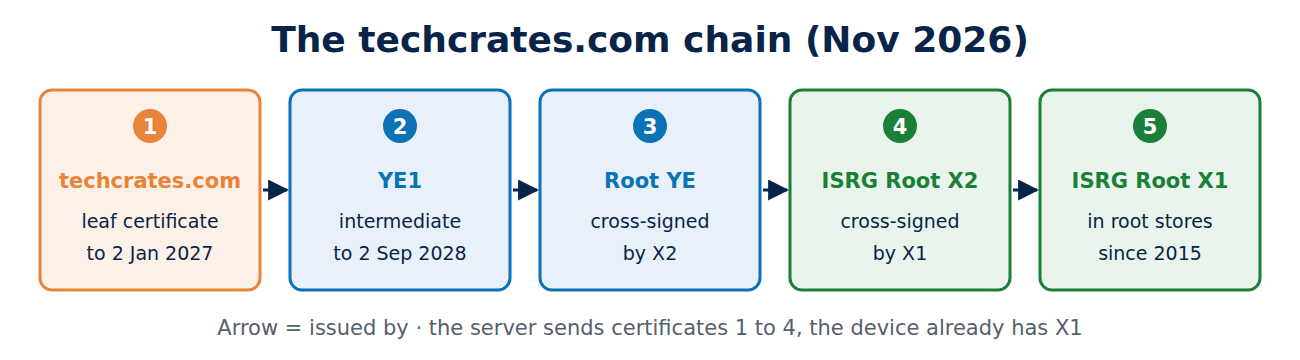
In November 2026 the techcrates.com server sent four certificates:
- techcrates.com, issued by YE1 (Let’s Encrypt), valid until 2 January 2027.
- YE1, issued by Root YE, valid until 2 September 2028.
- Root YE, in a version signed by ISRG Root X2 (valid until 2 September 2032).
- ISRG Root X2, in a version signed by ISRG Root X1 (valid until 2 September 2032).
ISRG Root X1 (RSA, from 2015) is in practically every root store, and ISRG Root X2 (elliptic curve P-384, from 2020) is in most recent ones. Root YE belongs to a new generation that Let’s Encrypt created in 2025 and still has to get into the root stores. Until then, cross-signatures make sure every device finds a path to a root it knows: a newer device can stop at X2, an older one goes on to X1.
How a browser checks the chain
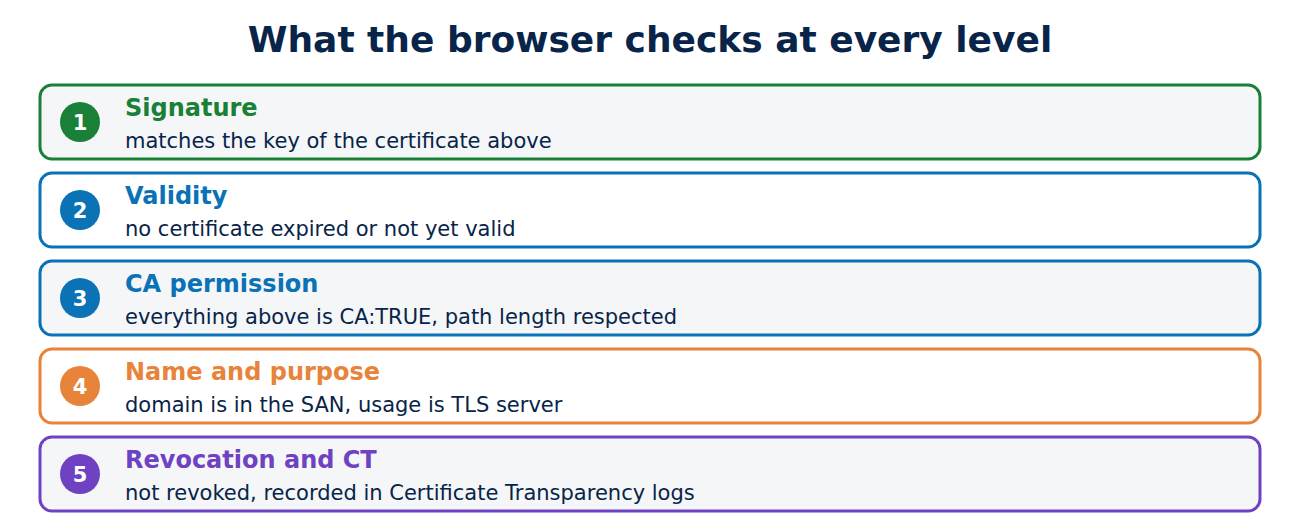
The browser builds a path from the leaf certificate, the intermediates the server sent and its own root store, then checks every step:
- Signature: each certificate must be correctly signed with the public key of the one above it.
- Validity: no certificate in the chain may be expired or not yet valid, which is why a device with the wrong date shows certificate errors.
- CA permission: every certificate above the leaf must be marked as a CA (Basic Constraints CA:TRUE) and be allowed to sign certificates. A path length limit can restrict how many levels may follow.
- Name and purpose: the domain you typed must appear in the leaf’s Subject Alternative Name list, and the certificate must be meant for server authentication.
- Revocation and transparency: the browser checks whether a certificate has been revoked and whether it appears in public Certificate Transparency logs.
If any check fails you see the familiar warning page, for instance with the code NET::ERR_CERT_AUTHORITY_INVALID when no path to a trusted root could be found.
Common chain problems
- Missing intermediate: the server sends only its leaf certificate. Some browsers cover for this: Chrome can download the missing certificate from the address in the certificate (Authority Information Access), and Firefox ships a list of known intermediates. Command-line tools such as curl, Python scripts and many apps fail instead, with messages like “unable to get local issuer certificate”. Always configure the full chain; with certbot that is the file fullchain.pem.
- Wrong order or unrelated certificates: the chain should run from the leaf upwards and contain only certificates that belong to it.
- Root included: usually harmless, but it adds bytes to every handshake.
- Out-of-date root store: when the old DST Root CA X3 certificate expired on 30 September 2021, older devices and software whose root stores had never been updated stopped trusting many sites.
To see the chain a server sends, run:
openssl s_client -connect www.techcrates.com:443 -servername www.techcrates.com -showcerts </dev/nullCross-signing: one chain, several paths
A new CA, or a new generation of roots, takes years to reach every root store. To work straight away, it gets cross-signed by an established root: there are then two certificates with the same name and the same key, one self-signed and one signed by the older root. Let’s Encrypt itself started this way in 2015, with a cross-signature from IdenTrust. Because the same key is in both, the browser can follow whichever path ends at a root it trusts.
Frequently asked questions
Why doesn’t the root sign website certificates directly?
The root key is so valuable that it should stay offline. Intermediates can be replaced and revoked without updating billions of devices.
Can I add my own root certificate?
Yes, for example on a company network or for a home lab. Only do it for sources you really trust, because that root could then issue certificates for any website your device visits.
How long can a chain be?
There is no fixed limit, but in practice chains have two to four certificates. Every extra level makes the handshake bigger.
What happens when a root expires?
Certificates whose only path leads to that root stop working. CAs therefore create successors years in advance and spread them through operating system and browser updates; keeping your devices updated matters here too, see how to keep your devices updated.
Conclusion
The chain of trust runs from a website’s certificate through one or more intermediates to a root certificate in your device’s root store. At each step the browser checks the signature, the validity dates, the CA permission and the purpose. For anyone running a server, the main lesson is simple: always send the full chain.
Sources and further reading
- Chain of Trust (Let’s Encrypt)
- RFC 4158: Certification Path Building (IETF)
- Chain of trust (Wikipedia)
- Using TLS to protect data (National Cyber Security Centre)



















Recent Comments