
For a browser to trust a website’s certificate, the certificate must be signed by a certificate authority (CA). The CA vouches that whoever asked for the certificate really controls the domain and, for some certificate types, that a real organisation stands behind the website. But how does a CA check this, who writes the rules, and what is the difference between DV, OV and EV? This guide explains what CAs do, the validation levels, the steps of issuing a certificate and what happens when a CA gets it wrong.
What a certificate authority does
A CA is an organisation whose root certificate is included in the root stores of operating systems and browsers. It has three jobs:
- Validate: it checks that the applicant is entitled to a certificate for a name.
- Issue: it signs the certificate with an intermediate key; how that links up to a root is explained in how the certificate chain of trust works.
- Maintain: it publishes revocation information, records every certificate in public logs and is audited every year.
Well-known CAs include the non-profit Let’s Encrypt, which issues certificates free and fully automatically, and commercial providers such as DigiCert, Sectigo, GlobalSign and Google Trust Services.
The rules: the CA/Browser Forum and the Baseline Requirements
The rules for publicly trusted website certificates come from the CA/Browser Forum, founded in 2005 by CAs and browser makers including Apple, Google, Microsoft and Mozilla. Its key document is the Baseline Requirements (BRs). They set out how applicants are validated, which fields a certificate may contain, how long it may be valid and how quickly a CA must revoke certificates when something goes wrong. Changes are agreed as numbered votes called ballots. Enforcement comes from the browser makers’ root programmes: a CA that breaks the rules risks being removed from their root stores.
Domain validation (DV): proving control of the domain
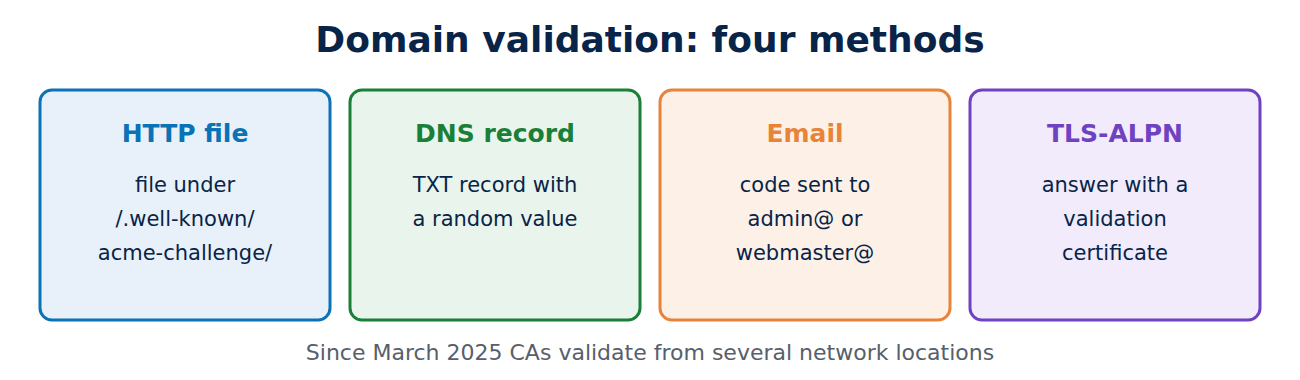
With domain validation, the CA only checks that the applicant controls the domain. The usual methods are:
- HTTP file: the applicant places a file with content chosen by the CA at a set path on the web server, such as /.well-known/acme-challenge/.
- DNS record: the applicant adds a TXT record with a random value to the domain’s DNS zone; see how DNS works.
- Email: the CA sends a code to a fixed address at the domain, such as admin@ or webmaster@.
- TLS-ALPN: the server answers a special TLS request with a prepared certificate.
Since March 2025, CAs must run these checks from several network locations. That makes it much harder to fool them by hijacking a single internet route. The CA must also look up the domain’s CAA record, which can rule out other CAs. DV certificates are now the vast majority, and they are the only kind Let’s Encrypt issues; understanding the ACME protocol shows how this is automated.
Organisation validation (OV) and extended validation (EV)
The higher levels add checks on the organisation:
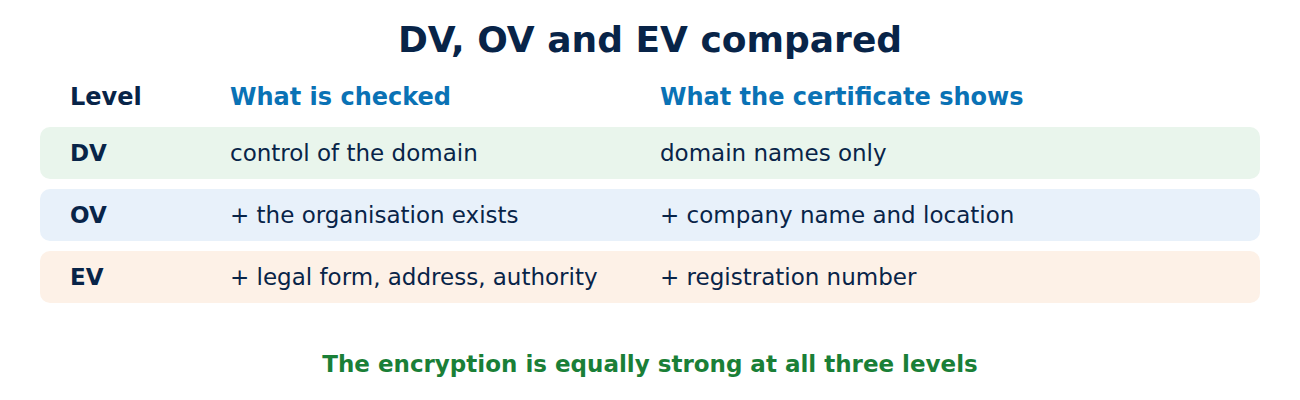
- OV (organisation validated): the CA confirms that the company or public body exists, for example through Companies House or another official register, and that the request really comes from it. The organisation’s name and location then appear in the certificate.
- EV (extended validation): under separate, stricter guidelines, the CA also checks the legal form, registration number, business address and the authority of the person making the request. This often takes days and costs more.
Browsers used to show the company name of EV sites in green in the address bar. That ended in 2019 (Chrome 77, Firefox 70): research showed that hardly anyone noticed it, and in 2017 a security researcher obtained an EV certificate for a newly registered company called “Stripe, Inc” that had nothing to do with the well-known payments firm. The encryption is exactly as strong with DV, OV and EV; only the identity checks differ.
How a certificate is issued
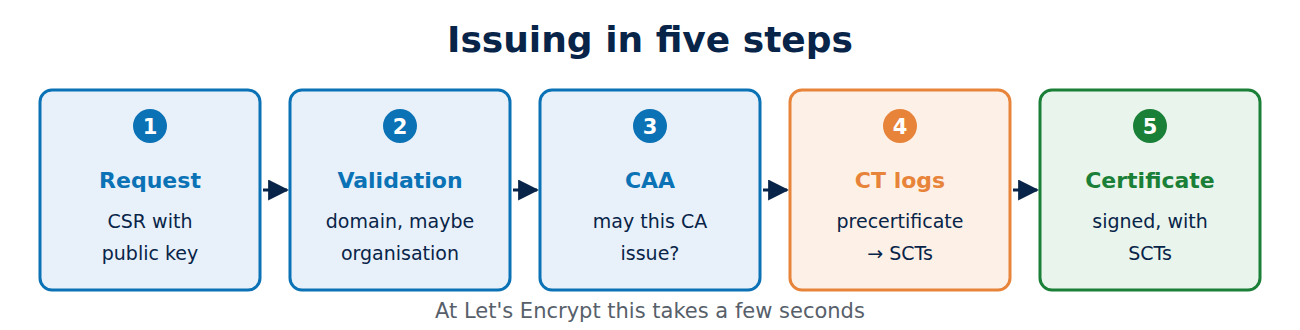
Issuing a certificate takes five steps:
- Request: the applicant generates a key pair and sends a certificate signing request (CSR) containing the public key.
- Validation: the CA validates the domain and, where needed, the organisation.
- CAA check: the CA checks it is allowed to issue for the domain.
- Precertificate and logs: the CA submits a precertificate to several public Certificate Transparency logs and receives receipts (SCTs).
- Issuance: the final certificate, with the receipts embedded, is signed and delivered.
At Let’s Encrypt the whole process takes a few seconds, because the ACME client on the server handles the request and the validation by itself.
Audits, mistakes and consequences
Public CAs must be audited every year by independent auditors under WebTrust or the European standard ETSI EN 319 411. Mistakes, such as a wrongly validated domain or a malformed field, must be reported publicly, and the affected certificates generally revoked within five days, or within 24 hours in serious cases.
A CA that keeps breaking the rules loses the browsers’ trust. In 2011 the Dutch CA DigiNotar was removed at once after a break-in in which fake Google certificates were issued, and it went bankrupt. In 2018 browsers withdrew trust from Symantec‘s certificates in stages, and in November 2024 Chrome, Firefox and Apple stopped trusting new certificates from Entrust.
Frequently asked questions
Is a free certificate less secure than a paid one?
No. The encryption is identical. A paid OV or EV certificate only adds checked details about the organisation.
Does the padlock prove a website is genuine?
No. It proves that the connection is encrypted and that the server controls the domain. Scammers get DV certificates too; see how to spot a phishing email.
Can anyone set up a CA?
Anyone can run a private CA, for example on a company network. For browsers to trust it, though, it must pass audits and be accepted into the root programmes, which takes years.
Why must validation happen from several locations?
Otherwise an attacker who redirects a single internet route could pass the domain check and get a certificate for someone else’s domain.
Conclusion
A certificate authority validates applicants, signs certificates and follows the CA/Browser Forum’s Baseline Requirements. DV checks only control of the domain, while OV and EV also check the organisation, with the same strength of encryption. Annual audits and the browsers’ root programmes make sure that breaking the rules has consequences.
Sources and further reading
- Baseline Requirements (CA/Browser Forum)
- Certificate authority (Wikipedia)
- How it works (Let’s Encrypt)
- WebTrust services (CPA Canada)


















Recent Comments