
Install a certificate and you soon meet a jumble of file extensions: .pem, .crt, .cer, .der, .key, .p7b, .pfx and .p12. One server wants two files, another wants a single file with a password, and sometimes a server rejects a file even though the certificate inside is fine. Behind all this there are only a handful of formats. This guide explains the two encodings, DER and PEM, the two containers, PKCS#7 and PKCS#12, shows how to convert between them with OpenSSL and lists which server expects which format.
Two encodings: DER and PEM
A certificate is a data structure described in a notation called ASN.1 and stored in binary as DER (Distinguished Encoding Rules); what is an X.509 certificate explains what it contains. DER files are compact, but you cannot read them and they are awkward to paste into emails or configuration files.
That is why PEM exists: the DER bytes are converted to printable characters with Base64, wrapped into lines of 64 characters and placed between a header and a footer line (defined in RFC 7468):
-----BEGIN CERTIFICATE-----
MIIDljCCAxygAwIBAgISBp...
-----END CERTIFICATE-----
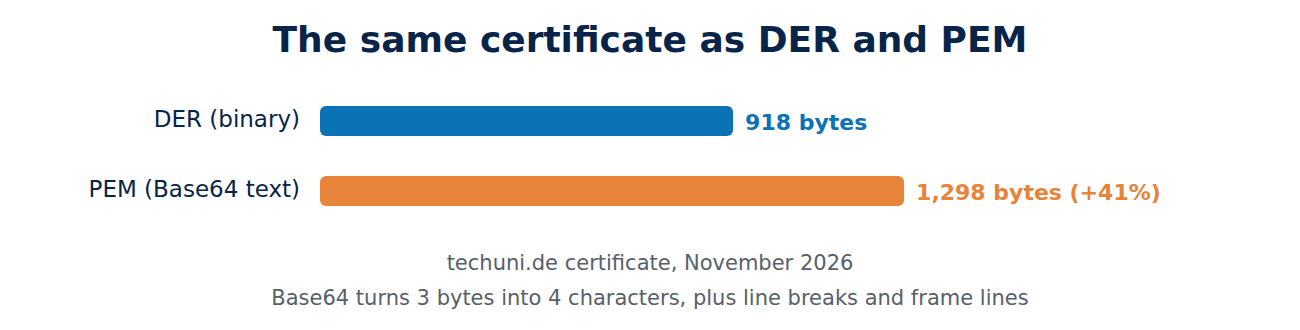
Base64 turns every 3 bytes into 4 characters, so the file grows by about a third. The real techuni.de certificate (November 2026) is 918 bytes as DER and 1,298 bytes as PEM, about 41% more, because line breaks and the two frame lines are added too.
File extensions and what they mean
Unfortunately the extension is not a reliable guide to what a file contains. The usual meanings are:
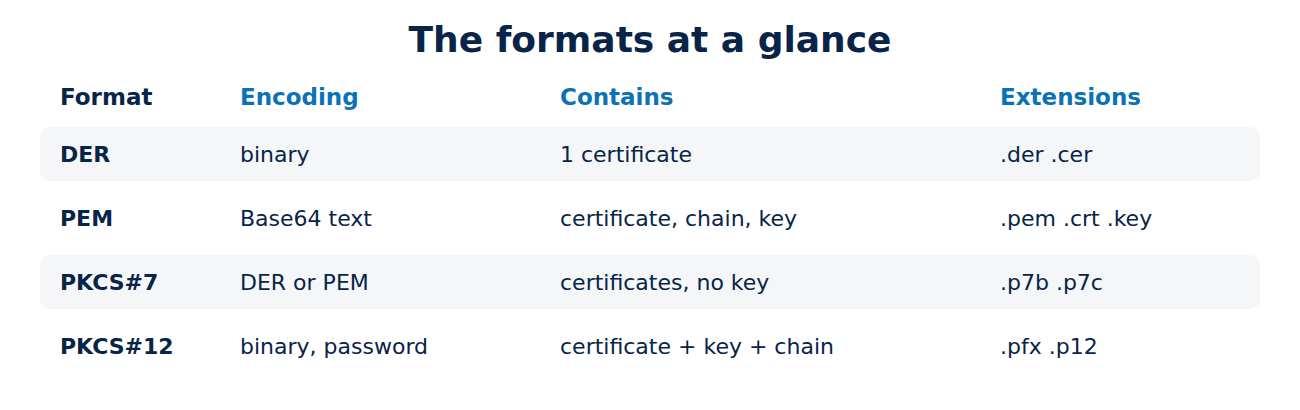
- .pem: text in PEM format; it can hold one certificate, a whole chain, a key or all of them.
- .crt and .cer: a certificate, either PEM or DER. On Windows, .cer files are often DER.
- .der: a certificate in binary DER form.
- .key: a private key, usually PEM.
- .csr: a certificate signing request; see how to create a private key and CSR.
- .p7b and .p7c: a PKCS#7 container holding certificates but no key.
- .pfx and .p12: a PKCS#12 container holding a certificate, its private key and usually the chain, protected by a password.
When in doubt, open the file in a text editor. If it starts with “BEGIN”, it is PEM, and the header line names the contents: CERTIFICATE, PRIVATE KEY, ENCRYPTED PRIVATE KEY or CERTIFICATE REQUEST. Older key files have headers such as RSA PRIVATE KEY or EC PRIVATE KEY.
PKCS#7: certificate chains without the key
PKCS#7 was designed for signed and encrypted messages and is now known as the Cryptographic Message Syntax. As a .p7b file it is mainly used to bundle several certificates, such as a leaf certificate and its intermediates. It cannot hold a private key. Windows servers and some Java applications expect chains in this format, and some CAs deliver their certificates this way. For how chains fit together, see how the certificate chain of trust works.
PKCS#12 and PFX: certificate and key in one file
PKCS#12 (RFC 7292) packs the certificate, the private key and the chain into a single file encrypted with a password. The extensions .pfx (from the Windows world) and .p12 are the same format. It is the way to move a certificate and its key from one machine to another, and it is the usual import format for Windows, the macOS Keychain, Java keystores and email certificates.
OpenSSL 3 encrypts PKCS#12 files with AES-256 and the PBKDF2 key derivation function by default. Very old systems only understand the earlier, weak algorithms; for them OpenSSL has a -legacy option, which you should use only when there is no alternative. Never send the password in the same email as the file. Share it another way, and keep it in a password manager; see the best password managers.
Converting formats with OpenSSL
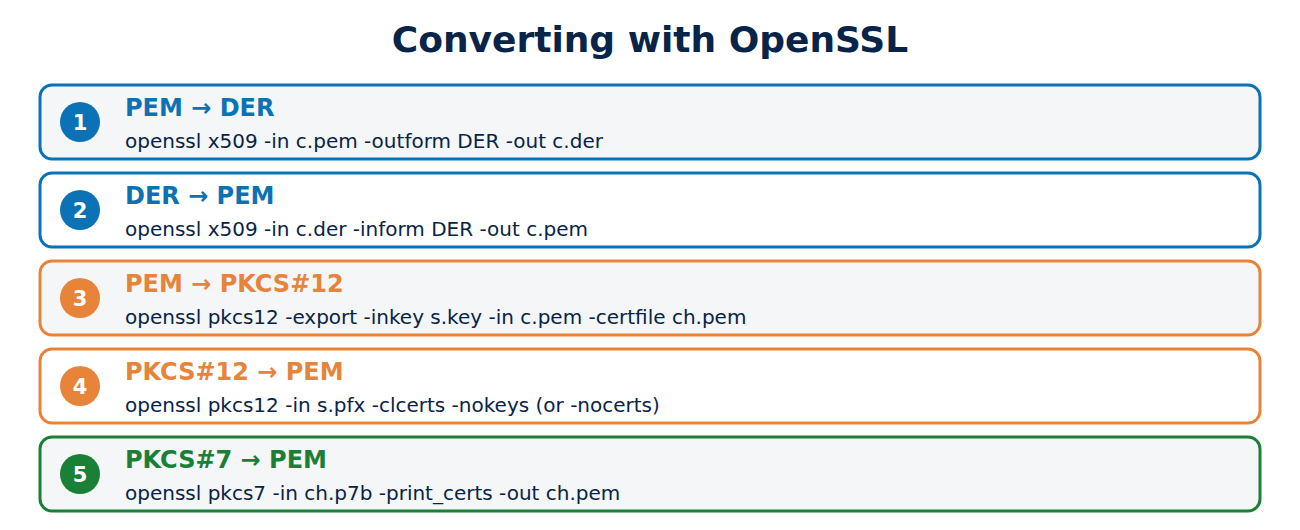
These are the conversions you need most often, tested with OpenSSL 3:
# PEM to DER and back
openssl x509 -in certificate.pem -outform DER -out certificate.der
openssl x509 -in certificate.der -inform DER -out certificate.pem

# Key, certificate and chain into PKCS#12 (asks for a password)
openssl pkcs12 -export -out server.pfx -inkey server.key -in certificate.pem -certfile chain.pem

# Split PKCS#12 into a certificate and a key
openssl pkcs12 -in server.pfx -clcerts -nokeys -out certificate.pem
openssl pkcs12 -in server.pfx -nocerts -noenc -out server.key

# PKCS#7 to PEM (add -inform DER for a binary file)
openssl pkcs7 -in chain.p7b -print_certs -out chain.pem
The -noenc option writes the key unencrypted, so protect that file carefully. To look inside a PKCS#12 file without saving anything, run openssl pkcs12 -in server.pfx -info -noout.
Which server needs which format?
- nginx and Apache: two PEM files, the full chain (fullchain.pem with Let’s Encrypt) and the private key (privkey.pem).
- Windows servers running IIS: a PFX file imported into the certificate store.
- Java applications such as Tomcat: a keystore; PKCS#12 has been the default since Java 9, and the older JKS format is outdated.
- Routers, firewalls and NAS boxes: PEM or PFX depending on the maker; the manual says which.
- Email programs: PKCS#12, to import a personal certificate together with its key.
Frequently asked questions
Is a .crt file different from a .pem file?
Often not. Both commonly contain the same PEM certificate with a different extension. What matters is the content.
Why does my server say “no start line”?
It expects PEM but got a binary DER file or a file with the wrong header. Converting with openssl x509 -inform DER fixes it.
Can I get the private key from a certificate?
No. A certificate holds only the public key. If the private key is lost, you need a new certificate.
Is PEM less secure than DER?
No. Both are the same content in a different form. Only the private key needs protecting, whatever its format.
Conclusion
Almost every certificate file is built on two encodings and two containers: DER is binary, PEM is the same data as Base64 text, PKCS#7 bundles certificates, and PKCS#12 bundles certificates with the private key behind a password. A few OpenSSL commands convert any of them into any other.
Sources and further reading
- RFC 7468: Textual Encodings of PKIX Structures (IETF)
- RFC 7292: PKCS #12 (IETF)
- openssl-pkcs12 (OpenSSL documentation)
- PKCS 12 (Wikipedia)

















Recent Comments