
Every time your browser shows a padlock next to a web address, it has first checked a certificate. That certificate is a small file the server sends while the connection is being set up, and it almost always follows the same standard: X.509. The standard defines what goes into a certificate, how it is encoded and how the certificate authority’s signature is attached. This guide walks through the structure field by field, explains the extensions that matter, and uses the real certificate of techcrates.com as an example.
What a certificate is
A certificate is a kind of digital ID card for a public key. It binds together three things:
- a name, such as the domain name www.techcrates.com,
- a public key, whose matching private key only the owner holds,
- the digital signature of a certificate authority (CA), confirming that the name and the key belong together.
The CA plays the part of the passport office: it checks the applicant and signs. If you trust the issuer, you can trust the certificate. The key pair behind it uses public-key cryptography such as RSA or elliptic curves; see RSA vs AES for the difference between public-key and symmetric encryption.
How an X.509 certificate is structured
X.509 is a standard of the International Telecommunication Union (ITU-T), first published in 1988. Version 3, from 1996, added the extensions that every modern certificate relies on, and RFC 5280 sets out how X.509 is used on the internet.
Technically, every certificate has exactly three parts:
- tbsCertificate (“to be signed”): all the details, such as the name, the key, the validity period and the extensions.
- signatureAlgorithm: the method the CA used to sign, for example ECDSA with SHA-384.
- signatureValue: the signature itself, calculated over a hash of the first part.
The whole thing is described in a notation called ASN.1 and stored in a compact binary encoding called DER. Most people see it as a block of text like the one below, which is the same binary file converted to Base64 (the PEM format, shortened here):
-----BEGIN CERTIFICATE-----
MIIDnjCCAyOgAwIBAgISBe...
-----END CERTIFICATE-----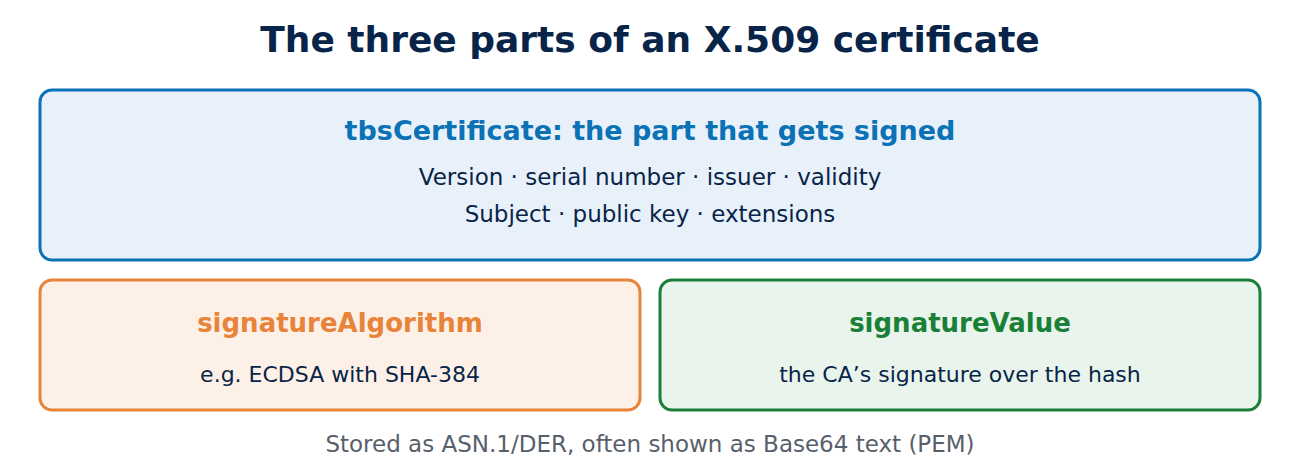
The main fields
The signed part contains these basic fields:
- Version: almost always 3 (stored internally as 2, because counting starts at 0).
- Serial number: unique for each CA. Public CAs must include at least 64 bits of randomness so that nobody can predict a serial number.
- Signature algorithm: repeats the outer algorithm so that it is covered by the signature too.
- Issuer: the name of the CA that signed the certificate.
- Validity: two timestamps, “not before” and “not after”, in Coordinated Universal Time (UTC).
- Subject: a so-called distinguished name made of short labels such as CN (common name), O (organisation) and C (country). Basic website certificates often contain only CN = the domain name.
- Subject public key info: the algorithm and the public key itself, such as an elliptic curve key on P-256 or a 2,048-bit RSA key.
Extensions: what makes a modern certificate
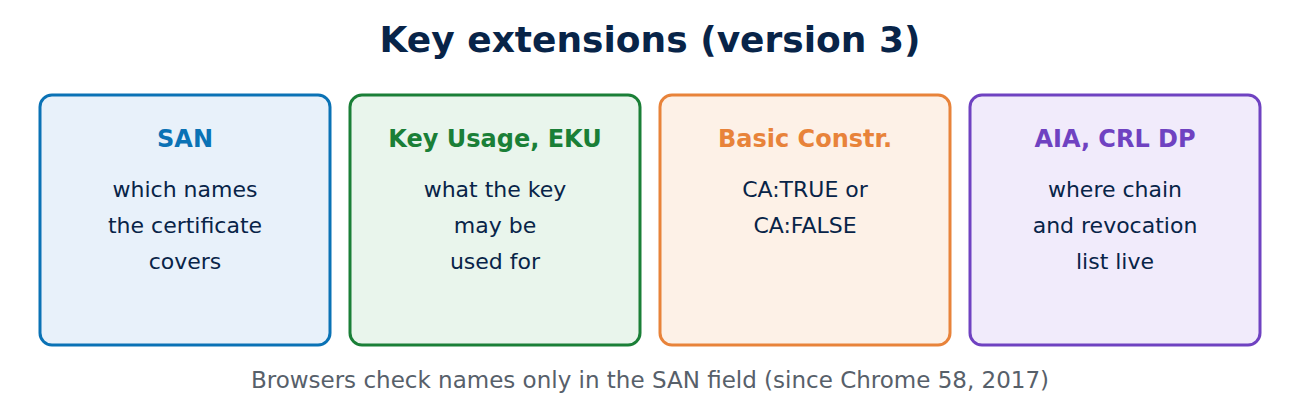
Since version 3 a certificate can carry extensions. Each is identified by an object identifier (OID) and can be marked critical, which means software that does not understand it must reject the certificate. The important ones are:
- Subject Alternative Name (SAN): the list of names the certificate is valid for, such as techcrates.com and www.techcrates.com. Browsers check only this list; Chrome stopped looking at the CN field in 2017 (Chrome 58).
- Key Usage and Extended Key Usage: what the key may be used for, such as “digital signature” and “TLS web server authentication”.
- Basic Constraints: whether the certificate belongs to a CA (CA:TRUE) or is an end-entity certificate (CA:FALSE). Without it, anyone holding an ordinary certificate could issue more certificates.
- Authority and Subject Key Identifiers: short IDs that help software find the issuer’s certificate.
- Authority Information Access and CRL Distribution Points: web addresses where the intermediate certificate and the CA’s revocation list can be downloaded.
- Certificate Policies: an OID for the validation level, for example 2.23.140.1.2.1 for domain-validated certificates.
- Signed Certificate Timestamps (SCTs): receipts from public logs proving that the certificate was publicly recorded.
A real example: the techcrates.com certificate
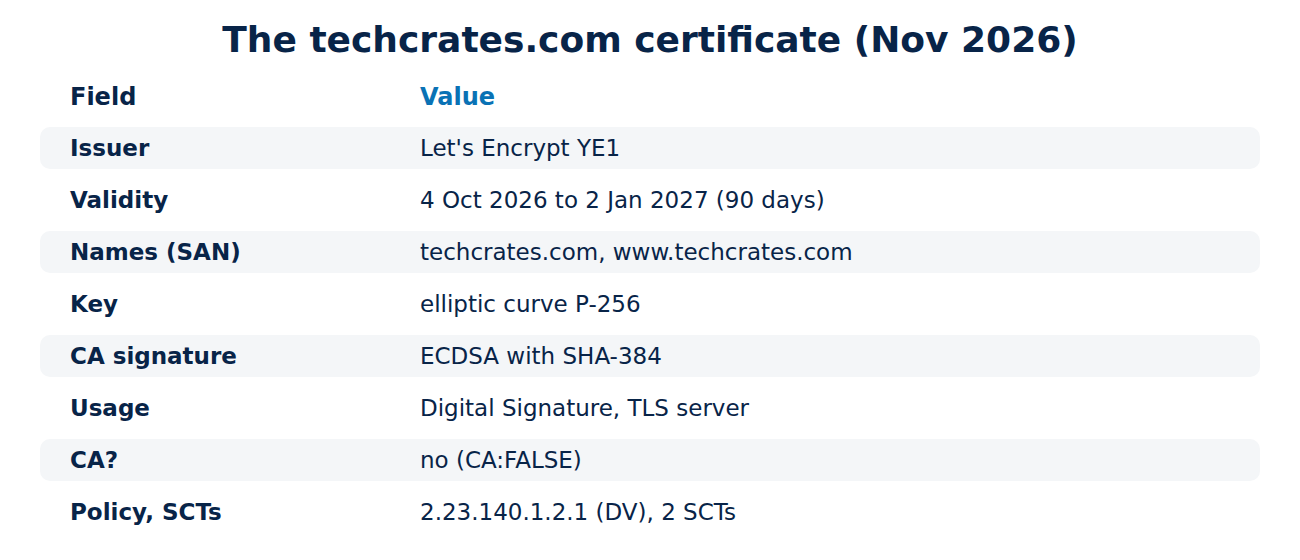
This is what the certificate of this website looked like in November 2026 (it is renewed automatically, so the dates and serial number change):
- Version 3, issuer C = US, O = Let’s Encrypt, CN = YE1.
- Valid from 4 October 2026, 19:04:26 UTC, to 2 January 2027, 19:04:25 UTC: 90 days minus one second.
- Subject CN = techcrates.com, with techcrates.com and www.techcrates.com in the SAN list.
- Key: elliptic curve P-256; the CA signed with ECDSA and SHA-384.
- Key Usage “Digital Signature” (critical), Extended Key Usage “TLS Web Server Authentication”, Basic Constraints CA:FALSE (critical).
- Revocation list at ye1.c.lencr.org, intermediate certificate at ye1.i.lencr.org, policy 2.23.140.1.2.1 (domain validated), two SCTs.
What is missing is telling too. There is no organisation name in the subject and no OCSP address: Let’s Encrypt only checks control of the domain, and it switched off OCSP in 2025. How issuance works is covered in understanding the ACME protocol.
How to view a certificate yourself
In a browser, click the icon to the left of the address bar, then “Connection is secure” (or similar) to open the certificate and all its fields. On the command line, OpenSSL shows everything:
openssl s_client -connect www.techcrates.com:443 -servername www.techcrates.com </dev/null 2>/dev/null | openssl x509 -noout -textFor a saved file, a shorter query lists the key fields:
openssl x509 -in certificate.pem -noout -subject -issuer -dates -ext subjectAltNameThe fingerprint that browsers display is not stored in the certificate. It is the SHA-256 hash of the whole DER file, which makes it handy for comparing two certificates at a glance. For everyday checks on a site before you log in or pay, see how to check if a website is safe.
Frequently asked questions
Does a certificate contain the private key?
No. It holds only the public key. The private key stays with the owner; only container formats such as PKCS#12 (.pfx) store both together.
Is a certificate secret?
No. Every server sends its certificate to every visitor, and public certificates are even published in Certificate Transparency logs.
What does “self-signed” mean?
The issuer and the subject are the same: the certificate has signed itself. Root certificates of CAs work this way, but a self-signed certificate on a website triggers a browser warning.
Why is the certificate valid for only 90 days?
Short lifetimes limit the damage if a key is stolen and force site owners to automate renewal. Since March 2026 the CA/Browser Forum has been cutting the maximum step by step, down to 47 days in 2029.
Conclusion
An X.509 certificate binds a name to a public key and carries the signature of a certificate authority. The basic fields name the issuer, the subject, the validity period and the key, while the extensions define which names and purposes the certificate covers and where revocation information can be found. Once you have taken a real certificate apart with OpenSSL, browser error messages make a lot more sense.
Sources and further reading
- RFC 5280: Internet X.509 Public Key Infrastructure Certificate and CRL Profile (IETF)
- X.509 (Wikipedia)
- Baseline Requirements for TLS server certificates (CA/Browser Forum)
- Chain of Trust (Let’s Encrypt)















Recent Comments