
Hardly a week passes without news of another data breach: a shop, a streaming service, a hospital or a social network loses customer data to criminals. Your e-mail address, password, phone number or even card details may be among it, often without you ever being told. The good news: you can check whether your data has leaked and limit the damage in a few minutes.
This guide explains how to find out whether you were affected, what to do depending on what leaked, and how to make future breaches much less dangerous.
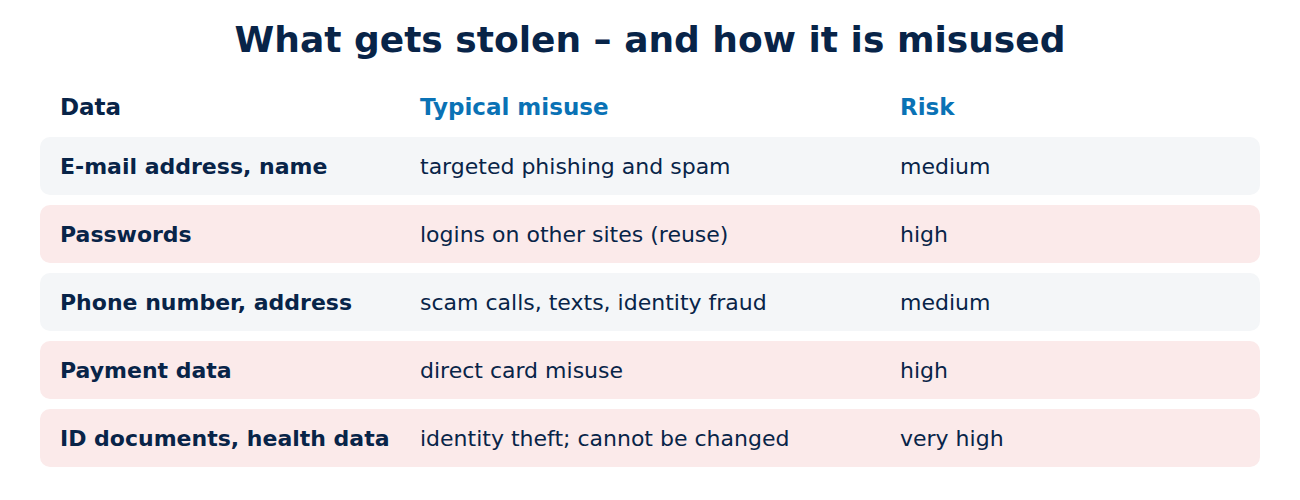
What gets stolen in a data breach
- E-mail addresses and names: used for targeted phishing and spam.
- Passwords: often stored as hashes, but weak passwords can be cracked, and some services stored them badly. Criminals then try the same e-mail and password on other sites (“credential stuffing”).
- Phone numbers and addresses: used for scam calls, texts and identity fraud.
- Payment data: card numbers can be misused directly.
- ID documents and health data: the most serious cases, because you cannot change them like a password.
How to check if your e-mail was in a breach
- Have I Been Pwned: enter your e-mail address at haveibeenpwned.com. The free service, run by security researcher Troy Hunt, lists the known breaches that contained it and what kind of data leaked. You can also subscribe to be notified of future breaches.
- Your password manager: Bitwarden, 1Password, Proton Pass, Apple Passwords and Google Password Manager warn about passwords that appeared in known breaches or are reused.
- Your browser: Chrome, Edge, Firefox and Safari check saved passwords against breach lists and show a warning.
- Notifications from the company: in the EU, the UK and every US state, companies must inform affected users of serious breaches. Treat such e-mails carefully: check them on the company’s website, because scammers send fake breach warnings too.
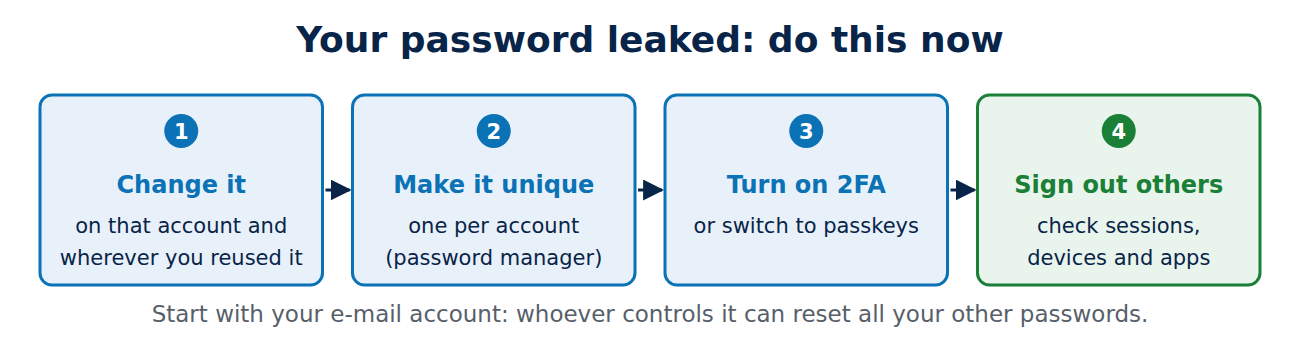
What to do if your password leaked
- Change the password of the affected account immediately, and everywhere else you used the same or a similar password.
- Use a unique password for every account. A password manager makes this practical.
- Turn on two-factor authentication or switch to passkeys, so a stolen password alone is useless.
- Sign out other sessions and check the list of connected devices and apps.
What to do if other data leaked
- E-mail address only: expect more phishing that mentions the breached company. Be extra careful with messages that ask you to “verify” your account; see how to spot a phishing e-mail.
- Phone number: watch for scam calls and texts, set a SIM PIN on your phone and ask your carrier for port-out protection.
- Card details: contact your bank, check statements closely and ask for a new card if needed.
- Bank account details: watch for unauthorised direct debits; in the EU you can usually reverse a SEPA direct debit within eight weeks.
- ID or social security numbers: report it to your national authority; in the US you can freeze your credit with the three credit bureaus for free to block new accounts in your name.
Do not pay for “data removal” panic
After a breach, ads for expensive monitoring services appear. Some are useful, especially identity theft protection after an ID document leak, but for most people the free steps above, a password manager and two-factor authentication give the most protection. Companies that lost your data often offer free monitoring for a year; check the offer on their official website.
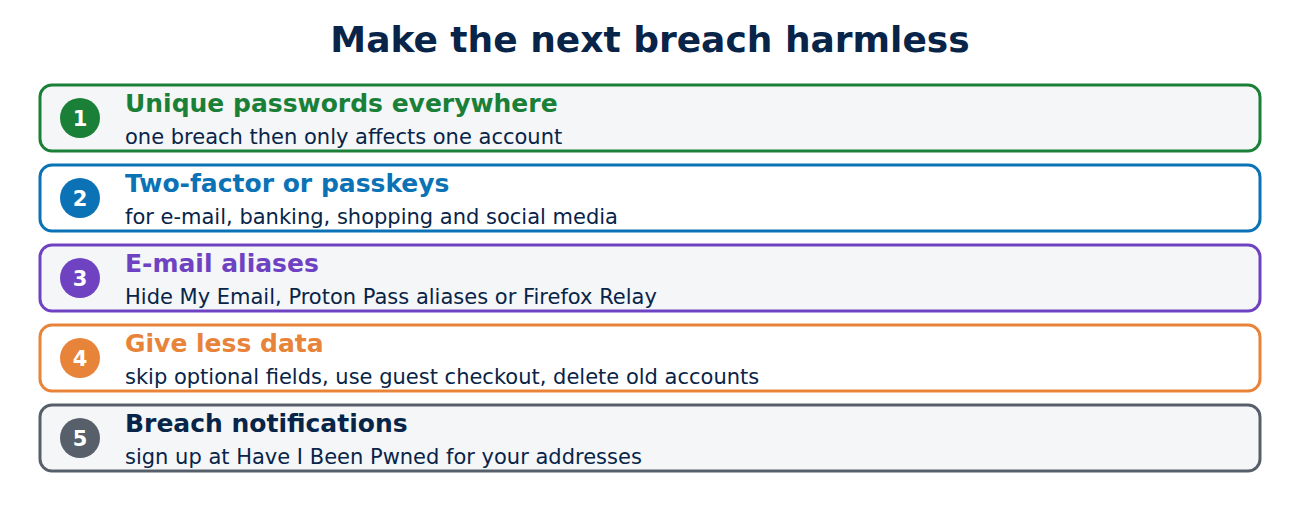
How to make future breaches harmless
- Unique passwords everywhere: then one breach only affects one account.
- Two-factor or passkeys for e-mail, banking, shopping and social media.
- E-mail aliases: services like Apple’s Hide My Email, Proton Pass aliases or Firefox Relay give each shop a different address, so you can see who leaked it and switch it off.
- Give less data: skip optional fields, use guest checkout and delete accounts you no longer use.
- Check regularly: sign up for breach notifications so you hear about new breaches quickly.
Conclusion
Check your e-mail addresses on Have I Been Pwned and look at the breach warnings in your password manager or browser. If a password leaked, change it everywhere you used it and turn on two-factor authentication. For card, bank or ID data, contact your bank or the relevant authority quickly. Unique passwords, two-factor authentication and e-mail aliases turn the next breach from a disaster into a minor annoyance.
Sources and further reading
- Have I Been Pwned (Troy Hunt)
- What to know about credit freezes and fraud alerts (US Federal Trade Commission)
- Data breaches: guidance for individuals and families (UK National Cyber Security Centre)













Recent Comments