
VPN apps are advertised everywhere, often with big promises: total anonymity, protection from hackers, safety on every network. A VPN is a useful tool, but it does much less than many adverts suggest, and for some people it is not needed at all.
This guide explains in plain words what a VPN does, when it helps, what it cannot do, and what to look for if you decide to use one.
What a VPN does
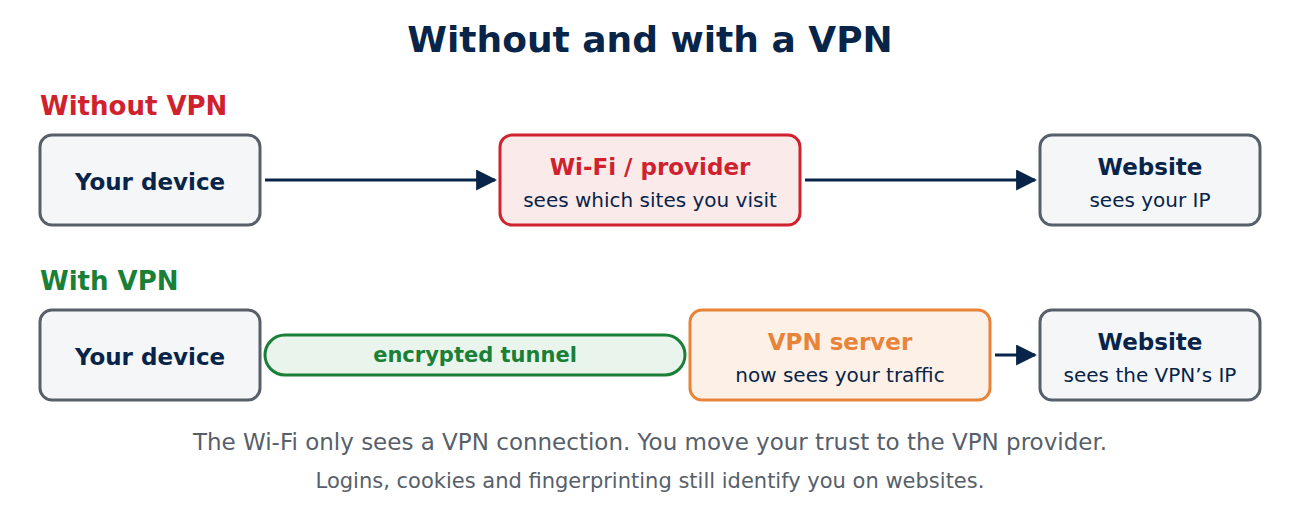
A VPN (virtual private network) creates an encrypted tunnel between your device and a server run by the VPN provider. All your internet traffic goes through that tunnel and leaves the internet from the VPN server.
- The network you are on (a café Wi-Fi, a hotel, your internet provider) only sees that you are connected to a VPN, not which websites you visit.
- The websites you visit see the VPN server’s IP address and location instead of yours.
- The VPN provider can now see what your internet provider used to see. You are moving trust from one company to another.
When a VPN is useful
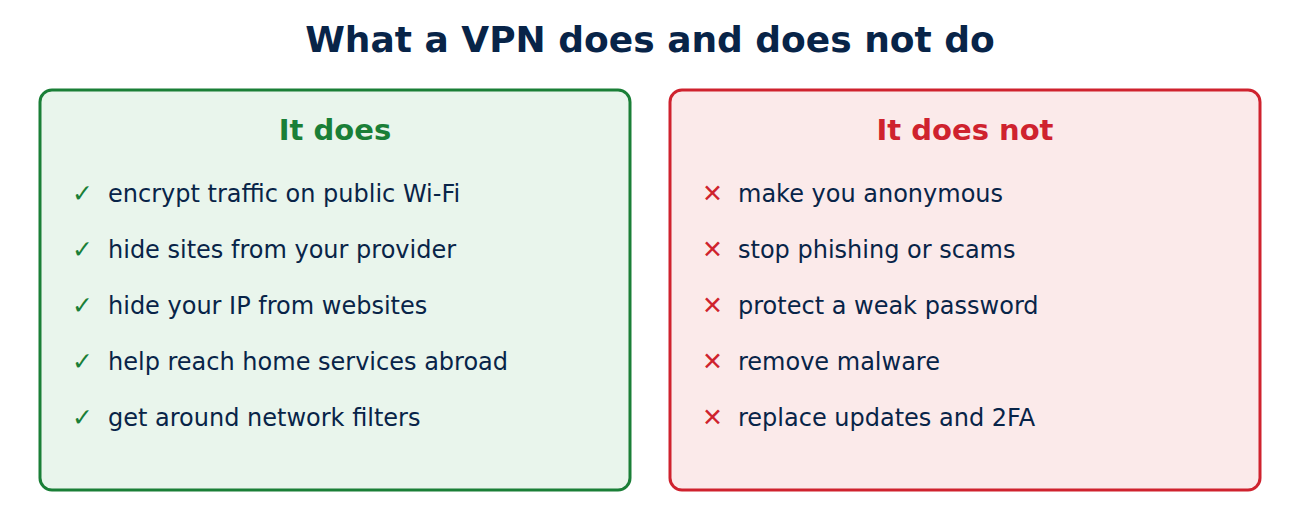
- Public and hotel Wi-Fi: it hides your traffic from the network operator and other users, and protects older apps that do not encrypt properly.
- Privacy from your internet provider: in countries where providers log or sell browsing data, a VPN keeps that data from them.
- Travel: it can give you access to your home country’s services, such as online banking that blocks foreign IP addresses. Streaming services often block VPN servers, and using a VPN may break their terms of use.
- Working remotely: many companies use their own VPN so employees can reach internal systems securely.
- Restrictive networks: in schools, workplaces or countries that block websites, a VPN can get around filters, but check the local rules first.
What a VPN does not do
- It does not make you anonymous. If you log in to Google, Facebook or your bank, they know who you are. Cookies and browser fingerprinting still identify you.
- It does not stop phishing, scams or malware. A fake login page is just as dangerous over a VPN. See how to spot a phishing e-mail.
- It does not protect a hacked account or a weak password. Use a password manager and two-factor authentication for that.
- It is not always needed for HTTPS sites: today almost all websites encrypt traffic with HTTPS, so on a normal home network a VPN adds less protection than it did ten years ago.
Do you need a VPN?
- Probably yes if you often use public Wi-Fi for work, travel a lot, live in a country with strong censorship or surveillance, or want to keep your browsing private from your internet provider.
- Probably not if you mostly browse at home, on your own secured Wi-Fi, and your main worries are scams and account security. Then your money and time are better spent on a password manager, passkeys and updates.
Free or paid VPN?
Running VPN servers costs money. Many free VPN apps make it back by showing ads, selling data or limiting speed. There are honest exceptions with limited free plans from established providers (for example Proton VPN’s free plan, which has no data cap but fewer servers and features). Avoid unknown free VPN apps with vague privacy policies: you would be routing all your traffic through a company you know nothing about.
What to look for in a VPN
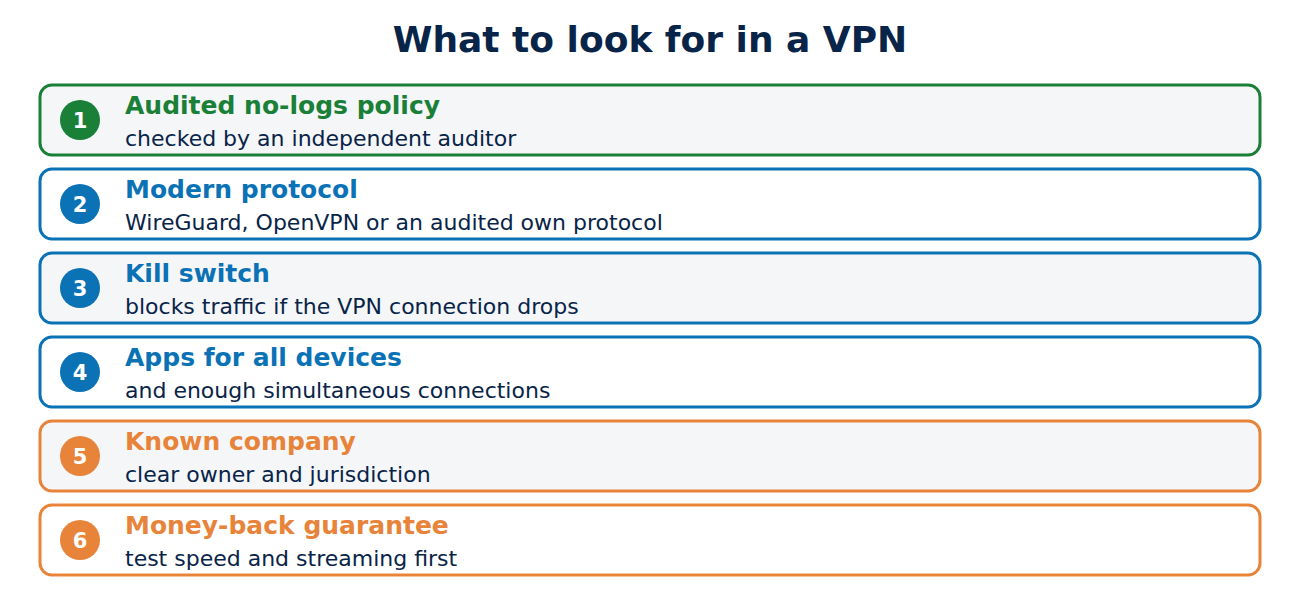
- A strict no-logs policy that has been checked in an independent audit.
- Modern protocols: WireGuard or OpenVPN, or the provider’s own audited protocol.
- A kill switch that blocks internet traffic if the VPN connection drops, so nothing leaks unprotected.
- Apps for all your devices, including the router or TV if you need them, and enough simultaneous connections.
- A clear company and jurisdiction: you should know who runs the service and under which country’s laws.
- A money-back guarantee, so you can test speed and streaming before you commit.
How to set up a VPN
- Install the provider’s app from the official app store or website.
- Sign in, turn on the kill switch and choose “connect automatically on untrusted Wi-Fi” if the app offers it.
- Pick the fastest nearby server for daily use, or a server in your home country when travelling.
- Check that it works: search for “what is my IP” and confirm that the location shown is the VPN server’s.
Some phones and browsers have built-in privacy relays, such as iCloud Private Relay for Safari on iPhone and Mac. They hide your IP address from websites in that browser but are not a full VPN for all apps.
Is using a VPN legal?
In most countries, including the US, UK and EU countries, using a VPN is legal. Some countries restrict or ban VPNs, and illegal activities stay illegal over a VPN. Streaming services may block access or close accounts if their terms forbid VPN use.
Conclusion
A VPN encrypts your traffic on the local network and hides your IP address from websites, which is valuable on public Wi-Fi, while travelling and where providers or governments watch internet use. It does not make you anonymous and does not protect against phishing, malware or weak passwords. If you need one, choose an audited no-logs provider with a kill switch, and avoid unknown free apps.
Sources and further reading
- Proton VPN free plan (Proton)
- Choosing the VPN that’s right for you (Electronic Frontier Foundation)
















Recent Comments