
Buying a printer looks simple until you compare running costs. The cheapest printer in the shop can become the most expensive one after a year of ink cartridges, while a printer that costs more at first may print for years almost for free. The first decision is the technology: laser or inkjet.
This guide explains how the two work, which one is cheaper for your kind of printing, and what to check before you buy.
How laser and inkjet printers work
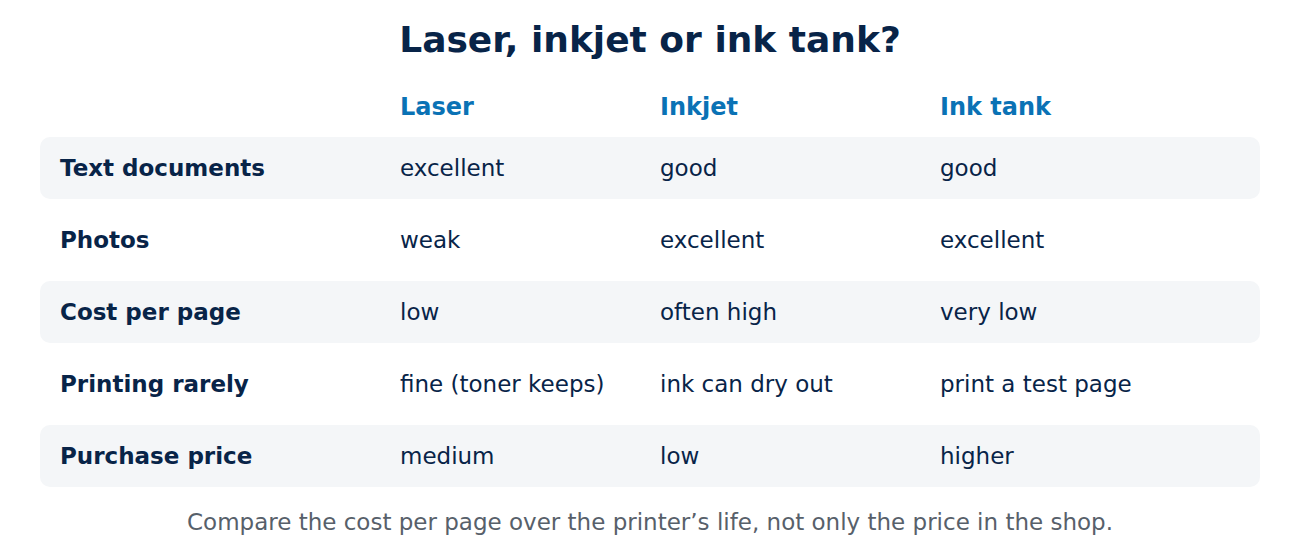
- Laser printers use a laser to draw the page as an electrical charge on a drum. Powdered toner sticks to the charged areas, is transferred to the paper and fused onto it with heat. Toner is a dry powder, so it does not dry out.
- Inkjet printers spray tiny droplets of liquid ink from a print head onto the paper. They can blend colours very finely, which is why they are good at photos.
Laser printers: pros and cons
- Pros: sharp text, fast printing, low cost per page, toner lasts a long time, no clogged heads after weeks without printing, and the print is smudge-proof straight away.
- Cons: colour laser printers are larger and more expensive, photos look flat on normal paper, and laser printers cannot print on special photo paper or heat-sensitive media.
Inkjet printers: pros and cons
- Pros: excellent photos and colour graphics, small and cheap to buy, many models scan and copy, and some can print on photo paper, cards and even CDs.
- Cons: cartridges can make the cost per page high, ink dries out and heads can clog if you print rarely, and printing is usually slower.
Ink tank printers: the middle ground
Ink tank printers (sold for example as EcoTank, MegaTank or Smart Tank) are inkjets with large refillable tanks instead of cartridges. You fill them from bottles, which brings the cost per page close to laser printers, while keeping the inkjet’s photo quality. They cost more to buy than cartridge inkjets, but for families and home offices that print a lot of colour, they often pay off within a year or two.
Cost per page: how to compare
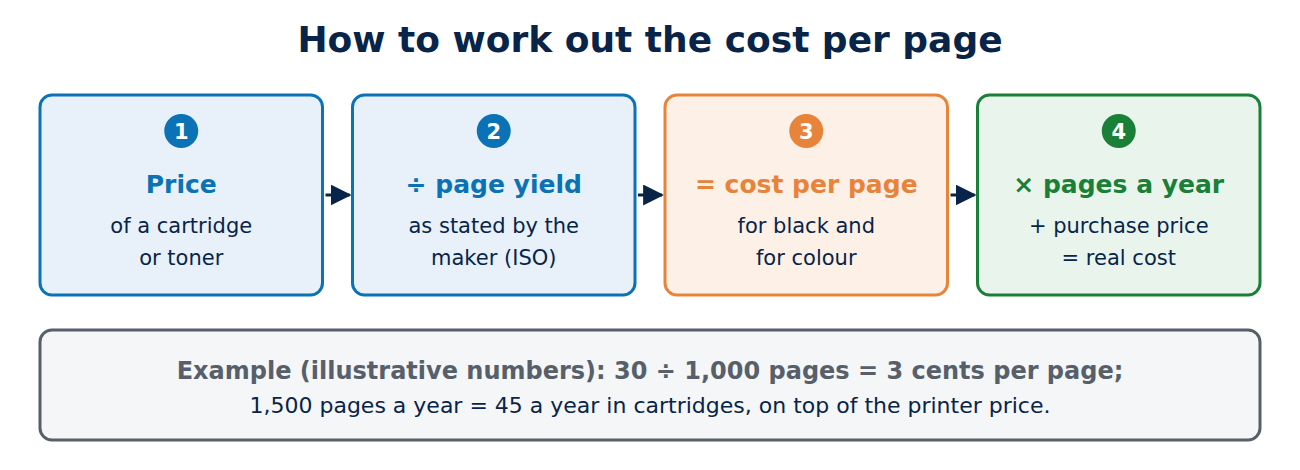
The real cost of a printer is the price plus everything you print over its lifetime. To compare models:
- Find the price of a replacement cartridge or toner and its page yield (manufacturers state it according to ISO standards, for example “approx. 1,000 pages”).
- Divide the price by the number of pages to get the cost per page. Do this for black and for colour.
- Multiply by the number of pages you print per year, and add it to the purchase price.
The starter cartridges supplied with new printers are often only partly filled, so do not judge running costs by them. Subscription ink services can be good value for regular printing, but check what happens when you cancel: some printers then block the subscription cartridges.
Which printer for which use?
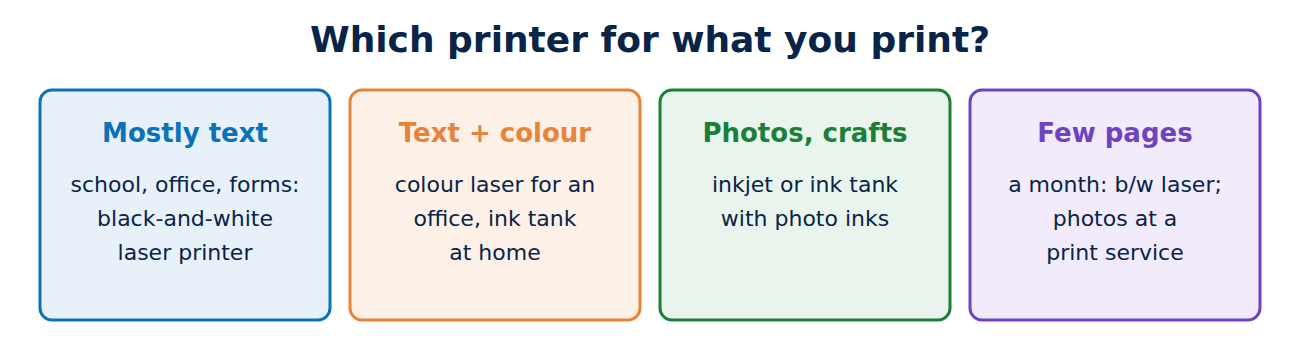
- Mostly black-and-white documents (school, office, forms): a black-and-white laser printer. Cheap per page and reliable even if you print rarely.
- Documents plus some colour: a colour laser for a small office, or an ink tank printer at home.
- Photos and creative projects: an inkjet or ink tank printer with photo inks.
- Printing only a few pages a month: a black-and-white laser, because toner does not dry out. For occasional photos, a print service is often cheaper.
What else to check before you buy
- Automatic double-sided printing (duplex) saves paper.
- Connectivity: Wi-Fi, AirPrint for iPhone and Mac, Mopria for Android, and a reliable app. Some printers require an online account and app for basic functions; read reviews about this.
- Scanner and copier: an all-in-one with an automatic document feeder (ADF) saves time if you scan multi-page documents.
- Third-party cartridges: some printers reject non-original cartridges after firmware updates. If you want to use cheaper compatible ink, check the model’s reputation first.
- Size and noise, especially for a desk at home.
Tips to print cheaper
- Use draft or toner-saving mode for internal documents.
- Print in black only when colour is not needed, and choose a font that uses less ink for long documents.
- Print an inkjet test page every week or two if you print rarely, to keep the heads from drying out.
- Scan and share documents as PDF instead of printing them; your phone camera or a scanning app is often enough.
Conclusion
For text documents and occasional printing, a black-and-white laser printer is the cheapest and most reliable choice. For photos and colour, choose an inkjet, and if you print colour regularly, an ink tank printer keeps running costs low. Always compare the cost per page, not just the purchase price, and check duplex printing, wireless printing and whether the printer accepts the ink you want to use.
Sources and further reading
- About AirPrint (Apple Support)

















Recent Comments