
For thirty years, getting a mobile contract meant waiting for a small plastic card in the post. The eSIM changes that: the SIM is built into the phone, and your mobile plan is downloaded in minutes. Some new phones no longer have a SIM tray at all. eSIMs make switching providers, using two numbers and getting data abroad much easier, but they also raise new questions when you change phones.
This guide explains what an eSIM is, how to set one up, how to use eSIMs for travel, and how to move your eSIM to a new phone.
What is an eSIM?
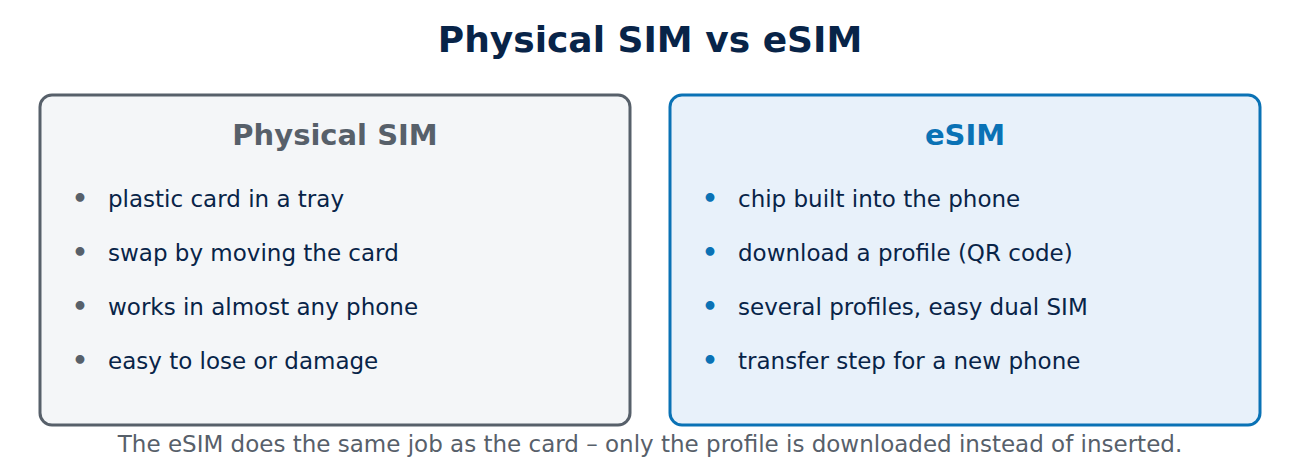
An eSIM (embedded SIM) is a small chip soldered into the phone that does the same job as a SIM card: it identifies you to the mobile network. Instead of inserting a card, you download a profile from your provider onto the chip. One eSIM can store several profiles, for example your home number and a travel data plan, and you switch between them in the settings.
Most phones from the last few years support eSIM, as do many smartwatches, tablets and some laptops. Since the iPhone 14 in the US, iPhones sold there have no SIM tray, and the iPhone 17, 17 Pro and 17 Pro Max are eSIM-only in a dozen countries including the US, Canada and Japan, while European models still have a tray as well. The iPhone Air is eSIM-only everywhere.
Advantages and disadvantages
- Pros: instant activation, no waiting for a card, easy dual SIM (two numbers on one phone), cheap travel data plans, and a stolen phone cannot simply be used with your SIM card in another device.
- Cons: moving to a new phone needs a transfer step, some smaller providers do not offer eSIM yet, and switching quickly between phones is less convenient than swapping a card.
How to set up an eSIM
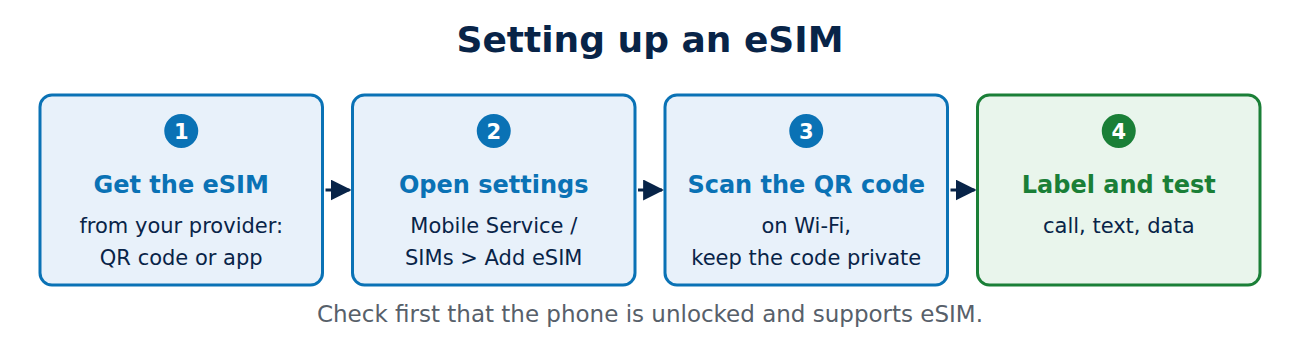
- Get the eSIM from your provider: in the provider’s app, online account or shop. You usually receive a QR code or an activation link.
- iPhone: Settings > Mobile Service (or Cellular) > Add eSIM, then scan the QR code or use the provider’s app. Many providers support “Carrier activation”, which needs no QR code at all.
- Android: Settings > Network & internet (or Connections) > SIMs > Add eSIM / Download SIM, then scan the code.
- Stay on Wi-Fi during the download, and keep the QR code private: anyone with it may be able to install your number.
Dual SIM: two numbers, one phone
With a physical SIM and an eSIM, or two eSIMs, you can use a private and a work number on the same phone, or keep your home number active for calls while using a cheaper local data plan abroad. In the settings you choose which line is used for calls, texts and mobile data, and messaging apps show which number a message came from.
eSIMs for travel
Travel eSIM providers sell data-only plans for a country or region that you install before the trip:
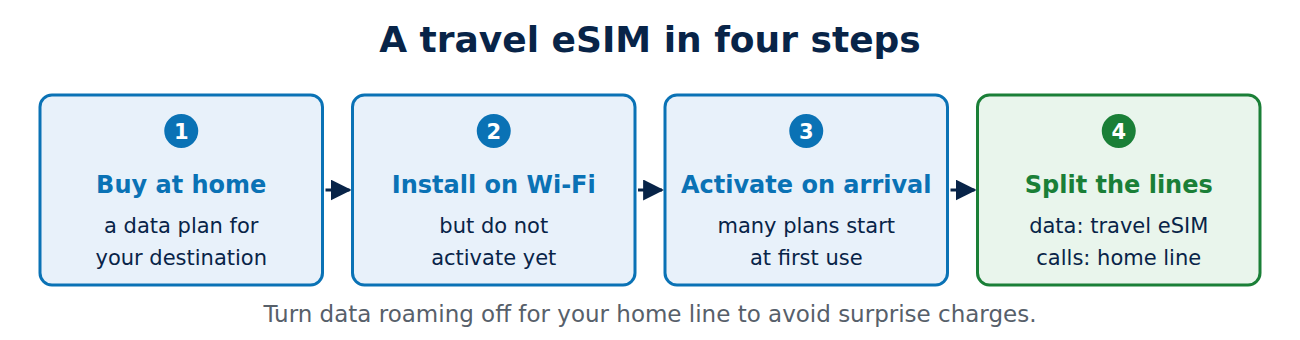
- Check that your phone is unlocked (not tied to one provider) and supports eSIM.
- Buy and install the travel eSIM at home over Wi-Fi, but activate it only when you arrive, because many plans start counting days at first connection.
- On arrival, set the travel eSIM for mobile data and keep your home line for calls and texts, with data roaming off on the home line.
Inside the EU, roaming on your own EU contract is usually included at home prices, so a travel eSIM is mainly worth it outside the EU, for example in the US, Asia, the UK (depending on your plan) or Switzerland. For translating menus and signs on the way, see our guide to the best translation apps for travel.
Moving your eSIM to a new phone
- iPhone to iPhone: during setup of the new iPhone, choose “Transfer from nearby iPhone” (eSIM Quick Transfer), if your provider supports it.
- Android to Android: newer Pixel and Samsung phones can transfer the eSIM during setup for supported providers.
- Between iPhone and Android: since 2024–2025, some providers support direct transfer; otherwise request a new eSIM QR code from your provider, often free in the app.
Do not delete the eSIM from your old phone until the new one works. Our guide on how to transfer data to a new phone covers the rest of the move.
Security tips
- Protect your provider account with a strong password and two-factor authentication: SIM-swap fraud now often targets eSIM reissues.
- Set a SIM PIN so the line cannot be used if the phone is stolen.
- Ask your provider for port-out or SIM-swap protection if it is available.
Conclusion
An eSIM is a SIM card built into your phone: plans are downloaded instead of posted, two numbers fit on one phone, and travel data becomes cheap and quick. Set it up in your provider’s app or with a QR code, use a data-only travel eSIM outside the EU, and transfer the eSIM during the setup of a new phone before deleting it from the old one. Protect your provider account, because the eSIM is now as valuable as your phone number.
Sources and further reading
- About eSIM on iPhone (Apple Support)
- Get a SIM and add it to your Pixel phone (Pixel Phone Help)



















Recent Comments