
Before a certificate authority can issue a certificate, it needs the public key it is going to vouch for. You hand it over in a certificate signing request, or CSR. The key pair and the CSR are created on your own machine, usually with the free OpenSSL toolkit. This guide explains what a CSR contains, which type of key to choose, gives the commands step by step, and shows how to keep the private key safe.
Key pairs and CSRs: the basics
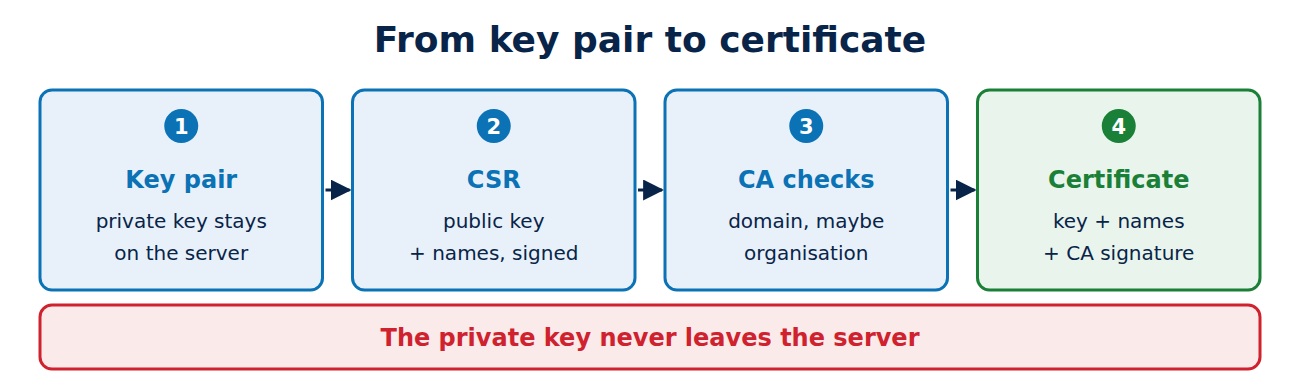
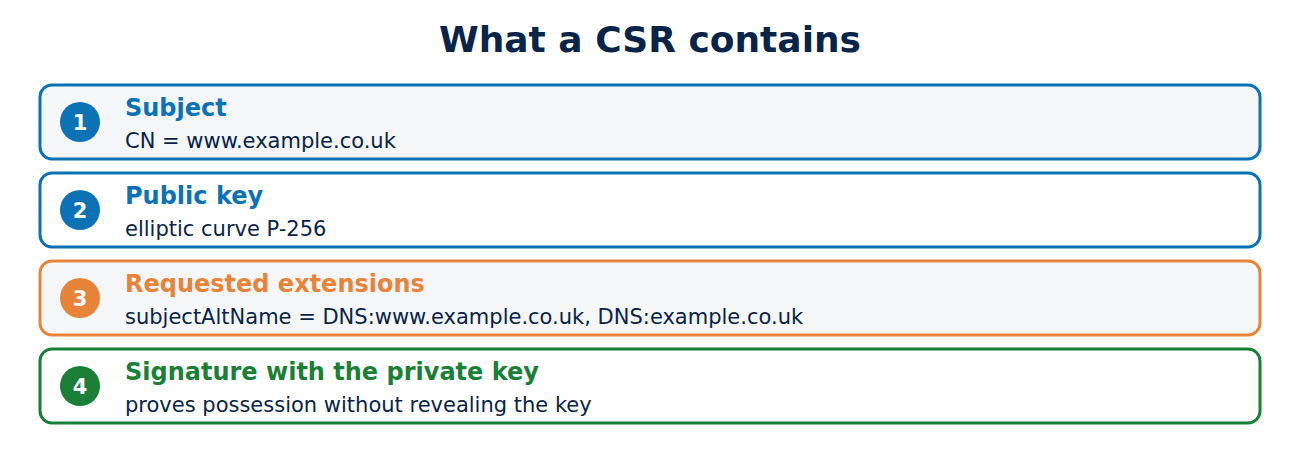
Everything starts with a key pair: a private key that never leaves your server, and the matching public key. The CSR is built from the public key and the names you want on the certificate. Its format is called PKCS#10 (RFC 2986), and it contains:
- the subject, such as CN = www.example.co.uk,
- the public key,
- the extensions you are asking for, above all the list of domain names (Subject Alternative Name),
- a signature made with the private key.
The signature proves to the CA that you hold the matching private key without revealing it. The CA then copies the public key and the validated names into the certificate; what is an X.509 certificate shows what the result looks like.
Which key? RSA or elliptic curve
Two kinds of key are used for website certificates:
- RSA: in use for decades and supported by every piece of software. Public CAs require at least 2,048 bits, and 3,072 bits is a sensible choice for new keys. For background, see RSA vs AES.
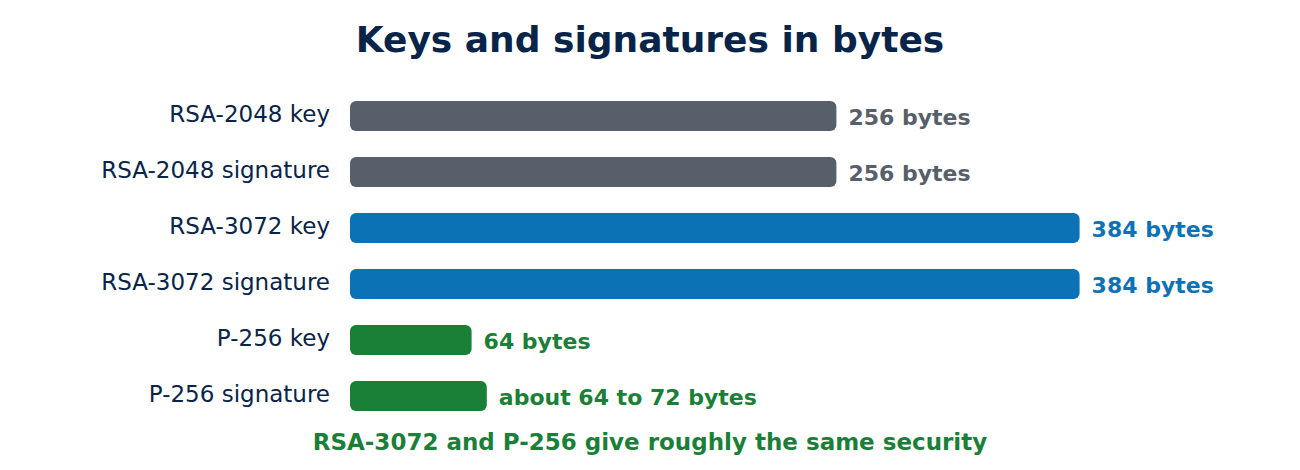
- ECDSA with elliptic curves: the P-256 curve gives roughly the same security as 3,072-bit RSA, with much smaller keys and faster signatures. P-384 is common too, but public CAs do not accept P-521 or Ed25519 keys.
The sizes show the difference: a 3,072-bit RSA public key is 384 bytes long and so is each signature, while a P-256 key is 64 bytes and a signature about 64 to 72 bytes. P-256 is the usual choice for new websites today; RSA still makes sense if you need to support very old devices.
Generate the private key
With OpenSSL 3, this command creates a P-256 key and saves it as server.key:
openssl genpkey -algorithm EC -pkeyopt ec_paramgen_curve:P-256 -out server.keyFor a 3,072-bit RSA key, use:
openssl genpkey -algorithm RSA -pkeyopt rsa_keygen_bits:3072 -out server.keyThe file holds the private key in the PEM text format, recognisable by the header line “BEGIN PRIVATE KEY”. The public key can always be derived from it, but not the other way round.
Create the certificate signing request
Now create the CSR. The list of names in the subjectAltName field matters most, because it is the only field browsers check:
openssl req -new -key server.key -out server.csr -subj "/CN=www.example.co.uk" -addext "subjectAltName=DNS:www.example.co.uk,DNS:example.co.uk"-new -key server.keycreates a new request for the existing key.-subjsets the subject. For domain validation the domain name is enough; a CA only includes details such as an organisation or town after checking them itself.-addextadds the domain names you want. Without it, the CSR contains only the common name.
Check the CSR
Look inside the request before you submit it:
openssl req -in server.csr -noout -text -verifyThe output should say “Certificate request self-signature verify OK” and show the right subject, the key type and your domain names under “Requested Extensions”. To check that the key, the CSR and later the certificate belong together, compare a hash of the public key:
openssl pkey -in server.key -pubout | openssl sha256
openssl req -in server.csr -pubkey -noout | openssl sha256
If both values match, the key and the request belong together.
Keep the private key safe
The CSR is public; the private key is not. Anyone who has it can pretend to be your server. So:
- Never send the key to the CA, by email or through a support ticket. A genuine CA never asks for it.
- Make the file readable only by the web server, on Linux for example with chmod 600 server.key.
- Encrypt copies and backups with a passphrase:
openssl pkey -in server.key -aes256 -out server-protected.key. - Use hardware for especially valuable keys, such as a hardware security module.
- If you suspect the key has been stolen, have the certificate revoked and generate a new key rather than reusing the old one.
What about Let’s Encrypt?
If you use Let’s Encrypt with an ACME client such as certbot, you rarely have to do any of this: the client creates the key and the CSR, submits the request and renews everything automatically. You can still use your own CSR, for example with certbot certonly –csr server.csr. See understanding the ACME protocol for how the process works. With commercial CAs you paste the contents of server.csr into the order form and receive the certificate once validation is complete.
Frequently asked questions
Can I use the same key for several certificates?
Technically yes, but it is better not to. A fresh key at every renewal limits the damage if an old key was copied without you noticing.
What happens if I lose the private key?
The certificate becomes useless. Generate a new key and CSR and have a new certificate issued.
Do I need to fill in country, town and company?
Not for domain-validated certificates. The CA only includes details it has checked itself.
Do these commands work on Windows?
Yes, with an OpenSSL installation or inside the Windows Subsystem for Linux. Windows can also create CSRs with its certificate manager or the certreq tool.
Conclusion
A CSR contains your public key, the names you want and a signature that proves you hold the private key. Two OpenSSL commands create the key and the request, and a third checks the result. The essentials are to list your domain names in the subjectAltName field and never to let the private key out of your hands.
Sources and further reading
- RFC 2986: PKCS #10 Certification Request Syntax (IETF)
- openssl-req (OpenSSL documentation)
- Certificate signing request (Wikipedia)
- User guide (Certbot documentation)



















Recent Comments