
Every certificate authority in the root stores is, in principle, allowed to issue for any domain. As a domain owner you can restrict that, and you do it where your domain is already managed: in DNS. A CAA record states which CAs may issue certificates for your domain. DNSSEC protects DNS answers from forgery, and DANE goes further still, publishing a server’s key directly in DNS. This guide explains all three, gives examples and shows where each is actually used today.
CAA: which CA may issue?
CAA stands for Certification Authority Authorization (RFC 8659). A CAA record names the CAs that may issue for a domain. Since 8 September 2017, every public CA has had to check it before issuing; if it names a different CA, they must refuse. If there is no CAA record, any CA may issue. The rest of the issuing process is covered in how certificate authorities work.
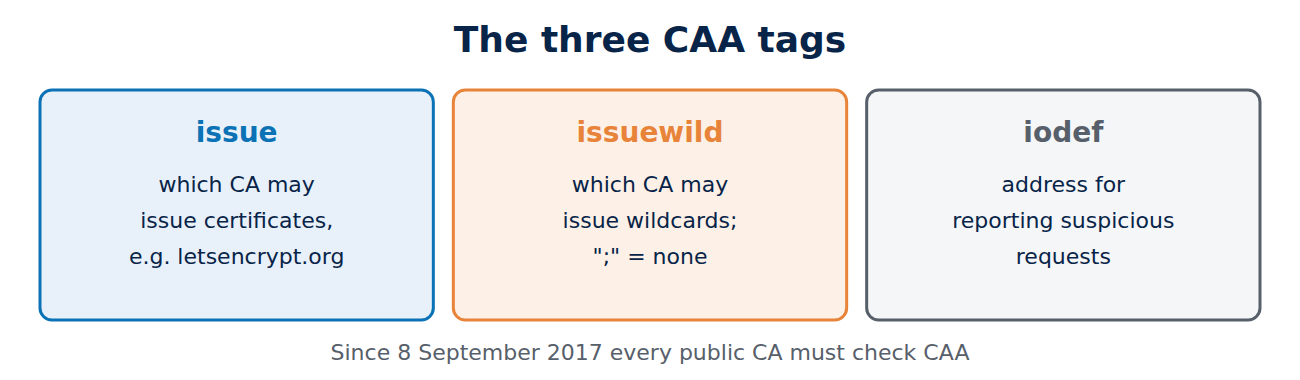
A CAA record has a flag, a tag and a value. The main tags are:
- issue: which CA may issue ordinary certificates, given by its identifier, such as letsencrypt.org, pki.goog (Google Trust Services), digicert.com or sectigo.com.
- issuewild: which CA may issue wildcard certificates. Without it, the issue tag applies to wildcards too.
- iodef: an address where a CA can report suspicious requests.
CAA records in practice
Here is an example for a zone that allows only Let’s Encrypt, permits no wildcards and sends reports to an email address:
example.co.uk.  CAA 0 issue "letsencrypt.org"
example.co.uk.  CAA 0 issuewild ";"
example.co.uk.  CAA 0 iodef "mailto:security@example.co.uk"
The value “;” means no CA at all. The accounturi extension can even restrict permission to one particular account at the CA, so an attacker with their own Let’s Encrypt account fails too. The CA looks for a record at the exact name first, such as www.example.co.uk, then climbs up level by level to example.co.uk, so a record for the domain also covers every subdomain without its own record.
You can check a CAA record with dig CAA example.co.uk +short. One catch: if you use several services, such as a CDN that orders its own certificates, you must allow its CAs too, or its renewals will fail. For DNS in general, see how DNS works.
DNSSEC: signed DNS answers
CAA and the CA’s domain validation both rely on DNS, and classic DNS has no protection against forged answers. An attacker who poisons or redirects DNS answers could feed a CA a false CAA record or a false validation address.
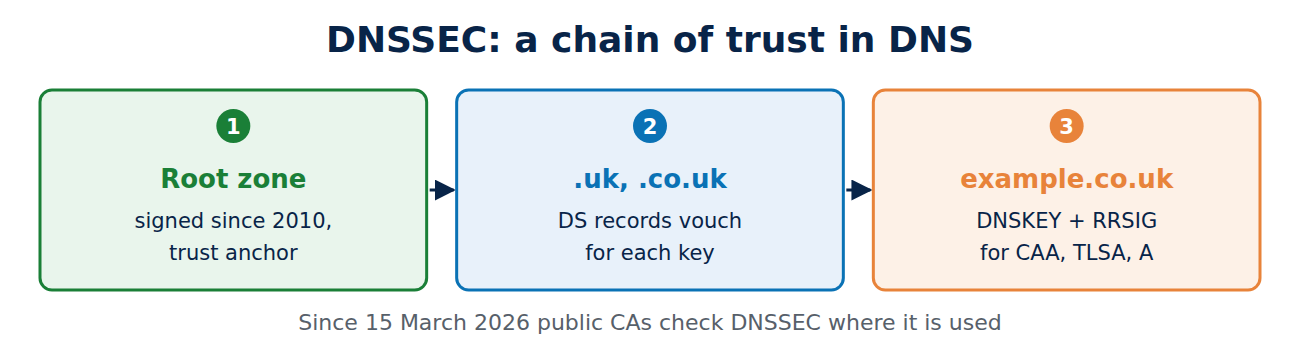
DNSSEC solves this with signatures. Each zone signs its records (RRSIG) with its own key (DNSKEY), and the parent zone vouches for that key with a DS record. This builds a chain of trust from the root zone, signed since 2010, through .uk to your domain, much like a certificate chain; see how the certificate chain of trust works. A validating resolver throws away any answer with a bad signature.
Since 15 March 2026, public CAs have had to check DNSSEC signatures whenever a domain uses DNSSEC, both for the CAA record and for DNS-based domain validation. There is a downside: if DNSSEC is misconfigured, for example an old DS record left behind after a change of DNS provider, the CA cannot issue at all and renewals fail.
DANE: the key lives in DNS
DANE (DNS-based Authentication of Named Entities, RFC 6698) goes a step further: a TLSA record in DNS names the exact certificate or key a server must use. Because DANE is only safe with DNSSEC, it requires DNSSEC. An example for a mail server:
_25._tcp.mail.example.co.uk. TLSA 3 1 1 8d02536c887482bc34ff54e41d2ba659bf85b341a0a20afadb5813dcfbcf286dThe three numbers mean: 3 = this exact server certificate, without a CA check; 1 = only the public key counts; 1 = as a SHA-256 hash. This command produces the hash from a certificate:
openssl x509 -in certificate.pem -noout -pubkey | openssl pkey -pubin -outform DER | openssl sha256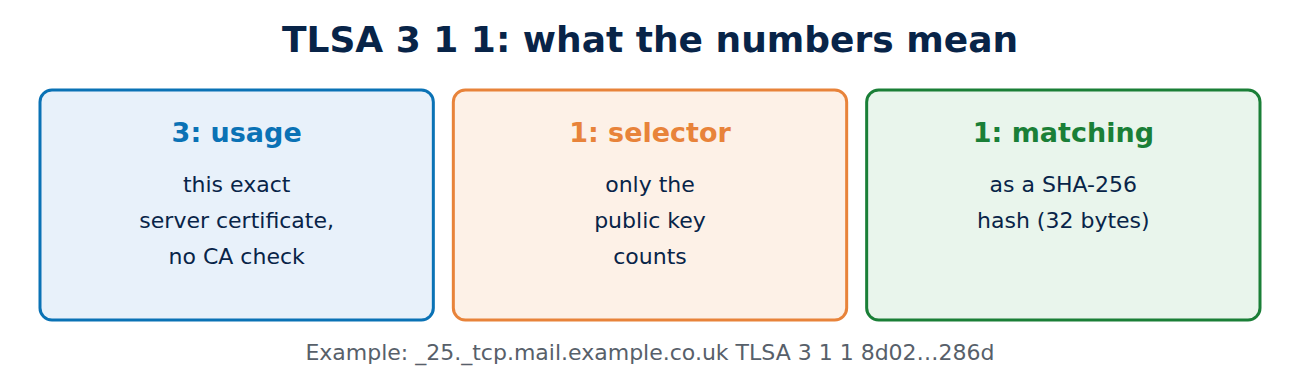
Where DANE is actually used
The major browsers do not support DANE. Its real home is email between mail servers. Without DANE, mail servers encrypt only if both sides offer it, and an attacker in the middle can quietly strip the encryption. With DANE, the sending server knows in advance that it must encrypt and which key to expect. Many providers use it, and Microsoft’s Exchange Online supports DANE for mail as well. For how email moves between servers, see SMTP and POP3 explained.
If you use DANE, take care when changing certificates: the new TLSA record must be published before the new key goes live, or other servers will refuse to connect. Many operators therefore keep the same key at renewal or publish two TLSA records at once.
Frequently asked questions
Should I add a CAA record?
Yes. It costs nothing and stops another CA issuing for your domain by mistake or after being tricked. Make sure you list every CA that you or your service providers actually use.
Does CAA protect me from an attacker who controls my DNS zone?
No. Anyone who can edit the zone can edit the CAA record too. Protect your DNS provider account with a strong password and two-factor authentication; see how to set up two-factor authentication.
How can I tell whether my domain uses DNSSEC?
Run dig DS example.co.uk +short: if a record comes back, the zone is signed. Online test tools also show whether the chain is intact.
Does DANE replace certificate authorities?
In principle it could, but in practice only for mail servers. Websites still need a certificate from a public CA.
Conclusion
A CAA record lets you decide in DNS which CAs may issue for your domain. DNSSEC makes sure such DNS answers cannot be forged, and since March 2026 every public CA checks it. DANE puts the server’s key itself into DNS and has become established for email between servers.
Sources and further reading
- RFC 8659: DNS Certification Authority Authorization (CAA) (IETF)
- Certificate Authority Authorization (Let’s Encrypt)
- Ballot SC-085v2: require DNSSEC validation for CAA and DCV lookups (CA/Browser Forum)
- Email security and anti-spoofing (National Cyber Security Centre)


















Recent Comments