
A certificate is not valid for “a website” but for specific names. Which names they are is set out in the Subject Alternative Name (SAN) extension. It can list several domains, or a wildcard that covers many subdomains in one go. This guide explains how the name list works, what multi-domain and wildcard certificates are, the rules for wildcards and when to use which.
Subject Alternative Name: the list of names in a certificate
In the early days the domain name went into the Common Name (CN) field of the subject. That field holds only one name, so the Subject Alternative Name extension was added to allow as many entries as needed. Since 2017 browsers check only the SAN list; a name that appears only in the CN produces the Chrome error NET::ERR_CERT_COMMON_NAME_INVALID. Where the extension sits in the certificate is shown in what is an X.509 certificate.
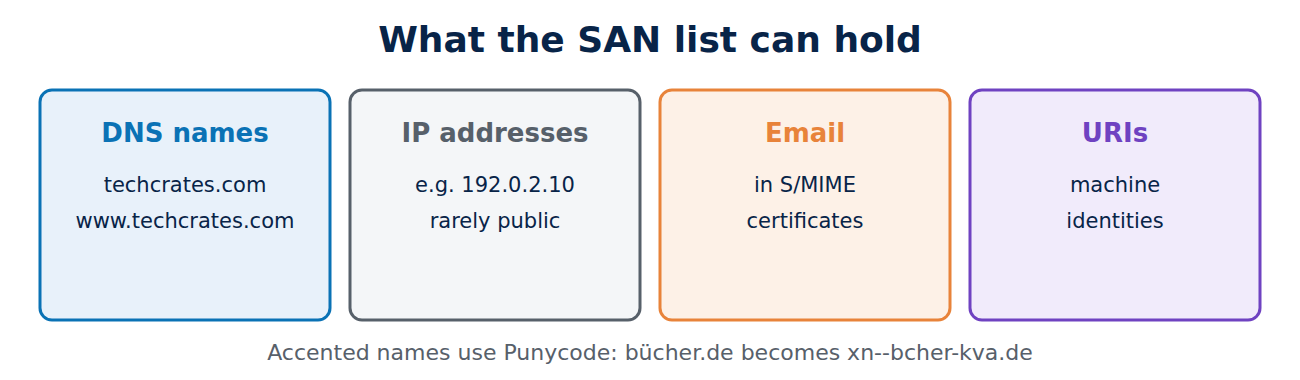
The SAN list can hold different kinds of name:
- DNS names such as www.techcrates.com, the normal case for websites,
- IP addresses, for devices without a domain name; public CAs rarely issue these,
- email addresses in email certificates,
- URIs for some machine identities.
The techcrates.com certificate contains two DNS names, techcrates.com and www.techcrates.com. During the handshake, the browser compares the name in the address bar with this list. Domains with accented letters are stored in an ASCII form called Punycode: bücher.de becomes xn--bcher-kva.de.
Several domains in one certificate
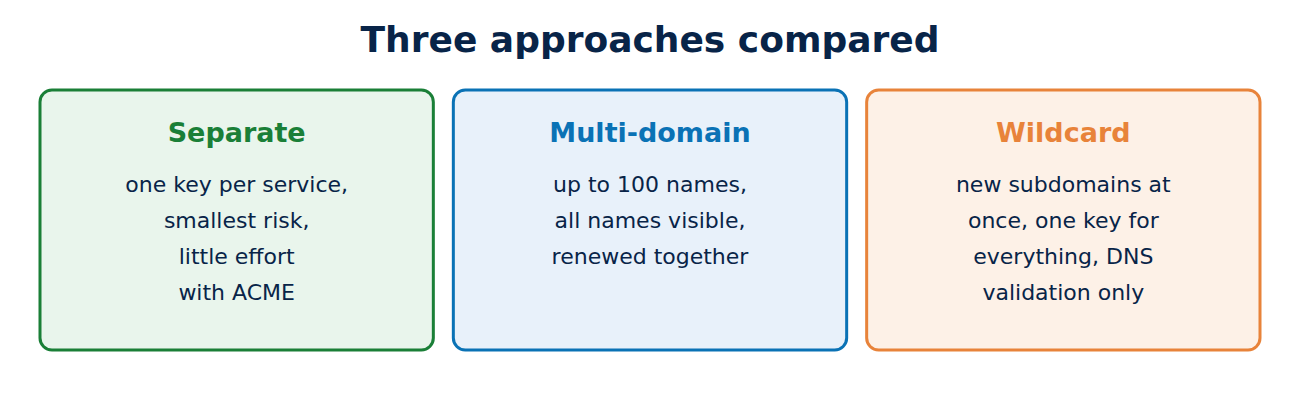
A multi-domain certificate (also called a SAN or UCC certificate) lists several different domains, such as example.co.uk, example.ie and example-shop.co.uk. Let’s Encrypt allows up to 100 names per certificate. That is handy when one server hosts many domains, but it has side effects:
- Every visitor can read all the other domains in the certificate.
- If a domain is added or removed, the whole certificate has to be reissued.
- If validation fails for a single domain, the whole request fails.
How to put the names into a request is shown in how to create a private key and CSR.
Wildcard certificates: the rules
A wildcard certificate contains a name with an asterisk, written as *.example.co.uk. The asterisk stands for exactly one label of your choice. The rules in the Baseline Requirements and RFC 9525 (the successor to RFC 6125) are:
- The asterisk may appear only in the left-most position and must replace the whole label, so partial patterns such as “w” followed by an asterisk are not allowed.
- It covers exactly one level.
- No CA will issue a wildcard for a public suffix such as .com or .co.uk on its own.
- EV certificates cannot contain wildcards.
What a wildcard covers and what it does not
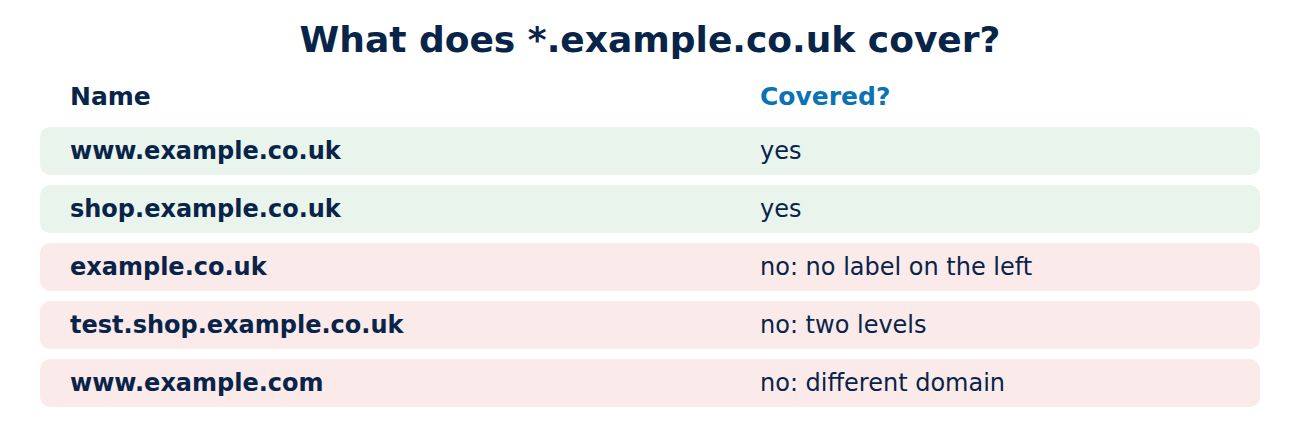
For a certificate issued for *.example.co.uk:
- www.example.co.uk: yes
- shop.example.co.uk: yes
- example.co.uk: no, because the bare domain has no label on the left for the asterisk to replace.
- test.shop.example.co.uk: no, because that is two levels.
- www.example.com: no, because it is a different domain.
That is why wildcard certificates almost always list the bare domain as well. An example from the public logs: techcrates.com has a certificate from Google Trust Services with two names, *.techcrates.com and techcrates.com itself. If you also need a second level, add another wildcard one level further down. For how domain names are structured, see how DNS works.
Pros and cons
A wildcard certificate is convenient: new subdomains work straight away without a new certificate, and individual subdomains do not show up in the public Certificate Transparency logs. Against that stand some risks:
- One key for everything: the same private key usually sits on many servers. If it is stolen from a poorly secured test server, an attacker can impersonate any other server on the domain, including the mail server or the shop.
- Larger attack surface: the more copies of a key exist, the more likely one gets lost.
- Harder validation: wildcards can only be validated through a DNS record, not through a file on the web server.
A rule of thumb: for a handful of fixed names, separate certificates or one multi-domain certificate are the better choice. A wildcard pays off when new subdomains appear all the time, for example on platforms that give every customer a subdomain, or when a service in front of your servers manages certificates centrally. With automatic issuance over ACME, separate certificates are hardly any extra work today.
Wildcard certificates with Let’s Encrypt
Let’s Encrypt has issued free wildcards since 2018, but requires DNS validation (DNS-01): the ACME client must create a TXT record at _acme-challenge.example.co.uk. To do that automatically, the client needs access to the DNS zone, usually through the DNS provider’s API. With certbot and its Cloudflare plugin the command looks like this:
certbot certonly --dns-cloudflare --dns-cloudflare-credentials ~/.secrets/cloudflare.ini -d example.co.uk -d "*.example.co.uk"The API token should only be allowed to edit TXT records, because whoever holds it can obtain certificates for the entire domain. Understanding the ACME protocol explains the process in more detail.
Frequently asked questions
Does *.example.co.uk also cover example.co.uk itself?
No. The bare domain must appear as a separate name in the SAN list.
How many names can a certificate have?
The rules set no fixed limit; Let’s Encrypt allows 100 and commercial CAs often 100 to 250. Very long lists make the certificate bigger.
Does a wildcard certificate work for mail servers?
Yes, if the name matches, such as mail.example.co.uk. For security reasons a separate certificate for the mail server is still better.
Can I get a certificate for an IP address?
From some CAs, yes. Let’s Encrypt allows IP addresses only in short-lived certificates valid for about six days.
Conclusion
The SAN extension defines which names a certificate is valid for, and it is the only name field browsers check today. Multi-domain certificates bundle several domains, while wildcard certificates cover exactly one level of subdomains but not the domain itself. Because a wildcard key often sits on many servers, separate, automatically renewed certificates are usually the safer choice.
Sources and further reading
- RFC 9525: Service Identity in TLS (IETF)
- Challenge types (Let’s Encrypt)
- Rate limits (Let’s Encrypt)
- Wildcard certificate (Wikipedia)

















Recent Comments