
Every certificate chain ends at a root certificate that your device trusts from the outset. But who decides which root certificates those are? The answer lies in the root stores of operating systems and browsers, and the root programmes that run them. Between them, they decide which certificate authorities may vouch for websites anywhere in the world, and they can take that right away again. This guide explains the major root programmes, how a CA gets in, the best-known cases of CAs being thrown out and how to look at your own device’s root store.
What a root store is
A root store is a list of root certificates that a piece of software treats as trustworthy. Every certificate chain the browser checks must end at one of them; how the certificate chain of trust works explains the chain itself. Besides the certificate, the root store records what each root is trusted for, such as websites or email, and sometimes restrictions such as a date after which new certificates are no longer accepted.
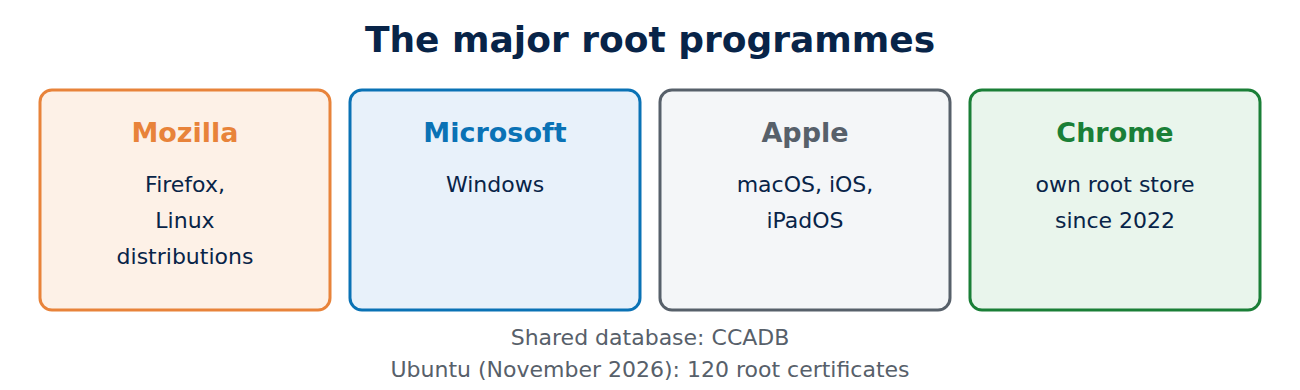
To give an idea of size: Ubuntu’s ca-certificates package, which is based on Mozilla’s list, contained 120 root certificates in November 2026, including Let’s Encrypt’s ISRG Root X1 and X2.
The major root programmes
A handful of root programmes decide for almost every device:
- Mozilla: its list is discussed in public on a mailing list and is used by Firefox and most Linux distributions.
- Microsoft: the Trusted Root Program for Windows; Windows downloads missing roots automatically when it needs them.
- Apple: for macOS, iOS and iPadOS; every browser on an iPhone or iPad uses this list too.
- Google Chrome: since 2022 Chrome has shipped its own Chrome Root Store and no longer relies on the operating system’s list on most platforms.
Android and Java have their own lists as well. The programmes coordinate with each other and share a database, the CCADB, where CAs file their certificates, audits and policies. The minimum rules for everyone come from the CA/Browser Forum; see how certificate authorities work.
How a CA gets into a root store
A new CA has a long road ahead:
- It publishes its policies (the Certificate Policy and Certification Practice Statement).
- It passes a WebTrust or ETSI audit, repeated every year.
- It applies to each root programme separately. At Mozilla a public discussion follows in which anyone can ask questions.
- Once accepted, the root still has to reach devices through updates, which often takes years. That is why new CAs start out with cross-signatures from established roots.
Trust does not last for ever either: Mozilla and Chrome trust a root for websites for at most about 15 years after its key was created. Chrome also requires hierarchies for website certificates to serve only that purpose: new intermediates have been limited to server use since 15 June 2026, and from 15 March 2027 the same applies to every new website certificate.
When trust is withdrawn: notable cases
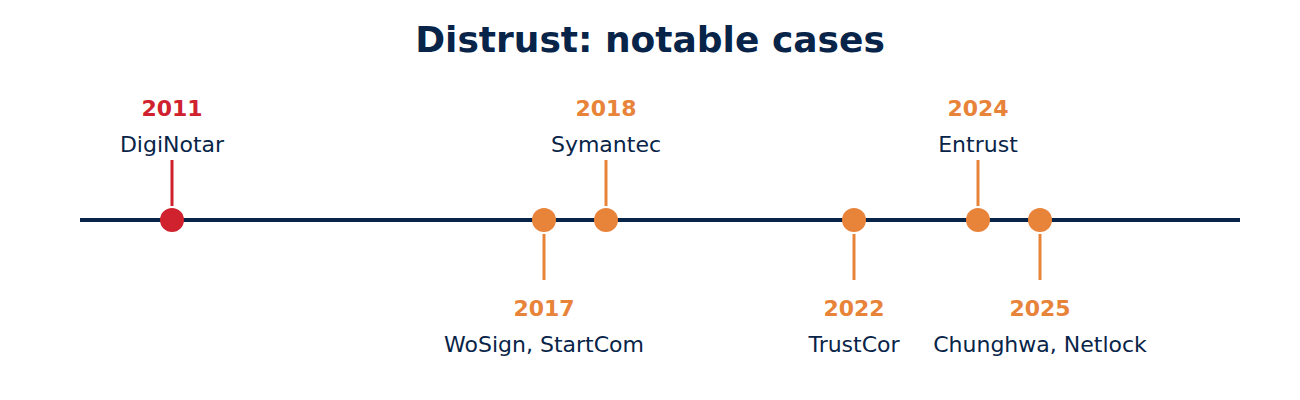
Root programmes can remove a CA that breaks the rules or no longer seems trustworthy:
- 2011, DigiNotar: after a break-in, fake certificates were issued for Google services among others and used to spy on users in Iran. Every browser removed the CA at once.
- 2016/2017, WoSign and StartCom: backdated certificates and an undisclosed takeover led to their exclusion.
- 2018, Symantec: after years of failures, browsers withdrew trust from Symantec certificates in stages, and every affected website had to move to certificates from another CA by October 2018.
- 2022, TrustCor: Mozilla and Microsoft removed the CA after reports linking it to a company behind spyware.
- 2024, Entrust: after repeated rule breaches, Chrome, Firefox and Apple stopped trusting its new certificates in November 2024.
- 2025, Chunghwa Telecom and Netlock: Chrome stopped trusting new certificates from both CAs from 1 August 2025.
How a distrust is put into practice
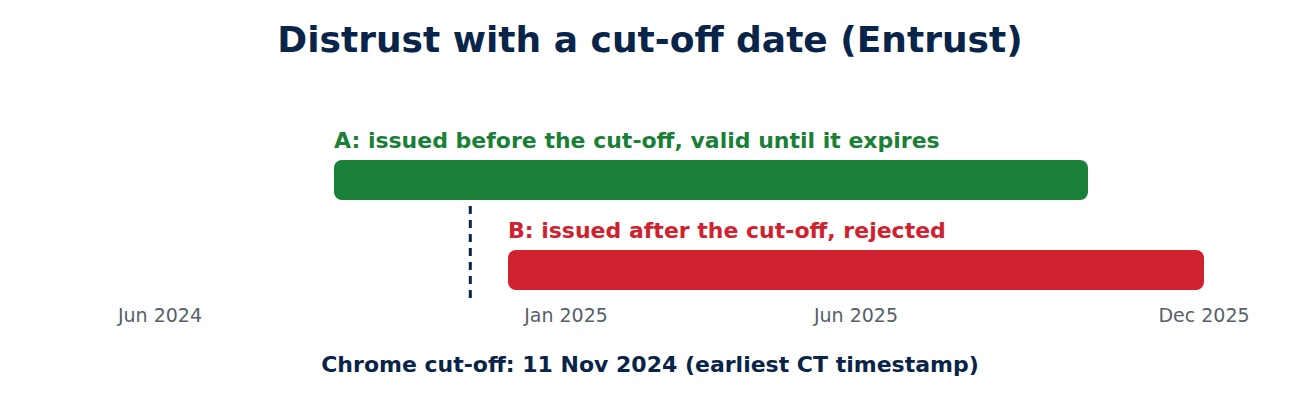
If a browser removed a big CA overnight, millions of websites would break in an instant. Root programmes therefore usually set a cut-off date: certificates issued before it keep working until they expire, and newer ones are rejected. Chrome works out the issue date from the earliest Certificate Transparency timestamp, which the CA cannot fake. For Entrust the cut-off was 11 November 2024 in Chrome and 30 November 2024 in Firefox. This gives website owners time to move to another CA. Only in an emergency, as with DigiNotar, is a CA removed completely and immediately.
How to look at your own root store
- Windows: run certmgr.msc and open “Trusted Root Certification Authorities”.
- macOS: open Keychain Access and select “System Roots”.
- Firefox: Settings, “Privacy & Security”, then “View Certificates” at the bottom and the “Authorities” tab.
- Chrome: Settings, “Privacy and security”, “Security”, “Manage certificates”.
- Linux: the list usually lives under /etc/ssl/certs; grep -c “BEGIN CERTIFICATE” /etc/ssl/certs/ca-certificates.crt counts them.
Only add your own roots, such as a company CA, if you trust the source. Some antivirus and monitoring tools install their own roots to inspect encrypted traffic, which weakens security if they are badly made; see do you need antivirus.
Frequently asked questions
Can I remove trust from a root myself?
Yes. The tools above let you disable roots or mark them as untrusted. Ordinary users rarely need to.
Why does my old phone not trust some websites any more?
Its root store no longer gets updates. New roots are missing, and expired old roots are no use.
Who pays for the root programmes?
The browser and operating system makers run them. CAs pay for their audits, not for being included.
Aren’t 120 roots a big risk?
Every root can issue for any domain, so each one is a potential weak point. Certificate Transparency and CAA records in DNS limit that risk.
Conclusion
Root stores decide which certificate authorities a device trusts. Mozilla, Microsoft, Apple and Google run the main lists, vet new CAs over years and withdraw trust when a CA fails, usually with a cut-off date so that existing websites keep working. Keep your devices updated and their root stores stay up to date too.
Sources and further reading
- Mozilla CA Program (Mozilla)
- Chrome Root Program Policy (Google)
- Common CA Database (CCADB)
- DigiNotar (Wikipedia)



















Recent Comments