
Every certificate authority your browser trusts can, technically, issue a certificate for any domain, including yours. How would you know if one did so wrongly? The answer is Certificate Transparency (CT): every publicly trusted website certificate must be recorded in several public, append-only logs that anyone can search. This guide explains why CT was invented, how a certificate gets into a log, what SCTs are, how Merkle trees stop anyone tampering with the logs and how to keep an eye on your own domain.
The problem: certificates issued to the wrong people
In 2011 attackers broke into the Dutch CA DigiNotar and issued, among others, a certificate covering all Google domains. It was used to read encrypted connections in Iran without the browser showing any warning. It was only spotted because Chrome had the genuine keys for Google’s domains built in. For any other domain nobody would have noticed: a CA could issue certificates without the domain owner ever finding out. Which CAs are trusted in the first place is explained in what is a root store.
The idea: a public logbook of every certificate
Google engineers responded by developing Certificate Transparency, published in 2013 as RFC 6962. The idea is that a certificate only counts if it has been publicly logged. CT logs are servers run by independent operators such as Google, Cloudflare, DigiCert, Sectigo and Let’s Encrypt. A log accepts certificates but cannot delete or change them without it being noticed. Anyone can read the logs, and monitors search them continuously for anything suspicious.
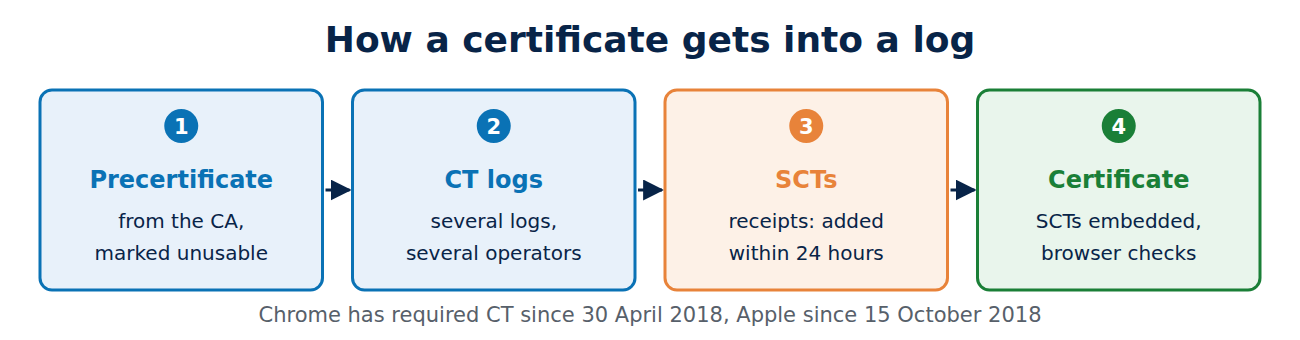
CT does not stop mis-issuance, but it makes it visible. Chrome has required CT for every certificate issued after 30 April 2018, and Apple since 15 October 2018. These browsers reject a certificate without valid proof that it has been logged.
How a certificate gets into a log
The CA first creates a precertificate: it contains all the data of the final certificate but is marked as unusable by a special extension. The CA submits the precertificate to several logs. Each log replies straight away with a Signed Certificate Timestamp (SCT), a signed promise to add the certificate within 24 hours. The CA embeds the SCTs in the final certificate, signs it and delivers it. The rest of a CA’s work is covered in how certificate authorities work.
SCTs: the receipts inside a certificate
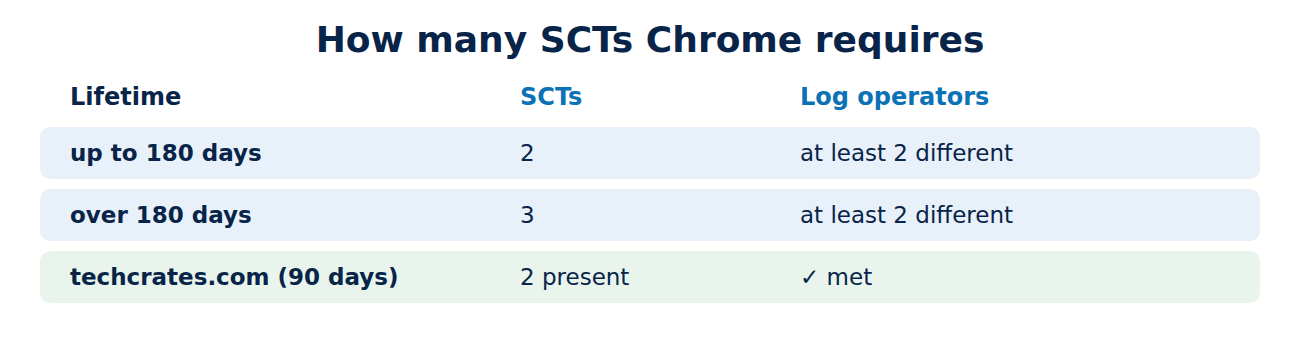
When a connection is made, the browser checks that the certificate carries enough valid SCTs. For embedded SCTs, Chrome requires:
- 2 SCTs from different logs for a certificate valid for up to 180 days,
- 3 SCTs for a certificate valid for more than 180 days,
- at least two different log operators among them, so that no single company can vouch alone.
The 90-day certificate of techcrates.com contains exactly two SCTs. You can see them in the browser’s certificate viewer or with OpenSSL; see what is an X.509 certificate. SCTs can also be delivered during the TLS handshake, but embedding them is the usual route.
Merkle trees: why nothing can be deleted quietly
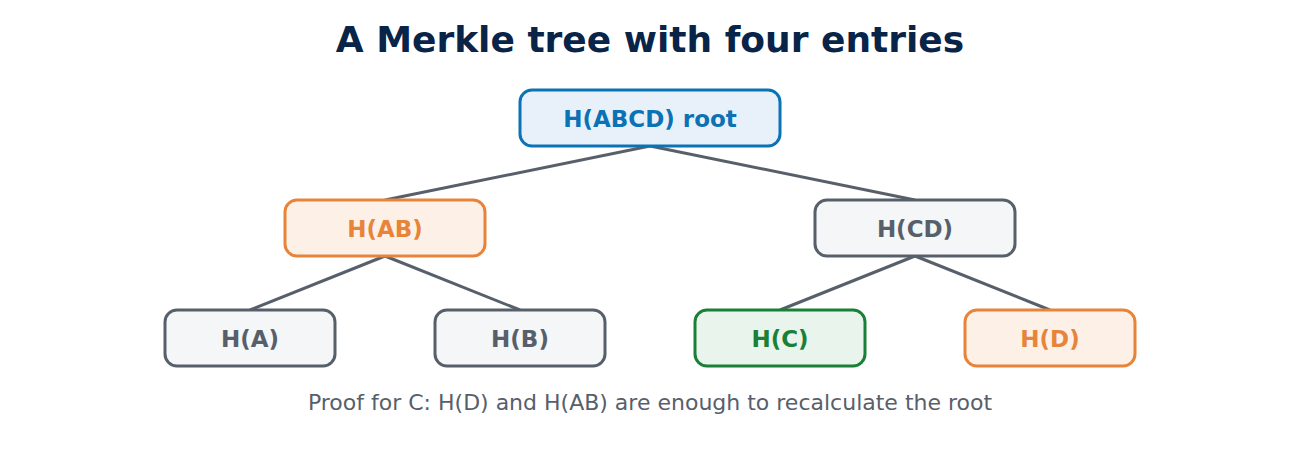
So that a log cannot remove anything later, it is built as a Merkle tree: each certificate produces a hash, pairs of hashes are combined into a new hash, and so on up to the root. The root hash therefore stands for the entire contents. The log regularly publishes a signed root, the Signed Tree Head.
An example with four certificates, A to D: H(A) and H(B) combine into H(AB), H(C) and H(D) into H(CD), and those two into the root H(ABCD). To prove that C is included, H(D) and H(AB) are enough: anyone who recalculates the root from them knows C belongs to the tree. With a million entries only about 20 hashes are needed, because 2²⁰ is roughly a million. A second kind of proof shows that a new root still contains all the old entries. If a log deleted an entry, the sums would no longer add up.
Monitoring: keeping an eye on your domain
For website owners, the biggest benefit of CT is that you can see every certificate that exists for your domains.
- crt.sh is a free search engine for CT logs. For techcrates.com it listed five unexpired entries in November 2026: the current Let’s Encrypt certificate twice (once as precertificate, once as final certificate), two wildcard certificates from other CAs obtained through Cloudflare, which runs the site’s DNS, and a certificate for some other subdomains.
- Alert services such as Cert Spotter or Cloudflare’s CT monitoring send an email as soon as a new certificate for your domain appears.
If a certificate turns up that you did not order, contact the issuing CA. CT has already proved its worth: in 2015 it revealed that Symantec had issued test certificates for google.com without permission, which later contributed to browsers withdrawing trust. CT monitors also help to find phishing domains that imitate well-known names; see how to spot a phishing email.
A side effect: subdomain names become public
Because every certificate is published, every name in it is public too, such as internal.example.co.uk or test.example.co.uk. Attackers watch the logs and often visit new domains within minutes of a certificate being issued, for example to take over half-finished installations. So:
- Do not put confidential project names in certificate names.
- Secure a new server first, then request its certificate.
- Use a private CA for internal names; its certificates are not logged.
- A wildcard certificate does not reveal individual subdomains, but it has other drawbacks.
Frequently asked questions
Do I need to log my certificate myself?
No. The CA does it automatically every time it issues one.
Does CT apply to private certificates?
No. Certificates from your own company CA are not logged, and browsers do not check them for SCTs as long as the root was installed manually.
Can entries be removed from a CT log?
No. Logs are append-only; that is the whole point.
Who runs the logs?
A few large companies and CAs. Browsers keep a list of approved logs and drop logs that break their rules.
Conclusion
Certificate Transparency makes the issuance of every public website certificate verifiable. CAs submit precertificates to several logs, embed the receipts in the certificate, and Merkle trees make sure nothing quietly disappears. For site owners it is worth checking crt.sh now and then, or setting up an alert for new certificates.
Sources and further reading
- Certificate Transparency (project site)
- Chrome Certificate Transparency Policy (Google)
- RFC 6962: Certificate Transparency (IETF)
- crt.sh: Certificate Search (Sectigo)



















Recent Comments