
A certificate is valid until its expiry date. But what if something goes wrong before then, for example because the private key has been stolen? Then the certificate authority must revoke the certificate, and browsers need to find out. That is harder than it sounds. This guide explains certificate revocation lists (CRLs), the online protocol OCSP and OCSP stapling, why OCSP is being phased out, how browsers check revocation today and why ever shorter lifetimes are making the problem smaller.
Why certificates are revoked
Typical reasons for revoking a certificate are:
- Key compromise: the private key was stolen, published by mistake or found on a hacked server.
- CA error: the certificate was wrongly validated or contains fields that are not allowed.
- Domain given up: the owner no longer controls the domain.
- Superseded: a new certificate has replaced it and it is no longer needed.
Under the CA/Browser Forum’s rules, a CA must revoke within 24 hours when a key has been compromised, and within five days for most other reasons. The rules themselves are covered in how certificate authorities work.
Certificate revocation lists (CRLs)
The oldest method is the certificate revocation list (CRL): a list, signed by the CA, of the serial numbers of every revoked certificate that has not yet expired, each with a date and often a reason. The address of the list is in the certificate’s CRL Distribution Points field; what is an X.509 certificate explains the fields.
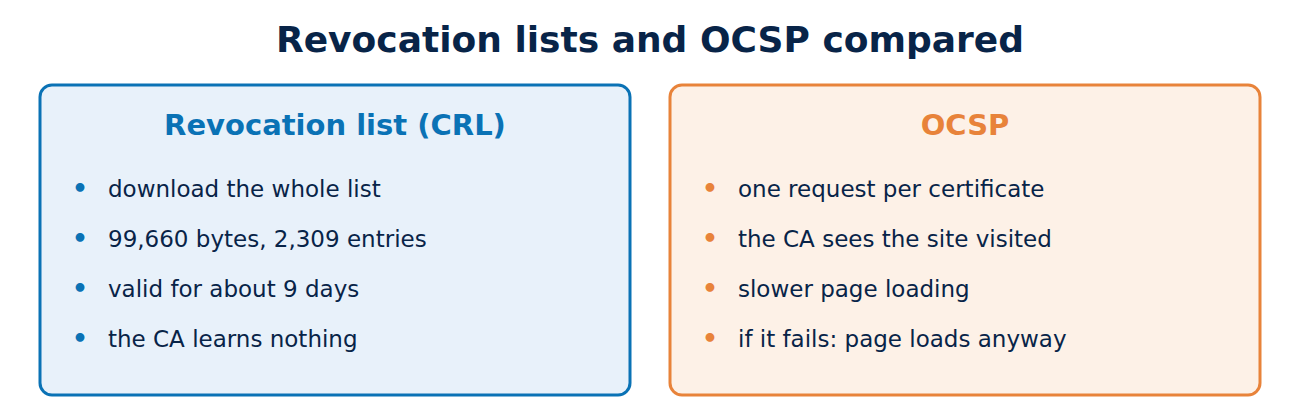
A real example: the techcrates.com certificate points to the list ye1.c.lencr.org/47.crl. On 7 November 2026 that file was 99,660 bytes, held 2,309 revoked serial numbers, had been created at 09:54 UTC and was valid until 16 November. Let’s Encrypt spreads its revoked certificates across many such partial lists so that no single file grows too large. That was always the weakness of CRLs: big CAs used to publish lists many megabytes in size, far too large for a browser to download on every page visit.
OCSP: asking about one certificate
The Online Certificate Status Protocol (OCSP) was meant to solve this. Instead of the whole list, the browser asks the CA’s OCSP server about one certificate and receives a signed answer: good, revoked or unknown. The answer is valid for a few days and can be cached.
OCSP has three weaknesses, though:
- Privacy: every request tells the CA which website you are visiting, along with your IP address.
- Speed: the extra request slows down page loading.
- Reliability: if the OCSP server cannot be reached, the browser ought to block the site. Because that would have caused too many outages, browsers let the site load anyway (a “soft fail”). An attacker who controls the connection therefore only needs to block the OCSP request.
For these reasons, Chrome switched off online revocation checks for ordinary certificates as early as 2012.
OCSP stapling: the server brings the answer
With OCSP stapling, the web server itself fetches the OCSP answer for its certificate at regular intervals and attaches (“staples”) it to the TLS handshake. The browser gets the signed answer without making its own request, the CA learns nothing about visitors, and pages load no slower.
With the Must-Staple extension, a certificate could even demand that the server always include an answer. It never caught on: many servers stapled unreliably, and only Firefox enforced Must-Staple.
Why OCSP is being phased out
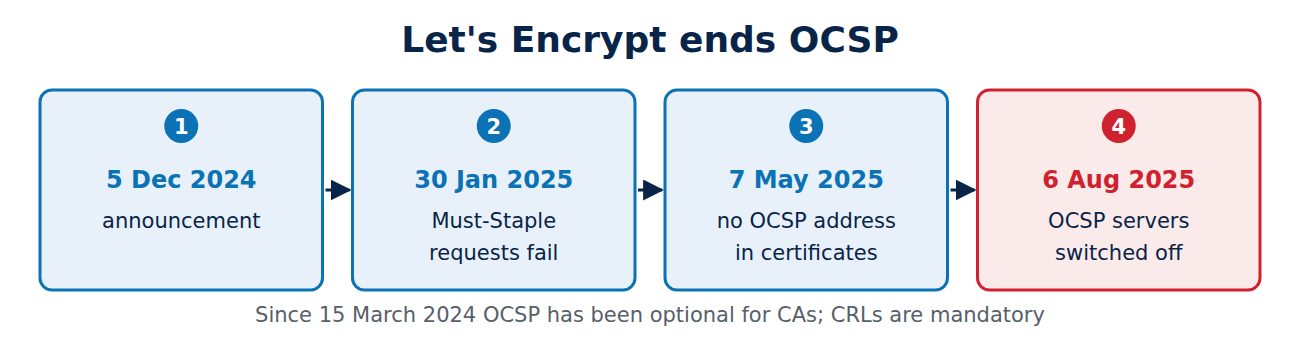
Since 15 March 2024 the CA/Browser Forum’s rules have allowed CAs to drop OCSP, while CRLs became mandatory. Let’s Encrypt, the largest CA, followed through:
- 5 December 2024: it announced the end of OCSP, mainly for privacy reasons.
- 30 January 2025: requests for Must-Staple certificates started to fail.
- 7 May 2025: new certificates stopped including an OCSP address and carried only a CRL address.
- 6 August 2025: the OCSP servers were switched off.
For most websites nothing changed. Only software that insisted on OCSP, such as some VPN gateways and mail servers, had to be reconfigured. For more on VPNs, see what is a VPN.
How browsers check revocation today
Instead of asking on every page visit, browsers receive revocation data in bulk through their update channels:
- Chrome uses CRLSets, a selection of important revocations chosen by Google, such as revoked intermediates or certificates involved in known incidents.
- Firefox uses CRLite: Mozilla collects the revocation lists of all CAs and compresses them with a filter technique so tightly that the status of every public certificate fits into a few megabytes.
- Apple also distributes its own revocation data to its devices.
The check happens locally in the browser, so it stays private and fast.
Short-lived certificates instead of revocation
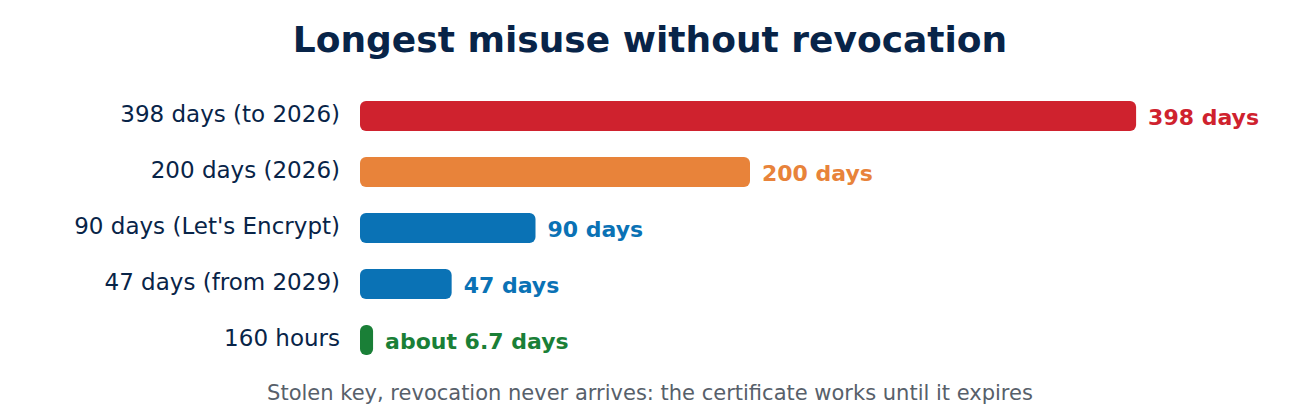
The neatest solution is to make revocation unnecessary: a certificate that expires after a few days hardly needs revoking. Since 2024 the rules have allowed very short-lived certificates to carry no revocation information, and since March 2026 the limit for that has been 7 days. Let’s Encrypt already offers certificates valid for 160 hours (about 6.7 days). A worked example: if a key is stolen and the certificate is not revoked, an attacker could use a 90-day certificate for up to 90 days, but a 160-hour certificate for less than 7 days. As maximum lifetimes fall to 47 days by 2029, that window shrinks for ordinary certificates too.
Frequently asked questions
Will I notice if a certificate has been revoked?
Yes, if your browser knows about the revocation it shows a warning page, in Chrome with the code NET::ERR_CERT_REVOKED.
Can I check whether a certificate is revoked?
Yes. The CRL address is in the certificate and the list can be downloaded; openssl crl -in list.crl -inform DER -noout -text shows the serial numbers.
What should I do if my key has been stolen?
Ask the CA to revoke the certificate straight away, generate a new key and request a new certificate. With Let’s Encrypt, certbot revoke does the first step.
Does OCSP still work anywhere?
Some CAs still run OCSP, mainly for corporate and government systems. For websites it hardly matters any more.
Conclusion
Detecting revoked certificates reliably was an unsolved problem for years: CRLs were too big, and OCSP leaked browsing habits and failed silently. Today browsers distribute revocation data in bulk, Let’s Encrypt has switched OCSP off, and ever shorter lifetimes are making revocation less and less necessary.
Sources and further reading
- Ending OCSP Support in 2025 (Let’s Encrypt)
- Ballot SC-063: make OCSP optional, require CRLs (CA/Browser Forum)
- RFC 6960: Online Certificate Status Protocol (IETF)
- Certificate revocation (Wikipedia)














Recent Comments