
When you download and run a program, your operating system quietly checks who made it and whether it has been changed since. That is possible thanks to code signing: software makers sign their programs digitally with a key that belongs to a certificate. This guide explains how the signature works, why timestamps matter, how Windows, macOS, iPhones and Android check signed software, which new rules have applied since 2023 and what happens when signing keys are stolen.
What code signing does
A code signature answers two questions:
- Origin: does the file really come from the named maker? The name in the certificate has been checked by a certificate authority.
- Integrity: has the file been changed since it was signed, for example by malware on a download server? Changing a single byte breaks the signature.
A signature says nothing about whether the software is good or harmless. Malware can be signed too, if its author obtained or stole a certificate; see how to remove malware from a Windows PC.
How the signature works
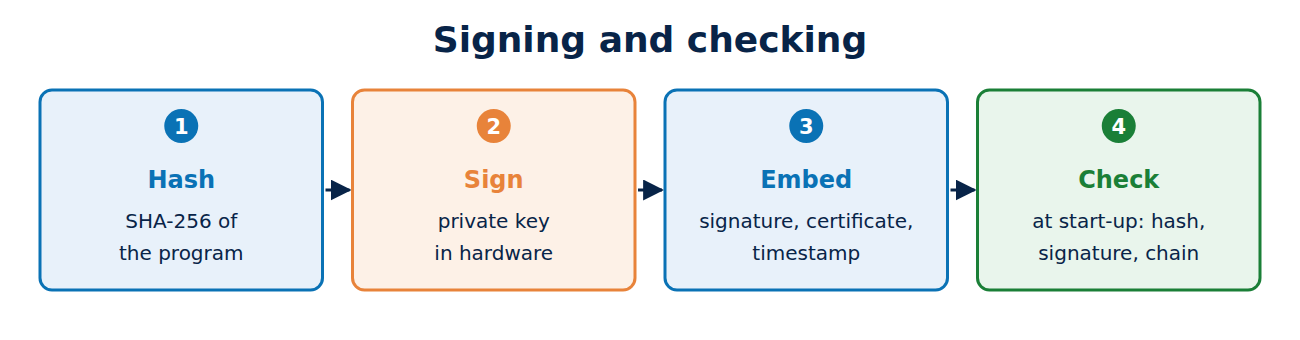
- The developer calculates a hash of the program, for example with SHA-256.
- They sign the hash with their private key, which must now be kept in hardware.
- The signature, the certificate with its chain and a timestamp are embedded in the file or stored alongside it.
- When the program starts, the operating system recalculates the hash, checks the signature with the public key from the certificate, and checks the chain up to a trusted root; see how the certificate chain of trust works.
The certificate is a code signing certificate: it lists “code signing” as its permitted use and names the organisation or individual whose identity the CA has checked. There is no simple domain validation as there is for website certificates.
Timestamps: signatures that outlast the certificate
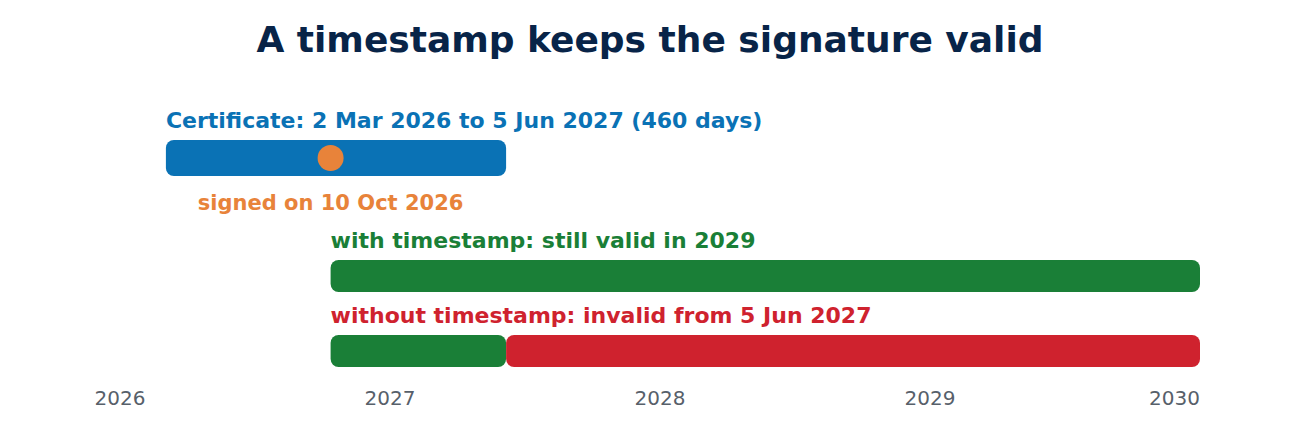
Code signing certificates expire after a little over a year, but software is often used for many years. So that a program does not suddenly count as unsigned on the expiry date, the developer has a timestamp added during signing, from a timestamping service following RFC 3161. The service confirms, with its own signature, that the signature was made while the certificate was valid. The signature then stays valid after the certificate expires.
An example: a certificate is valid from 2 March 2026 to 5 June 2027 (460 days). A program signed with a timestamp on 10 October 2026 still counts as correctly signed in 2029. Without a timestamp, Windows would treat it as invalidly signed after 5 June 2027.
Windows: Authenticode and SmartScreen
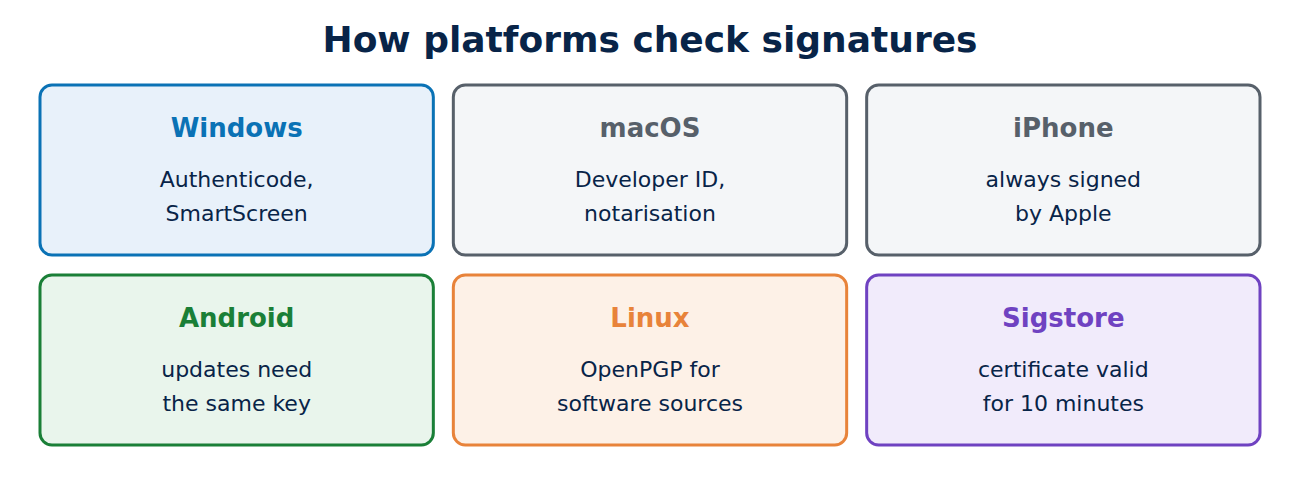
Windows uses Authenticode. The signature sits inside the EXE or MSI file, and the “Digital Signatures” tab in the file’s properties shows the publisher and the timestamp. User Account Control names the publisher of signed programs and shows “Unknown publisher” for unsigned ones.
On top of that, Microsoft Defender SmartScreen rates downloaded programs by their reputation: how often has this file, or software from this publisher, run without problems? New programs and new certificates therefore trigger a warning at first. Programs signed with a more expensive EV certificate used to get a good reputation straight away; Microsoft dropped that advantage in 2024. Drivers for the Windows kernel must now be signed by Microsoft itself through its hardware developer portal.
macOS, iPhone and Android
- macOS: programs from outside the App Store need a Developer ID certificate from Apple and, since macOS 10.15 (2019), must also be notarised: Apple scans the program automatically for malware. Otherwise Gatekeeper only lets them run after extra steps.
- iPhone and iPad: apps are always signed by Apple and come from the App Store or, in the EU, from approved alternative marketplaces.
- Android: every app is signed with the developer’s key. The certificate is usually self-signed, because Android does not check identity but checks that updates are signed with the same key as the installed version. On Google Play, Google manages the signing key of many apps (Play App Signing).
- Linux: package managers such as apt check the signatures of their software sources with OpenPGP keys.
- Open source: the Sigstore project allows signing without a long-term key: developers sign in, receive a certificate valid for just 10 minutes, and every signature is recorded in a public log, much like Certificate Transparency.
New rules: hardware keys and shorter lifetimes
Publicly trusted code signing certificates have their own CA/Browser Forum rules:
- Since 1 June 2023, private keys must be generated and stored in hardware: a USB token, an HSM or a cloud signing service. A .pfx file on a developer’s PC is no longer allowed; see what is an HSM.
- Since 1 March 2026, new code signing certificates have been valid for at most 460 days, down from 39 months.
Build pipelines therefore usually sign through a cloud service that keeps the key in an HSM rather than with a token plugged into a machine.
When signing keys are stolen
Signing keys are a popular target. The Stuxnet worm was signed in 2010 with certificates stolen from the hardware makers Realtek and JMicron. In 2022, code signing certificates taken in a break-in at Nvidia were soon used to sign malware. In the SolarWinds attack of 2020, intruders slipped malicious code into the build process, so it shipped signed with the genuine key. The defences are keys in hardware, signing only in a locked-down build environment, logging every signature and revoking at once on any suspicion.
Check a signature yourself
# Windows (PowerShell)
Get-AuthenticodeSignature .\setup.exe | Format-List

# macOS
codesign -dv --verbose=4 /Applications/Example.app
spctl -a -vv /Applications/Example.app
On Windows you can also right-click the file, choose “Properties” and open the “Digital Signatures” tab.
Frequently asked questions
Is signed software automatically safe?
No. The signature proves origin and integrity, not the maker’s intentions. Only download software from sources you trust.
Why does Windows warn me despite a valid signature?
SmartScreen does not know the program or publisher yet. The warning goes away once enough people have run the file without problems.
How much does a code signing certificate cost?
From commercial CAs usually a few hundred pounds a year, depending on the validation level and the hardware. For open-source projects, Sigstore is free.
What happens to signed software when the certificate is revoked?
Depending on the revocation date, signatures from that point on, or even earlier ones, are treated as invalid, for example when a stolen key had been misused for some time.
Conclusion
Code signing ties a program to its maker and makes any change visible. Timestamps keep signatures valid beyond the certificate’s expiry, and each platform has its own checks, from SmartScreen and Apple’s notarisation to Android’s same-key rule for updates. Since 2023 the keys must be in hardware, and since 2026 the certificates last at most 460 days.
Sources and further reading
- Baseline Requirements for code signing certificates (CA/Browser Forum)
- SmartScreen reputation for Windows app developers (Microsoft)
- Notarizing macOS software before distribution (Apple)
- Sigstore documentation (Sigstore)












Recent Comments