
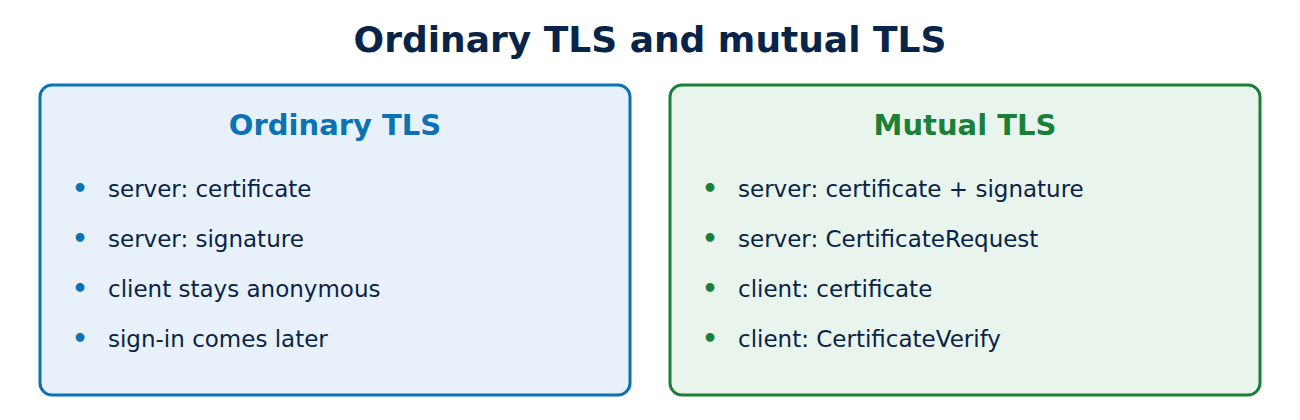
On an ordinary HTTPS connection only the server proves who it is: it presents its certificate and the browser checks it. Who the visitor is gets settled afterwards by the website, with a password or a passkey. With mutual TLS (mTLS), the client presents a certificate too, and the server checks it before any data flows at all. This guide explains how the handshake differs, where mTLS is used, from APIs to company Wi-Fi, why client certificates should now come from your own CA, and gives an example with nginx and curl.
Ordinary TLS: only the server shows its ID
During the TLS handshake the server sends its certificate and proves with a signature that it holds the matching private key. The browser checks the chain up to a trusted root and the domain name; see how the certificate chain of trust works. The client stays anonymous. Sign-in and permissions are handled by the application, for example with a password and a second factor; see how to set up two-factor authentication.
Mutual TLS: both sides prove who they are
With mTLS, the server also asks for a client certificate during the handshake (the CertificateRequest message). The client replies with:
- Certificate: its certificate and chain,
- CertificateVerify: a signature over the handshake so far, made with its private key. This proves it has not simply copied someone else’s certificate.
The server checks the client certificate against the CAs it trusts for clients, usually a single private CA, and checks its validity and, where set up, its revocation status. If the check fails, the connection is dropped before a single request reaches the application. In TLS 1.3 the client certificate is sent encrypted; in TLS 1.2 eavesdroppers could still read it.
Where mTLS is used
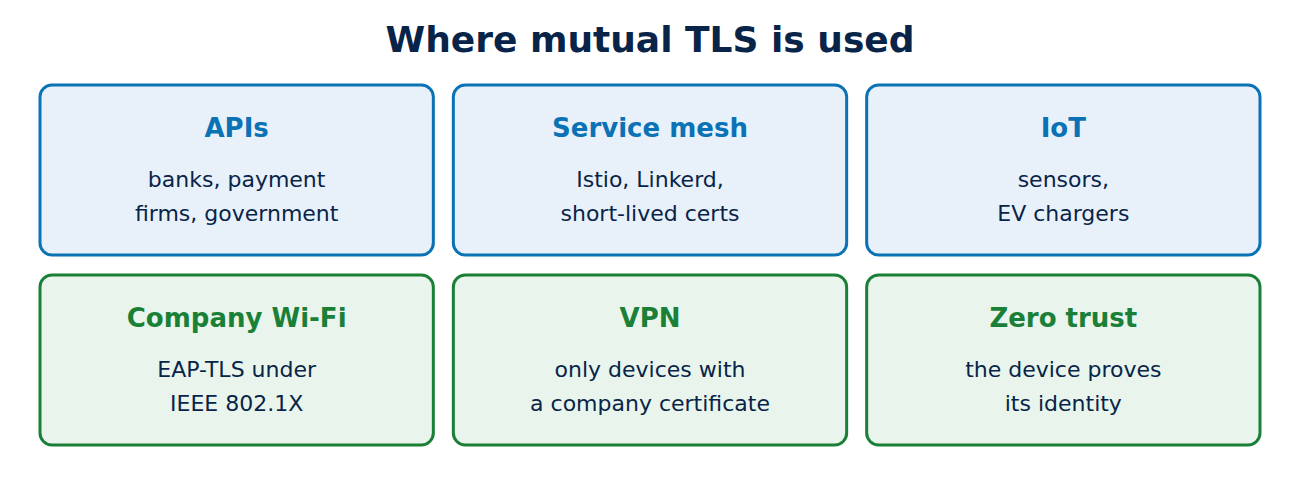
- APIs between businesses and services: payment providers, banks and government bodies protect their APIs with client certificates. Under the European PSD2 rules, and in UK open banking, payment firms identify themselves to banks with certificates.
- Microservices and service meshes: in Kubernetes, tools such as Istio and Linkerd automatically give every service a short-lived certificate and make services talk to each other only over mTLS.
- Internet of Things devices: sensors, EV chargers and smart meters sign in to their cloud service with a certificate, often installed at the factory.
- Company Wi-Fi: with EAP-TLS under IEEE 802.1X, a laptop joins the network with a certificate instead of a password.
- VPNs and zero trust: VPN gateways and zero-trust systems only let in devices with a valid company certificate; see what is a VPN.
Where client certificates come from
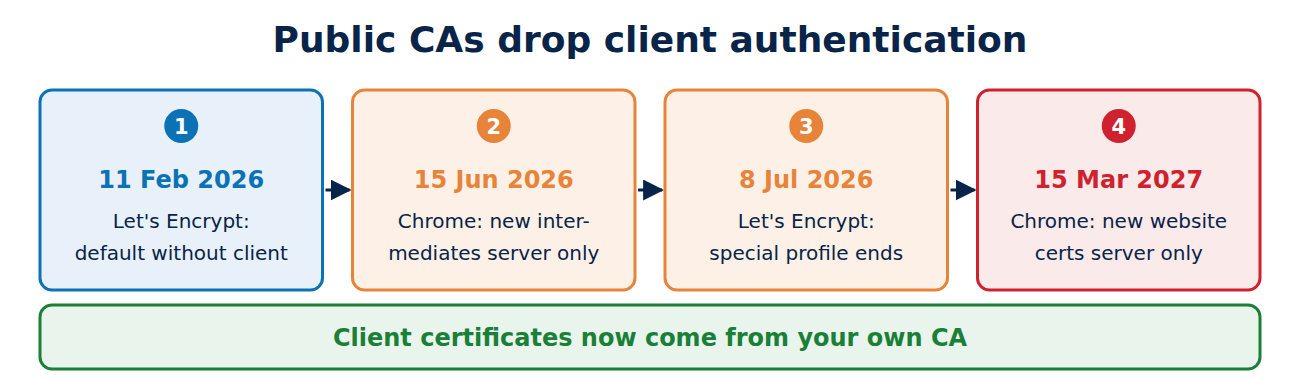
Many public website certificates used to include “TLS client authentication” as an allowed use. Not any more: the Chrome Root Program requires public hierarchies to issue server certificates only. New intermediates have been limited to server use since 15 June 2026, and new website certificates will be from 15 March 2027. Many CAs dropped client use earlier; Let’s Encrypt removed it from its default certificates on 11 February 2026 and retired the special profile for it on 8 July 2026.
For mTLS this is the better approach anyway: client certificates come from your own private CA. The server then trusts only that CA rather than every public CA in the world, and you decide lifetimes, names and revocation yourself. The basics of creating a key and a request are in how to create a private key and CSR.
Setting up mTLS: an example with nginx and curl
In nginx, two lines in the server block are enough to admit only clients with a certificate from your own CA:
ssl_client_certificate /etc/nginx/client-ca.pem;
ssl_verify_client on;
The variable $ssl_client_s_dn then holds the name from the client certificate, which you can pass to the application, for instance to decide which partner may do what. A client connects with curl like this:
curl --cert client.pem --key client.key https://api.example.co.uk/statusWithout a certificate, nginx answers with error 400 and the message “No required SSL certificate was sent”. One thing to watch: if a load balancer or CDN in front of your server terminates TLS, the client check has to happen there, because the server behind it never sees the client certificate.
Pros and cons
The advantages:
- No password that can be stolen, guessed or typed into a phishing page.
- Protection from the first byte: unknown clients never reach the application.
- A strong identity for machines that no human operates.
The drawbacks:
- Distribution and renewal: every client needs a certificate that must be renewed in time and revoked if lost. Without automation this quickly gets out of hand.
- Browser usability: picking a certificate in a browser is clumsy for people; for consumer sign-in, passkeys have won; see passkeys explained.
- Troubleshooting: when the handshake fails, the error messages are often unhelpful.
Frequently asked questions
Do I need mTLS for my website?
Not for a public website. mTLS is worth it for APIs, internal services and devices whose counterparts are known.
Is mTLS the same as a passkey?
No, but they are related: both prove possession of a private key. Passkeys work inside the application and are tied to the website, while mTLS works in the TLS connection.
Can I use a Let’s Encrypt certificate as a client certificate?
Not any more. Since July 2026 Let’s Encrypt has not issued certificates for client use.
How do I revoke a lost client certificate?
Through your private CA’s revocation list, which the server loads regularly (in nginx with ssl_crl). Short lifetimes limit the damage further.
Conclusion
With mutual TLS both sides prove their identity with certificates, and the server only lets known clients through at all. It suits APIs, microservices, devices and company Wi-Fi. Client certificates now come from your own CA, because public CAs no longer issue certificates for client use.
Sources and further reading
- RFC 8446: TLS 1.3, Certificate message (IETF)
- ngx_http_ssl_module: ssl_verify_client (nginx)
- Upcoming features (Let’s Encrypt)
- What is mutual TLS? (Cloudflare)


















Recent Comments