
A certificate is only as secure as the private key behind it. If that key sits in a file on a server, anyone who takes over the server can copy it, and nobody will notice the copy. That is why valuable keys belong in hardware they cannot leave: in a hardware security module (HSM) in the data centre, or in the TPM inside your own PC. This guide explains how both work, the security levels they are certified to, where hardware is mandatory and which other key vaults sit inside phones and security keys.
Why keys belong in hardware
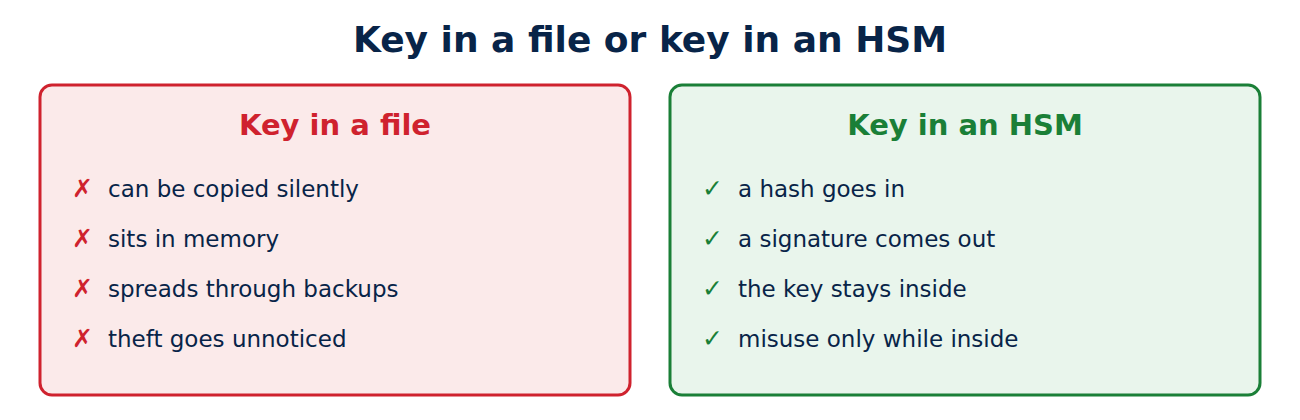
A private key stored in a file has three weaknesses:
- It can be copied: whoever can read the file has the key, and the theft leaves no trace.
- It shows up in memory: even an encrypted key is decrypted in memory while in use, where malware can read it.
- It spreads through backups: backups, virtual machine snapshots and old disks all contain copies.
Keys held in hardware, by contrast, can only be used, not read out. The server sends the device a hash, the device signs it internally and returns only the signature. An attacker can at most misuse the device while they have access, but cannot walk away with the key.
What an HSM is
A hardware security module is a dedicated, tamper-resistant computer for cryptographic keys. It generates keys itself, stores them and performs signing and decryption internally. Common forms are:
- network appliances in the data centre, shared by many servers, from makers such as Thales, Entrust and Utimaco,
- plug-in cards for individual servers,
- small USB modules such as the YubiHSM 2 or Nitrokey HSM for smaller jobs,
- cloud HSMs from the big cloud providers, where you rent a dedicated device.
Applications usually talk to an HSM through the standard PKCS#11 interface. The cases of large HSMs detect attempts to open them and wipe their keys. Critical operations, such as creating a new root, often require several people with their own smartcards, for example three out of five, so that no one can act alone.
Security levels: FIPS 140-3 and Common Criteria
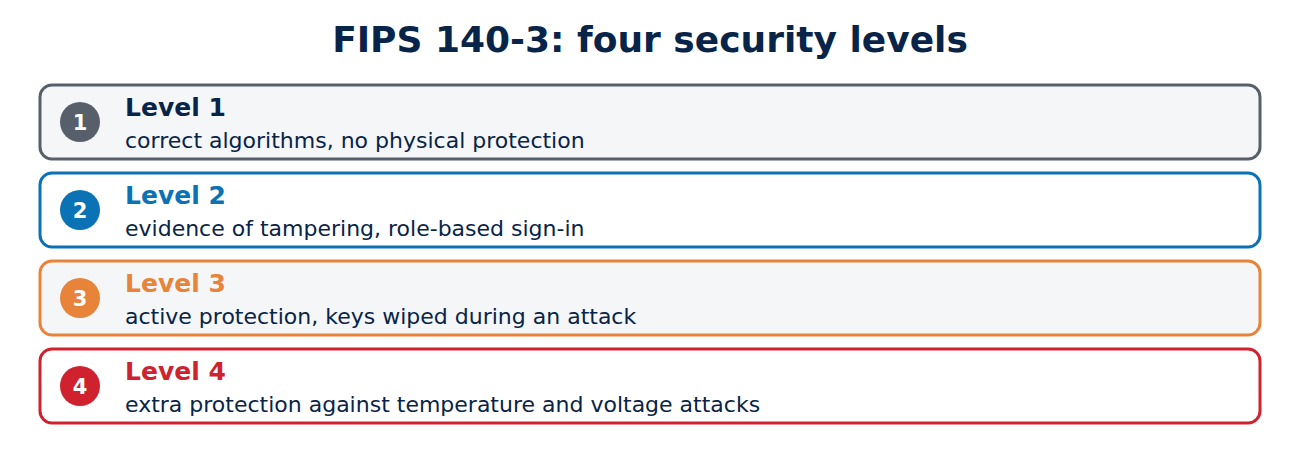
Certifications show how well an HSM protects its keys. The most widely used is the US standard FIPS 140-3, the successor to FIPS 140-2, with four levels:
- Level 1: correctly implemented algorithms, no special physical protection.
- Level 2: visible evidence of tampering, such as seals, and role-based sign-in.
- Level 3: active protection against intrusion, with keys wiped during an attack, and sign-in per person.
- Level 4: extra protection against attacks using temperature and voltage.
Common Criteria evaluations are also important, especially in Europe, for example for devices that create qualified electronic signatures.
Where HSMs are required
- Certificate authorities: under the CA/Browser Forum’s rules, public CAs must keep their keys in hardware certified to FIPS 140 level 3 or an equivalent Common Criteria evaluation; see how certificate authorities work.
- Code signing: since 1 June 2023, keys for publicly trusted code signing certificates must be generated and stored in hardware: an HSM, a token or a cloud service.
- Qualified electronic signatures under EU rules can only be created in a certified signature device.
- Payments: banks process PINs and card data in HSMs under the card industry’s rules.
For a private company CA, an HSM is not mandatory, but it is strongly recommended for the root key; see how to run a private certificate authority.
What a TPM is
The Trusted Platform Module (TPM) is a small security chip in almost every modern PC and laptop, often built into the processor as a firmware TPM. Windows 11 requires TPM 2.0. A TPM is far slower than an HSM, but it is cheap and in every device. Its main jobs are to:
- protect disk encryption: BitLocker stores its key in the TPM and releases it only if the start-up process is unchanged; see how to encrypt your laptop.
- guard sign-in keys, for example for Windows Hello and passkeys on a PC; see how to set up Windows Hello.
- hold device certificates for Wi-Fi and VPN, so a company laptop signs in with a key that never leaves the machine.
- record measurements during start-up, so it can be shown that firmware and boot loader have not been tampered with.
To check for a TPM, run tpm.msc on Windows or ls /dev/tpm* on Linux.
Other key vaults: Secure Enclave, smartcards, security keys
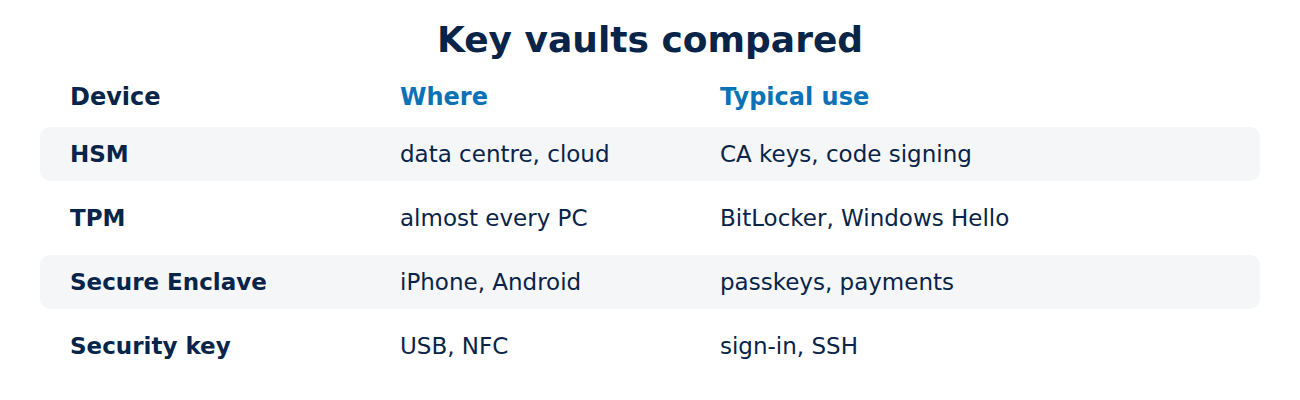
- Smartphones: iPhones have the Secure Enclave, and many Android phones a separate security chip (StrongBox) or an isolated area of the processor. They hold the keys for passkeys, payments and device encryption.
- Smartcards and ID cards: chip cards, such as the ones used for qualified signatures, never release their keys.
- Security keys such as YubiKey or Nitrokey: small USB or NFC devices for signing in, signing and SSH; see how to use a security key.
They all share one principle: the key is created and used inside the chip, but never handed out in readable form.
Frequently asked questions
Can an HSM be hacked?
Extracting the key is extremely hard. But an attacker who controls the server can still use the HSM to sign things, so access control and logging matter too.
Do I need an HSM for my website?
Usually not. With short-lived certificates a well-secured server is enough. HSMs are worth it for CA keys, code signing and payment data.
What happens to the keys if the TPM fails?
They are lost. That is why BitLocker gives you a recovery key, which you must keep somewhere else.
Is a firmware TPM as secure as a separate chip?
For most purposes, yes. A separate chip resists some physical attacks better, while a firmware TPM shares the processor with the rest of the system.
Conclusion
Private keys are safest in hardware, where they can be used but not copied. HSMs protect the most important keys of CAs, software makers and banks, and are certified to FIPS 140-3 or Common Criteria. TPMs, the Secure Enclave and security keys bring the same principle to every PC and phone.
Sources and further reading
- FIPS 140-3: Security Requirements for Cryptographic Modules (NIST)
- Hardware security module (Wikipedia)
- Trusted Platform Module overview (Microsoft)
- TPM 2.0 Library Specification (Trusted Computing Group)















Recent Comments