
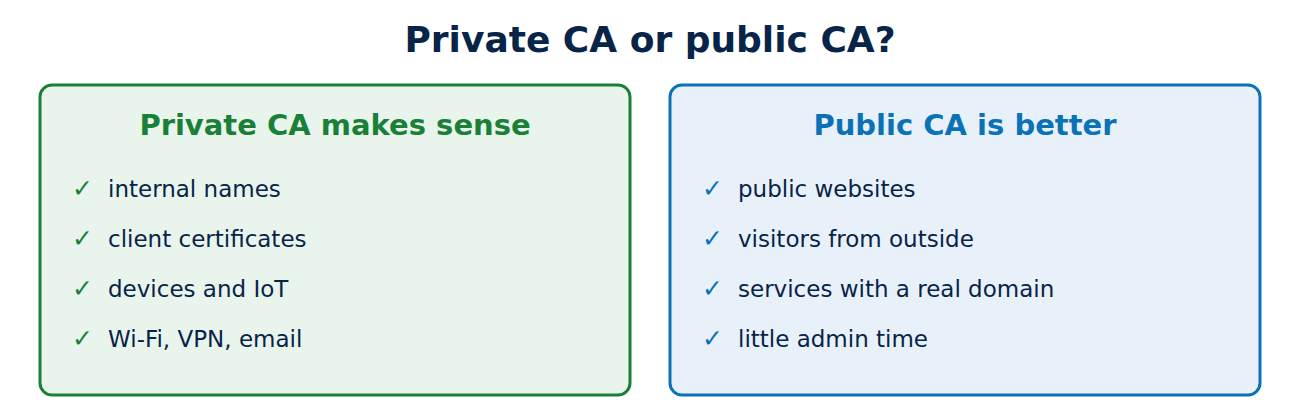
For public websites, a certificate authority such as Let’s Encrypt is the right choice. But many certificates are never checked by strangers’ browsers at all: servers on a company network, devices, VPN gateways, client certificates or services in Kubernetes. For these, organisations and home-lab enthusiasts often run their own CA, a private PKI. This guide explains when that makes sense and when it does not, what a sound hierarchy looks like, which tools are available, and walks through a small CA built with step-ca.
When a private CA makes sense
- Internal names: public CAs have not issued certificates for names such as server.local or private network addresses since 2015. A private CA can.
- Client certificates: public website certificates no longer suit this: Let’s Encrypt stopped including client use in 2026, and Chrome allows only server use in new website certificates from March 2027. For mutual TLS you need your own CA anyway; see what is mutual TLS.
- Devices and machines: routers, printers, sensors or containerised services that are only reachable internally.
- Company Wi-Fi, VPN and email: signing in with a certificate instead of a password, and internal signing.
- Your own rules: you set lifetimes, names and fields, and internal names do not end up in the public Certificate Transparency logs; see what is Certificate Transparency.
When it does not
A private CA is no good for anything outside visitors use: its root is not in the root stores of other people’s devices, so every visitor would see a warning. Internally too, if a service has a real public domain name and Let’s Encrypt can issue for it through DNS validation, that is often simpler than running a PKI. A private CA is also a responsibility: whoever steals its root key can impersonate any website to every device that trusts it.
The structure: an offline root and an issuing CA
A well-built private PKI has at least two levels, just like a public CA; see how the certificate chain of trust works:
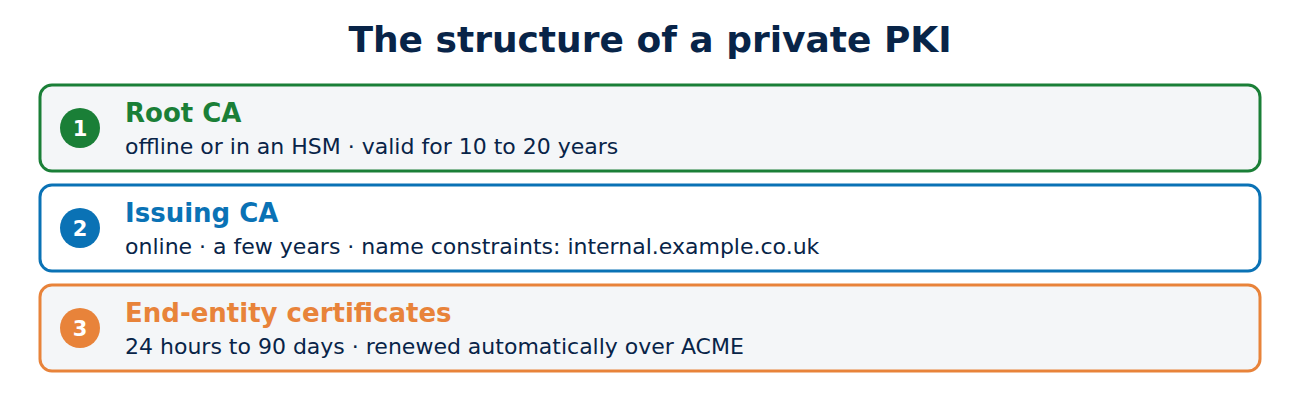
- Root CA: long-lived, typically 10 to 20 years. Its key is kept offline, on a machine with no network connection or in a hardware security module, and is used only to sign issuing CAs and to renew revocation lists.
- Issuing (intermediate) CA: online, valid for a few years, and issues the actual certificates. If it is compromised, you revoke it with the root and set up a new one.
- End-entity certificates: as short-lived as practical, from 24 hours to 90 days, and renewed automatically.
The Name Constraints extension is also worth using: it restricts a CA to certain namespaces, such as internal.example.co.uk. Even if that CA is misused, it cannot issue valid certificates for anyone else’s domains. A good namespace is a subdomain of a real domain you own, or the .internal suffix, which ICANN reserved for private networks in 2024. The .local suffix is meant for automatic name discovery on local networks and often causes conflicts.
Tools: from step-ca to AD CS
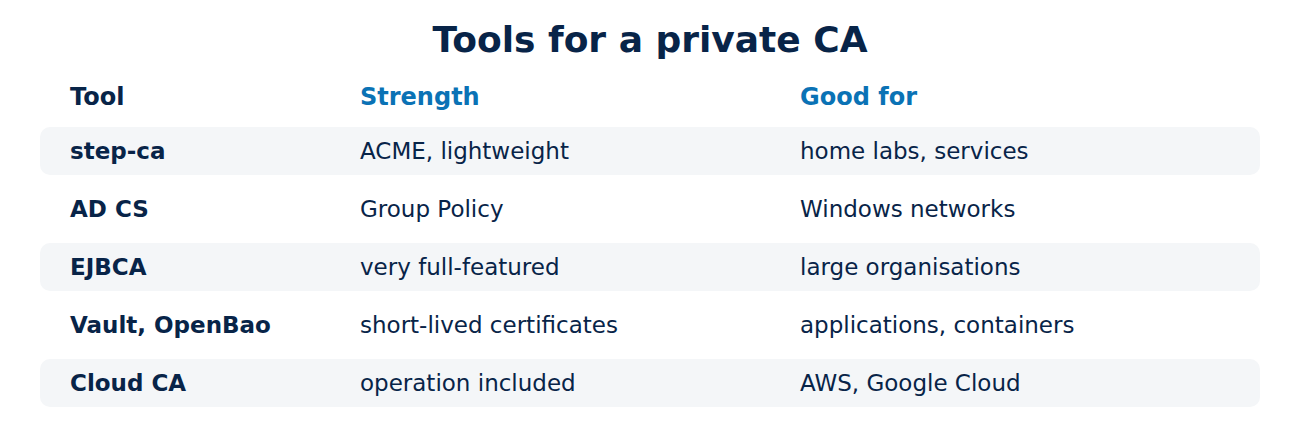
- step-ca (Smallstep): a lean open-source server that also speaks the ACME protocol, so services can fetch certificates automatically, just as they would from Let’s Encrypt.
- Active Directory Certificate Services (AD CS): the CA built into Windows Server and closely tied to Active Directory. Computers and users receive certificates automatically through Group Policy. Misconfigured certificate templates are a popular attack path, widely documented by security researchers since 2021.
- EJBCA: a full-featured open-source PKI for large environments.
- HashiCorp Vault and its fork OpenBao: issue short-lived certificates for applications and containers.
- Cloud services such as AWS Private CA or Google Certificate Authority Service, which take care of running the CA.
- OpenSSL on its own is fine for a test lab but too error-prone for long-term use.
Example: a small CA with step-ca
With the step command-line tool, a test CA is up and running in minutes:
step ca init --name "Example Internal" --dns ca.internal.example.co.uk --address :443 --provisioner admin
step-ca $(step path)/config/ca.json
step ca certificate wiki.internal.example.co.uk wiki.crt wiki.key
step ca provisioner add acme --type ACME
The first command creates the root and issuing CA with their keys, the second starts the server, and the third obtains a certificate for a wiki server. By default, step-ca certificates are valid for only 24 hours and renewed automatically. The fourth command switches on ACME, so certbot, Caddy or Kubernetes tools can work with your own CA directly. For long-term use, move the root key off the server afterwards and store it safely. What a certificate request contains is shown in how to create a private key and CSR.
Distributing and protecting the root
For devices to trust your CA, its root certificate has to go into their root stores:
- on Windows through Group Policy or device management (such as Intune),
- on Macs, iPhones and Android devices through device management profiles,
- on Linux, for example by copying it to /usr/local/share/ca-certificates/ and running update-ca-certificates,
- in Java and other programs with their own root stores, there as well.
After that you have the same duties as a public CA, on a smaller scale: publish revocation lists, watch expiry dates, protect the root key and tightly restrict access to the issuing CA. Root stores in general are covered in what is a root store.
Frequently asked questions
Isn’t a self-signed certificate per server enough?
For a single test server, perhaps. With several services you would have to mark every certificate as trusted on every device. With a CA, each device needs only one root.
How long should the root be valid?
Long enough that you are not constantly updating every device, typically 10 to 20 years. What matters most is that its key stays offline.
Is a home-lab CA safe on my home network?
Yes, if you protect the root key well. Install the root only on your own devices.
What happens if I lose the root key?
You can no longer sign new issuing CAs or revocation lists. An encrypted backup in a second place is essential.
Conclusion
A private CA is worth running for internal names, client certificates, devices and anything else that strangers’ browsers never check. Good practice means an offline root, an issuing CA with name constraints, short lifetimes and automation over ACME, for example with step-ca. For public websites, a public CA remains the right choice.
Sources and further reading
- step-ca documentation (Smallstep)
- Active Directory Certificate Services overview (Microsoft)
- EJBCA (Keyfactor)
- .internal (Wikipedia)


















Recent Comments