
A certificate authority inside Active Directory is a powerful tool, for attackers as well. In June 2021, Will Schroeder and Lee Christensen of SpecterOps showed in their paper “Certified Pre-Owned” how misconfigured Active Directory Certificate Services (AD CS) can turn an ordinary user into a domain administrator within minutes. They named the weaknesses ESC1 to ESC8; the security community now counts up to ESC16. This guide explains the main patterns, Microsoft’s strong certificate mapping (KB5014754) and a checklist for securing your own PKI.
Why certificates are so valuable in AD
A certificate with the client authentication purpose is an identity card in Active Directory: it can be used to sign in through Kerberos (PKINIT) or Schannel without a password. Whoever obtains a certificate in an administrator’s name effectively is that administrator, until the certificate expires or is revoked. Changing the password does not help. That is why an enterprise CA belongs in the highest protection tier, just like a domain controller. How templates and autoenrolment work is explained in Windows certificate autoenrolment and AD CS templates.
The classic attacks, ESC1 to ESC8
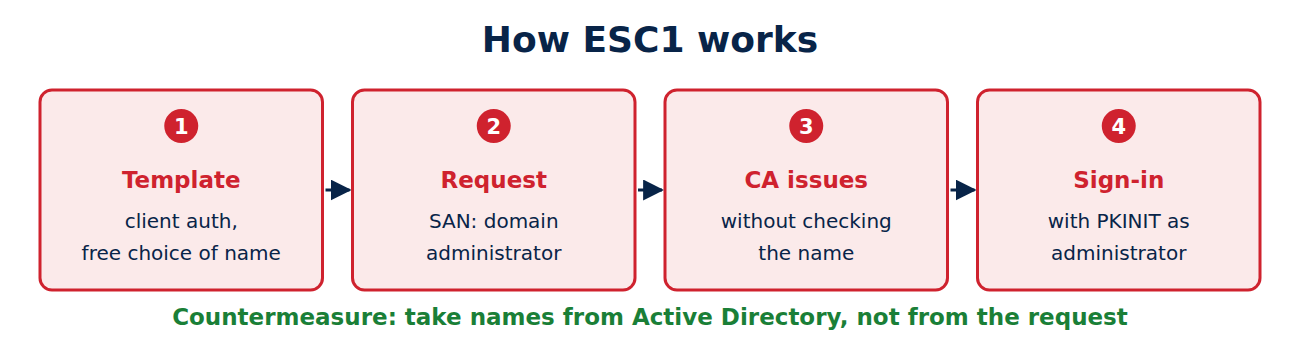
- ESC1: a template allows client authentication, ordinary users may enrol, and the requester may supply the name. The attacker requests a certificate with the domain administrator’s name in the Subject Alternative Name field.
- ESC2: a template allows any purpose (Any Purpose) or no fixed purpose at all.
- ESC3: an enrolment agent template is open to ordinary users, letting them request certificates on behalf of others.
- ESC4: wrong permissions on a template. Whoever can edit it can turn it into ESC1.
- ESC5: wrong permissions on other PKI objects, such as the CA server or containers in AD.
- ESC6: the CA has the EDITF_ATTRIBUTESUBJECTALTNAME2 flag set and accepts names from any request.
- ESC7: wrong permissions on the CA itself, such as “Manage CA” for ordinary users.
- ESC8: NTLM relay to the CA’s web enrolment. An attacker forces a domain controller to authenticate to them and relays that to the CA’s web interface, the well-known chain behind the PetitPotam attack.
Newer variants up to ESC16
Since 2022, further patterns have been added, mostly around how certificates are mapped to accounts:
- ESC9 and ESC10: templates without the security extension, or domain controllers with weak mapping. Anyone who can change an account’s sign-in name (UPN) can obtain a certificate that matches a different account.
- ESC11: NTLM relay to the CA’s RPC interface when it does not require encrypted requests.
- ESC13 and ESC14: issuance policies linked to groups, and weak explicit mappings in the altSecurityIdentities attribute.
- ESC15 (EKUwu, CVE-2024-49019): with schema version 1 templates, a requester could write extra application policies into the request. Microsoft patched this on 12 November 2024.
- ESC16: the CA leaves the security extension carrying the account SID out of every certificate, opening the same door as ESC9 but for the entire CA.
KB5014754: strong certificate mapping
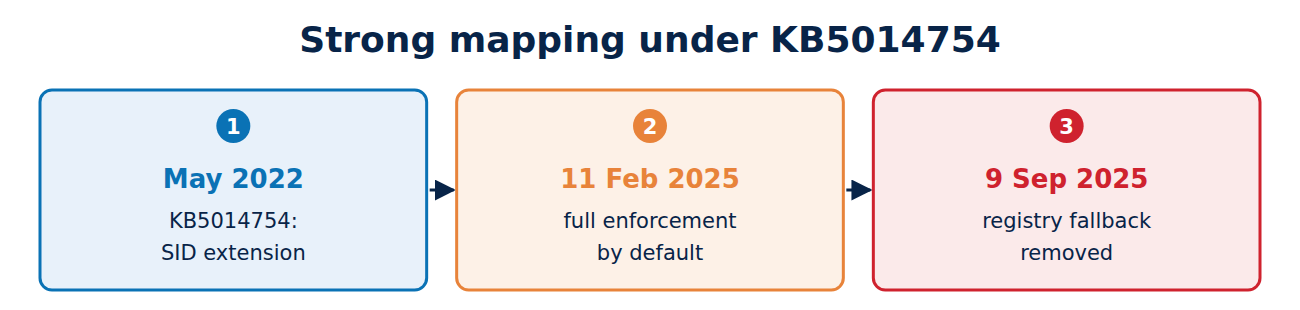
Microsoft responded in May 2022 with update KB5014754. Since then an enterprise CA writes the account’s SID into a dedicated extension in every certificate (OID 1.3.6.1.4.1.311.25.2), and domain controllers check at sign-in that the SID matches the account. The timeline:
- May 2022: compatibility mode; weak mappings only produce warnings in the event log.
- 11 February 2025: domain controllers switch to full enforcement mode by default.
- 9 September 2025: with that month’s security update, the registry setting to fall back to compatibility mode stops working.
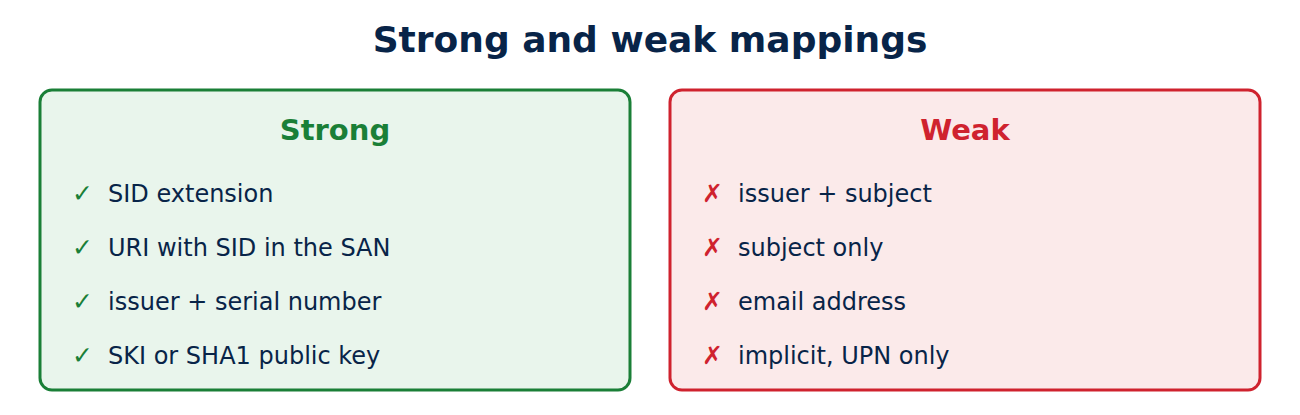
Strong mappings are the SID extension, a URI containing the SID in the Subject Alternative Name, and explicit mappings by issuer and serial number, subject key identifier (SKI) or SHA-1 hash of the public key. Weak ones map only by issuer and subject, by subject alone or by email address. Certificates from third-party CAs or device management therefore often need adjusting.
How to audit and harden your PKI
Free tools exist for the audit: Locksmith and PSPKIAudit (PowerShell), plus Certipy and Certify, which attackers use as well. A Certipy run from the point of view of an ordinary user looks like this (domain and account as examples):
certipy find -u auditor@company.local -p 'Password' -dc-ip 10.0.0.10 -vulnerable -stdoutThe key countermeasures:
- Names from AD: never take the name from the requester on templates with client authentication. Where there is no alternative, require approval by a certificate manager.
- Tight permissions: enrolment only for the groups that need the certificate; write access to templates and the CA only for tier 0 administrators.
- Withdraw unused templates from the CA, especially old version 1 templates.
- Switch off web enrolment, or run it only over HTTPS with Extended Protection, and disable NTLM where possible.
- Check the flags: EDITF_ATTRIBUTESUBJECTALTNAME2 off, security extension on, encrypted RPC requests enforced.
- Install updates and enforce strong mapping.
- Log: turn on auditing of Certificate Services. Event 4886 records a request and 4887 an issued certificate; unusual names in requests are a warning sign.
The CA’s own key needs protecting too, ideally in an HSM; see what is an HSM.
Frequently asked questions
Am I affected if I only use the default templates?
The built-in templates are mostly harmless, but permissions and CA settings can still be wrong. A run of Locksmith or PSPKIAudit shows this within minutes.
Does resetting a compromised account help?
Not against a stolen certificate. The certificate has to be revoked; see how certificate revocation works.
Do old certificates still work after enforcement?
Only if they carry the SID extension or are strongly mapped. Older certificates without it must be reissued.
Does this make AD CS obsolete?
No, but it needs looking after like any tier 0 component. Many organisations add device management and cloud PKI alongside it.
Conclusion
AD CS attacks almost always exploit configuration mistakes: requester-supplied names, permissions that are too broad, dangerous flags and NTLM relay. With names from Active Directory, tight permissions, web enrolment switched off, current mapping under KB5014754 and regular audits, your PKI is well protected. More guides in the hub Certificates, PKI and encryption.
Sources and further reading
- Certified Pre-Owned (SpecterOps)
- KB5014754: Certificate-based authentication changes on Windows domain controllers (Microsoft)
- CVE-2024-49019 (Microsoft)
- Locksmith (GitHub)



















Recent Comments