
An expired certificate is one of the most mundane and yet most common causes of IT outages. The server is running, the network works, and still nobody can connect, because a date has passed. As certificate lifetimes shrink, managing certificates becomes a permanent job. This guide looks at well-known outages, explains the lifecycle of a certificate and sets out three steps to prevent trouble: an inventory, automatic renewal and monitoring.
Why expired certificates cause so many outages
A certificate expires at an exact moment, after which every client refuses to connect. That it still catches people out again and again has several causes:
- Long gaps: with a lifetime of a year or more, the person who set up the certificate has often moved on long before it expires.
- Unknown locations: certificates are not only in web servers but in load balancers, firewalls, devices, Java applications and configuration files.
- No owner: the warning email goes to an address nobody reads any more.
- Chains and roots: an expiring intermediate or root certificate can break connections too; see how the certificate chain of trust works.
Well-known outages
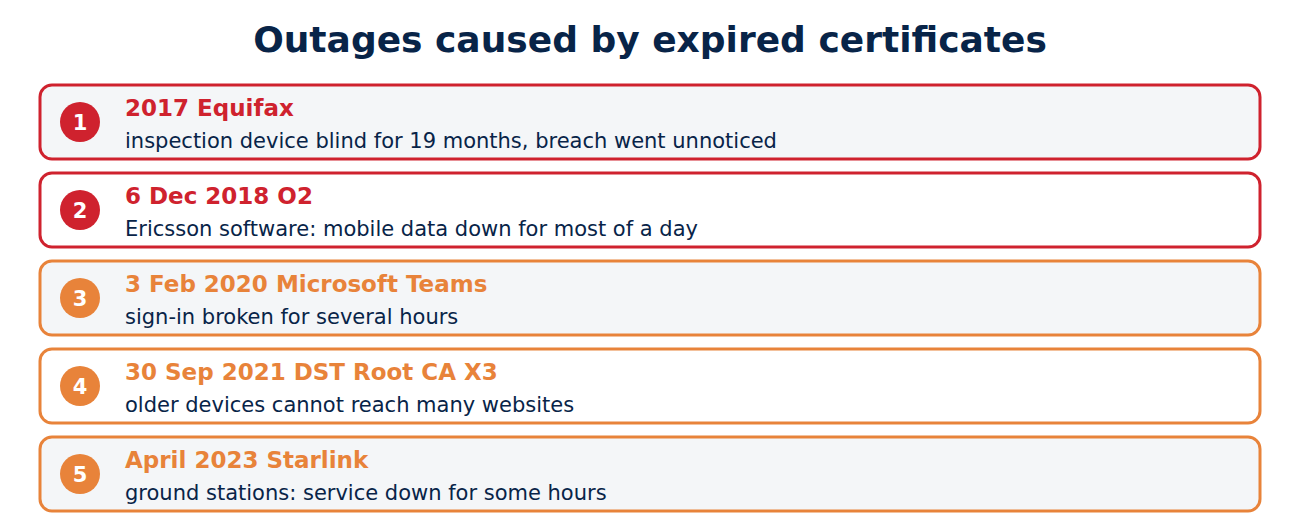
- 2017, Equifax: a certificate on a device that inspected encrypted traffic for attacks had expired about 19 months earlier. The device therefore checked nothing, and the theft of data on around 147 million people went unnoticed for weeks.
- 6 December 2018, O2: an expired certificate in software from the network supplier Ericsson took down O2’s mobile data network in the UK, affecting about 32 million customers for most of a day; other networks abroad were hit too.
- 3 February 2020, Microsoft Teams: an expired authentication certificate made Teams unusable for several hours.
- 30 September 2021: the old DST Root CA X3 root certificate expired, and older devices and software could no longer reach many websites.
- April 2023, Starlink: an expired certificate in its ground stations interrupted the satellite internet service worldwide for several hours; see satellite internet.
The lifecycle of a certificate
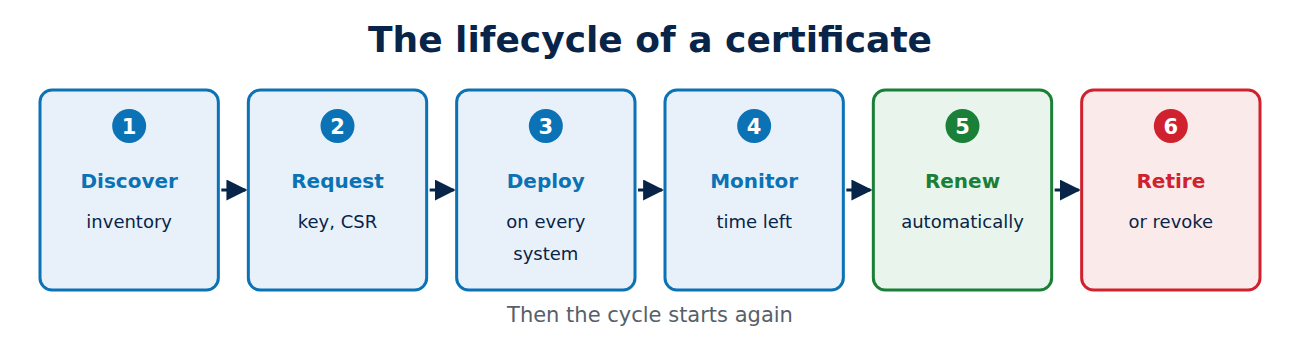
Every certificate goes through the same stages:
- Discover and record: which certificates exist, where are they and who owns them?
- Request: generate a key, submit a request, pass validation; see how to create a private key and CSR.
- Deploy: install the certificate and chain on every system that needs it, then reload the services.
- Monitor: keep an eye on remaining lifetime, chain and revocation status.
- Renew: in good time, ideally automatically, with a fresh key.
- Revoke or retire: revoke if a key is lost, and remove certificates that are no longer needed.
Professionals call this certificate lifecycle management (CLM). Large organisations use dedicated platforms, while smaller set-ups manage fine with ACME clients and good monitoring.
Step 1: build an inventory
You can only renew what you know about. Good sources for an inventory are:
- Certificate Transparency logs: every public certificate for your domains is listed there, for example on crt.sh; see what is Certificate Transparency.
- Network scans: tools such as nmap read the certificates of every reachable service, internal ones included.
- Your own CA and the cloud: the issuance records of your internal CA and the certificate managers of your cloud providers.
For each certificate, record at least the names, the issuer, the expiry date, where it lives (server, file, device), the team responsible and how it is renewed.
Step 2: renew automatically
With 47-day lifetimes from 2029, doing this by hand is no longer an option; see why certificate lifetimes are getting shorter. The ACME protocol handles the request, validation and installation automatically, with certbot, acme.sh, Caddy or cert-manager; see understanding the ACME protocol. Proven practice:
- renew after about two thirds of the lifetime, so after 60 days for a 90-day certificate,
- reload the service automatically after renewal and check that the new certificate is really being served,
- use ACME Renewal Information (ARI) so the CA can trigger an early renewal after an incident.
Step 3: monitor and alert
Automation can fail silently, for example when a DNS API credential expires. Independent monitoring therefore checks from the outside what is actually being served:
echo | openssl s_client -connect www.techcrates.com:443 -servername www.techcrates.com 2>/dev/null | openssl x509 -noout -enddate
openssl x509 -in certificate.pem -noout -checkend 2592000
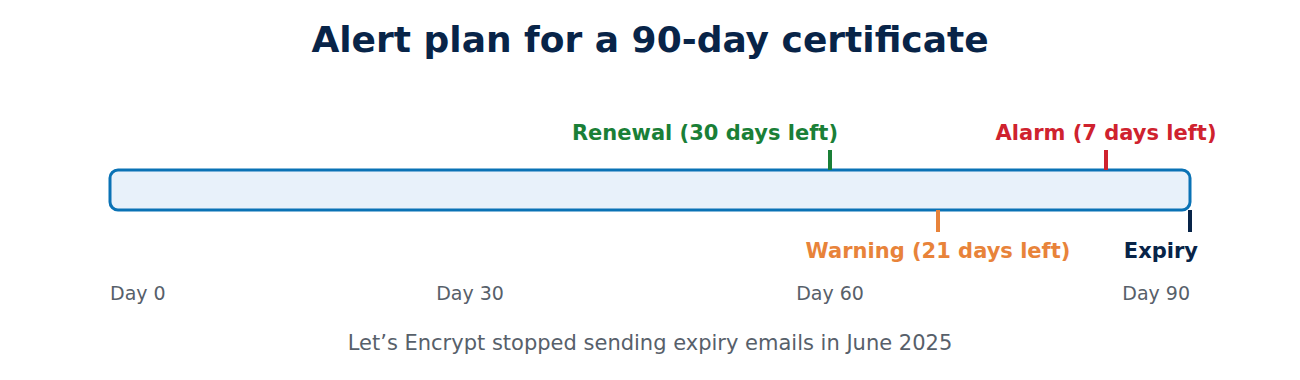
The first command shows the expiry date of the certificate being served; the second returns an error if a file expires within the next 30 days (2,592,000 seconds). Monitoring systems such as Prometheus, Zabbix or Uptime Kuma do this regularly for every service. A sensible plan for 90-day certificates: automatic renewal with 30 days left, a warning at 21 days and an alarm at 7 days. The server behind this website, for instance, sends an email when a certificate has less than 21 days left. Note that Let’s Encrypt stopped sending expiry emails in June 2025, so your own monitoring is essential.
Ownership and hidden certificates
Technology alone is not enough. Every certificate needs a responsible team, alerts should go to shared mailboxes or ticket systems rather than individuals, and new services should only go live once their certificate is in the inventory. The certificates most easily forgotten are:
- those in load balancers, firewalls, routers and printers,
- Java keystores and application configuration files,
- signing certificates for sign-in systems such as SAML,
- client certificates for devices and services; see what is mutual TLS,
- long-lived certificates from your own CA that only fall due every few years.
Frequently asked questions
How can I find out when a website’s certificate expires?
In the browser, click the icon next to the address and open the certificate, or use the openssl command above.
Is a commercial CLM platform worth it?
Often, once you have several hundred certificates, many teams and more than one CA. Small set-ups manage with ACME clients and a monitoring system.
What should I do if a certificate has expired?
Get a new one issued and installed at once; with Let’s Encrypt that takes minutes. Then find out why the renewal failed and improve the monitoring.
Should I make certificates last longer to avoid outages?
No. Longer lifetimes only postpone the problem and prolong the damage from stolen keys. Automation is the better answer.
Conclusion
Expired certificates have brought down mobile networks, Teams and satellite internet. You can prevent it with a complete inventory, automatic renewal over ACME, independent monitoring with staged alerts and clear ownership. With 47-day lifetimes from 2029, that becomes a must for everyone.
Sources and further reading
- Ending Support for Expiration Notification Emails (Let’s Encrypt)
- Why millions of Brits’ mobile phones were knackered on Thursday (The Register)
- Report on the Equifax data breach (US House Oversight Committee)
- ssl-cert script (Nmap)



















Recent Comments