
An ordinary email is like a postcard: the sender can be faked, and every server along the way can read it. S/MIME changes that with certificates. A signed email proves who sent it and that it arrived unchanged; an encrypted email can only be read by the recipient. Outlook, Apple Mail and Thunderbird support S/MIME without any add-ons. This guide explains how signing and encryption work, the types of certificate, how to set S/MIME up and where its limits lie.
What S/MIME does
S/MIME (Secure/Multipurpose Internet Mail Extensions, currently version 4.0 under RFC 8551) uses the same X.509 certificates as websites; what is an X.509 certificate explains their structure. Instead of a domain name, the certificate contains the owner’s email address. S/MIME offers two functions, which you can use separately or together:
- Signing: proves the sender is genuine and the message is intact.
- Encryption: keeps the content confidential all the way to the recipient, in other words end to end.
That sets it apart from the encryption between mail servers, which protects only the journey; on the servers themselves the message sits in plain text. How email travels is covered in SMTP and POP3 explained.
Signing: confirming sender and content
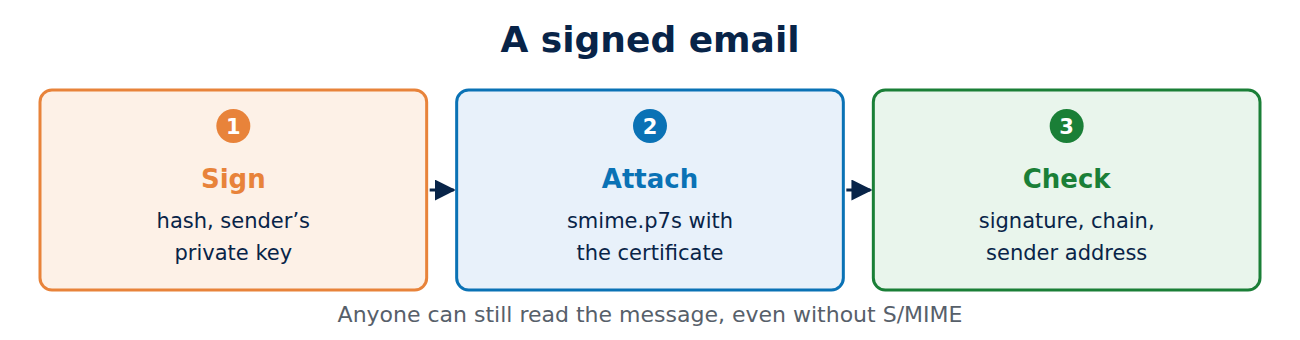
When signing, the mail program calculates a hash of the message and its attachments and signs it with the sender’s private key. The signature and certificate travel with the message as an attachment called smime.p7s. The recipient’s mail program then checks:
- that the signature matches the message, so nothing has been changed,
- that the certificate comes from a trusted CA, is valid and has not been revoked,
- that the address in the certificate matches the sender’s address.
If all is well, a seal or tick appears. Anyone can read a signed message, even without S/MIME.
Encrypting: only the recipient can read it
To encrypt, the sender needs the recipient’s public key, which means their certificate. The easiest way to get it is for the recipient to send you a signed message first; your mail program saves the certificate automatically. In organisations, certificates are often available from a directory too.
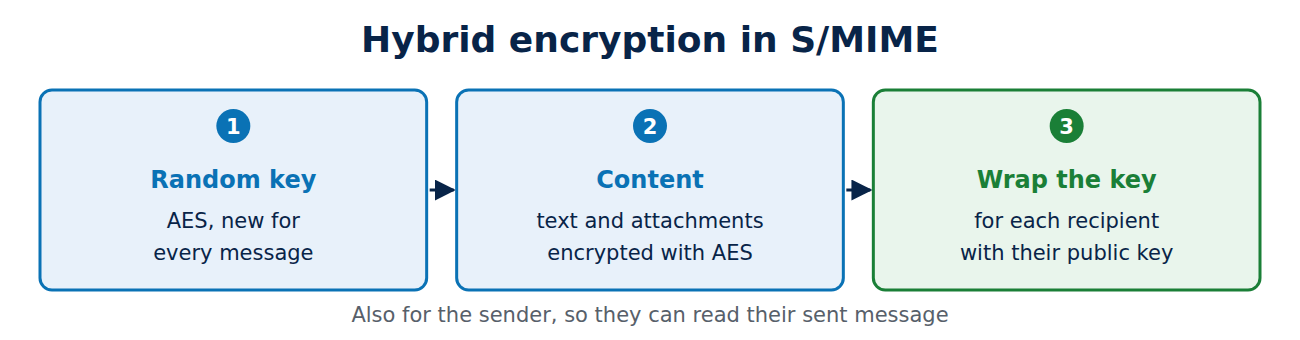
Technically, S/MIME is hybrid: the program creates a random key for the fast AES algorithm and encrypts the text and attachments with it. Only this short AES key is then encrypted with each recipient’s public key, and with the sender’s own key as well, so that the sender can still read the sent message. For background on the two kinds of encryption, see RSA vs AES.
The certificate: types and rules
Since 1 September 2023, publicly trusted S/MIME certificates have had their own Baseline Requirements from the CA/Browser Forum. They define four validation types:
- Mailbox-validated: the CA only checks that the applicant controls the address, for example with a code sent by email. Only the address appears in the certificate.
- Organisation-validated: adds the checked name of the organisation.
- Sponsor-validated: the name of the person and of the organisation vouching for them, such as their employer.
- Individual-validated: the person’s name, checked against an ID document, for example.
An S/MIME certificate is valid for at most 825 days. Many universities and companies get certificates through a group agreement, and simple mailbox-validated certificates are cheap or free from some CAs.
Setting up S/MIME in five steps
- Get a certificate from a CA or your organisation. You usually end up with a password-protected PKCS#12 file (.p12 or .pfx) holding the certificate and private key; see certificate file formats explained.
- Import it: on Windows double-click it to add it to the certificate store, on a Mac add it to Keychain, and in Thunderbird use Settings, Privacy & Security, Certificates.
- Assign it in your mail program: in Outlook under Trust Center, Email Security; in Thunderbird under the account’s End-To-End Encryption settings.
- Sign by default, so that your contacts collect your certificate automatically.
- Keep a backup of the PKCS#12 file, with a strong password, somewhere safe, even after it expires.
On an iPhone you can install the .p12 file as a profile and switch S/MIME on in the account’s Mail settings; see how to set up email on your phone.
Limits and pitfalls
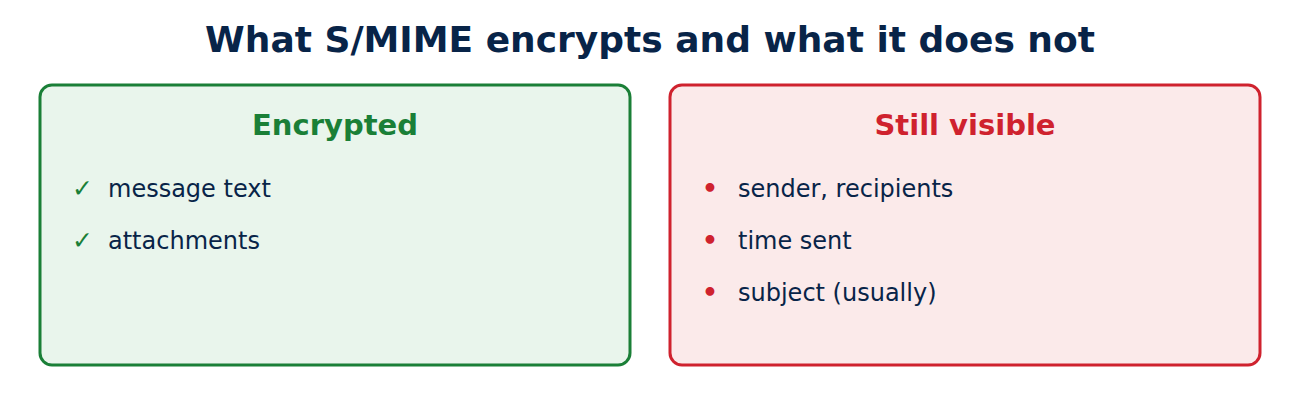
- Subject and headers stay readable: the text and attachments are encrypted, but the sender, recipients, time and usually the subject line remain visible.
- Keep your old keys: if you delete the old private key after renewing, you can no longer open old encrypted messages.
- Webmail: many webmail services do not support S/MIME, or only with extra software.
- Forwarding: encrypted messages can only be forwarded to people who have a certificate.
- Security flaws: in 2018 the EFAIL attack showed that some mail programs could leak decrypted content through HTML elements. Current programs are protected, but it is still wise to block remote content.
S/MIME or OpenPGP?
Besides S/MIME there is OpenPGP, which does the same jobs without certificate authorities: users vouch for each other’s keys or trust them on first contact. S/MIME suits organisations better, because certificates are issued centrally and Outlook and Apple Mail support them directly. OpenPGP is built into Thunderbird and popular with individuals and developers. The two cannot read each other’s messages.
Frequently asked questions
Can a recipient without S/MIME read my signed email?
Yes. They just see an extra attachment called smime.p7s; the text reads normally.
Does S/MIME protect against phishing?
Partly. A valid signature with a matching address is hard to fake, but fraudsters can get certificates for lookalike addresses. See how to spot a phishing email.
Can my employer read my encrypted email?
Organisations often keep a central copy of private keys (key escrow) so that mail stays readable after someone leaves. This should be set out in company policy.
What happens when the certificate expires?
Old signatures still show as valid at the time they were made, and new messages need a new certificate. Keep using the old key to open old encrypted messages.
Conclusion
S/MIME signs and encrypts email with X.509 certificates and works in the major mail programs without add-ons. Signing proves the sender and the integrity of the message, while encryption protects the content all the way to the recipient. Back up your private key, and remember that the subject line and headers stay visible.
Sources and further reading
- RFC 8551: S/MIME Version 4.0 Message Specification (IETF)
- S/MIME Baseline Requirements (CA/Browser Forum)
- Set up Outlook to use S/MIME encryption (Microsoft Support)
- EFAIL (researchers at Münster University of Applied Sciences, Ruhr University Bochum and KU Leuven)















Recent Comments