
A company with 3,000 laptops, 500 printers and 200 routers cannot request every certificate by hand. To solve that problem, Cisco and VeriSign created the Simple Certificate Enrollment Protocol, or SCEP, around the year 2000. It lets devices request their own certificate from a certificate authority without anyone copying files about. SCEP was only formally written up as RFC 8894 in September 2020, by which time it was already running on millions of devices. This guide explains how an SCEP request works, the notorious challenge password, the protocol’s weaknesses and where it is still used today.
What SCEP is for
Getting a certificate normally means generating a key pair, creating a certificate signing request (CSR), submitting it to the CA, receiving the certificate and installing it. How that works by hand is shown in how to create a private key and CSR. For one web server that is fine; for thousands of devices it is not. SCEP automates exactly these steps:
- The device generates its own key pair; the private key never leaves it.
- It fetches the CA certificate and checks it.
- It sends its CSR to the SCEP server and receives the finished certificate.
- Shortly before expiry it renews the certificate the same way.
Typical uses are Wi-Fi and VPN access with certificates, routers and firewalls that authenticate each other, and managed smartphones. The certificates nearly always come from an organisation’s own CA; see how to run a private certificate authority.
How an SCEP request works
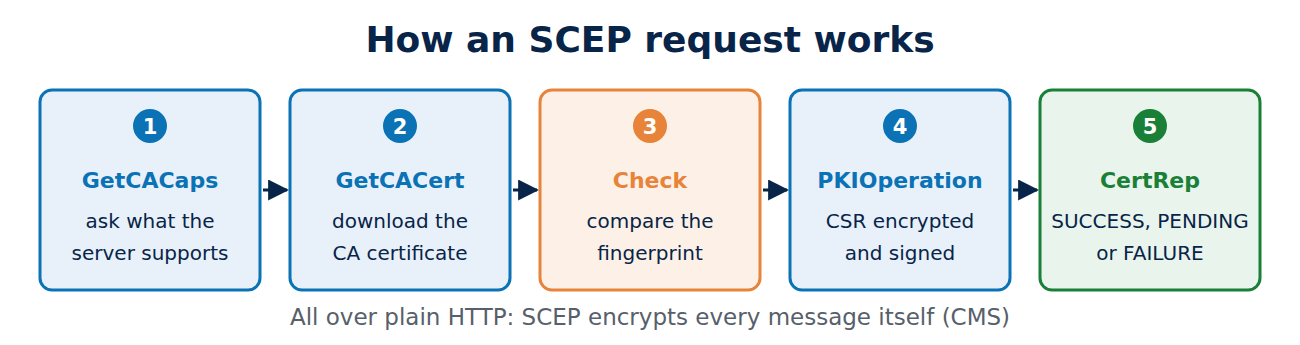
SCEP runs over plain HTTP. Each action is a request with an operation parameter:
- GetCACaps: the client asks what the server supports, such as SHA-256, AES or POST requests.
- GetCACert: the client downloads the certificate of the CA (and, if there is one, of a registration authority, RA).
- PKIOperation: the actual request. The client wraps its PKCS#10 CSR in a CMS message, encrypts it for the CA and signs it. The reply (CertRep) says SUCCESS with the certificate, FAILURE or PENDING.
- With PENDING, a person or an approval process still has to decide, and the client polls at intervals.
Because HTTP encrypts nothing, SCEP protects the messages itself: the CSR is encrypted to the CA certificate and the reply to the client. The first step matters most. The CA certificate arrives unprotected over HTTP, so the device has to compare its fingerprint with a known value the administrator has configured. Otherwise an attacker on the network could slip in a CA certificate of their own.
Asking a Microsoft SCEP server (NDES) about its capabilities looks like this; the reply is an example:
curl "http://ndes.example.local/certsrv/mscep/mscep.dll/pkiclient.exe?operation=GetCACaps"
POSTPKIOperation
Renewal
SHA-256
AES
SCEPStandard
SCEPStandard means the server meets the minimum set in RFC 8894: AES, SHA-256 and POST.
The challenge password and its weaknesses
How does the SCEP server know that a request is authorised? The classic answer is the challenge password: an attribute in the CSR that the server checks. This is where the protocol is weakest.
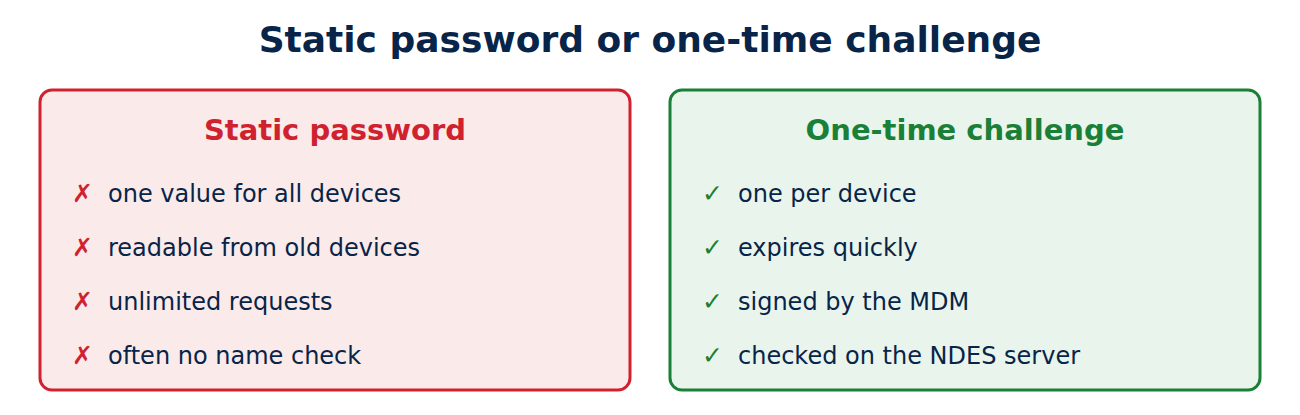
- Static passwords: on many networks a single password sits in every device configuration. Anyone who reads it out of a decommissioned router can request as many certificates as they like.
- Free choice of names: if the server does not check the names in the CSR, an attacker can request a certificate in someone else’s name, such as a server or an administrator.
- No proof of the device: SCEP does not prove on which device the key was generated. A certificate meant for a company laptop can end up on a home computer.
- Old algorithms: older implementations still use DES, 3DES, MD5 or SHA-1. RFC 8894 recommends AES and SHA-256.
One-time passwords are better. Microsoft’s SCEP service NDES (Network Device Enrollment Service) generates them on an admin page, and they expire after a short time. Device management systems such as Microsoft Intune go further: they create a separate, signed challenge for each device, which a plug-in on the NDES server checks. Only a device that Intune knows then receives exactly the certificate it is meant to have.
Where SCEP is used today
Despite its age SCEP is everywhere, because almost everything speaks it:
- Mobile device management (MDM): Intune, Jamf and others push SCEP profiles to Windows, iPhone, Mac and Android.
- Network equipment: routers, switches and firewalls from many vendors use it to obtain their certificates.
- Microsoft environments: NDES connects SCEP to Active Directory Certificate Services; for Active Directory itself see understanding Active Directory.
- Open-source CA software: step-ca, EJBCA and Dogtag offer an SCEP endpoint.
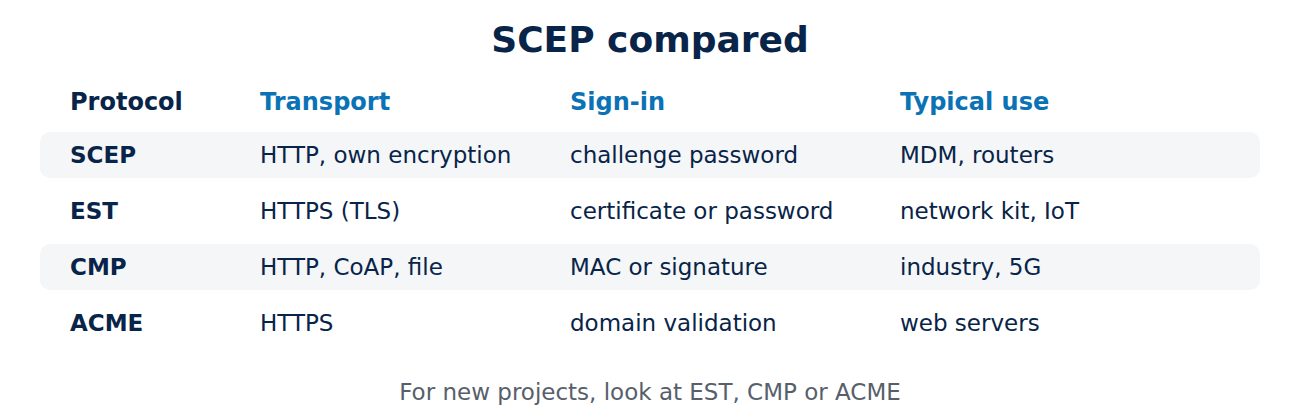
New projects have more modern options: EST uses HTTPS instead of home-made encryption, CMP is aimed at industry and mobile networks, and ACME checks automatically, as Let’s Encrypt does, that the requester controls a domain; see the ACME protocol and certificate automation. For its own devices, Apple now recommends ACME with device attestation instead of SCEP.
Frequently asked questions
Is SCEP insecure?
Not inherently. With one-time passwords, checked names, AES and SHA-256 and a well-run CA it is acceptable. Static passwords and servers that issue any name are the danger.
Do I need a Windows server for SCEP?
No. NDES is just one implementation. Open-source CAs such as step-ca or EJBCA and many cloud PKI services offer SCEP too.
Why does SCEP not use HTTPS?
The protocol dates from a time when many devices could not do TLS, so it encrypts each message itself. Running it behind HTTPS is possible but not required.
Can an SCEP certificate be revoked?
Yes, like any other, through the CA. See how certificate revocation works.
Conclusion
SCEP lets devices request their own certificates: fetch the CA certificate, check its fingerprint, send an encrypted request, receive the certificate. Its weak spot is the challenge password. With one-time passwords, name checks and an MDM that ties each challenge to a known device, SCEP remains usable; new projects should look at EST, CMP or ACME. More guides in the hub Certificates, PKI and encryption.
Sources and further reading
- RFC 8894: Simple Certificate Enrolment Protocol (IETF)
- Network Device Enrollment Service overview (Microsoft)
- SCEP infrastructure for Intune (Microsoft)
- Simple Certificate Enrollment Protocol (Wikipedia)















Recent Comments