
Company smartphones, laptops used at home and tablets in the warehouse often no longer join Wi-Fi or VPN with a password, but with a certificate. It is distributed through mobile device management (MDM), such as Microsoft Intune, Jamf or VMware Workspace ONE. This guide explains the three routes in Intune (trusted certificate, SCEP and PKCS profiles), what Apple does differently with ACME and device attestation, how Android protects keys, and what to watch on Windows since strong certificate mapping arrived.
Why certificates through MDM?
An MDM knows which device belongs to the organisation, who it is assigned to and whether it complies with the rules. It can therefore decide who gets a certificate and install it with a profile. The certificate then opens Wi-Fi with 802.1X, VPN, internal websites with mutual TLS or email encryption with S/MIME. If the device is retired or reported stolen, the MDM removes the profile and can have the certificate revoked. The basics of signing in with a client certificate are covered in what is mutual TLS.
Intune: trusted certificate, SCEP and PKCS
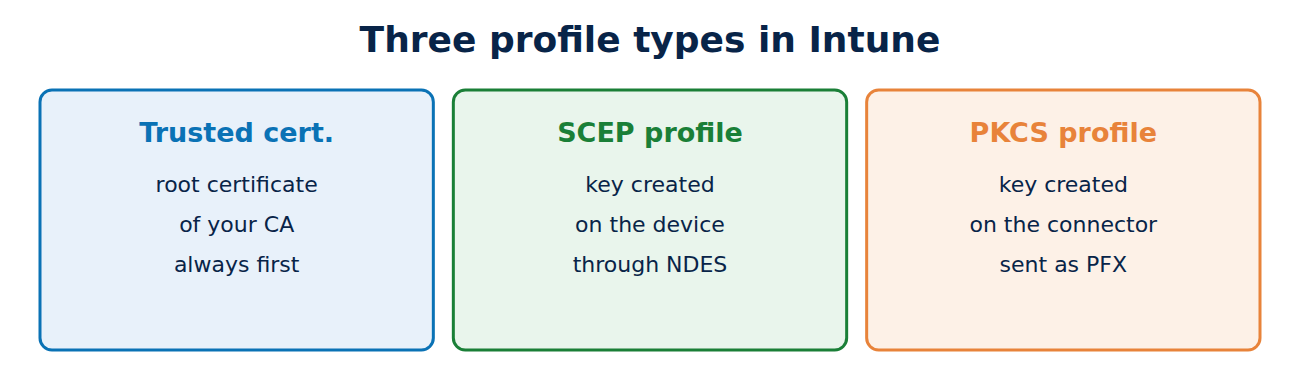
Intune has three profile types that work together:
- Trusted certificate: distributes the root certificate of the organisation’s CA and any intermediates. Without this profile all the others fail, because the device does not trust the CA; see how the certificate chain of trust works.
- SCEP certificate: the device generates its own key pair and requests the certificate over SCEP. Intune supplies a challenge that is valid only for that device, and a plug-in on the SCEP server (with AD CS, the NDES service with the Intune Certificate Connector) checks it. The private key never leaves the device. More in what is SCEP.
- PKCS certificate: here the Intune Certificate Connector on a server generates the key and request, obtains the certificate from the CA and sends both, encrypted, to the device as a PFX file. No NDES is needed, but the key is not created on the device.
There is also imported PKCS, which distributes existing certificates with their keys, for example so that a user can open old encrypted emails on every device; see what is S/MIME.
SCEP or PKCS?
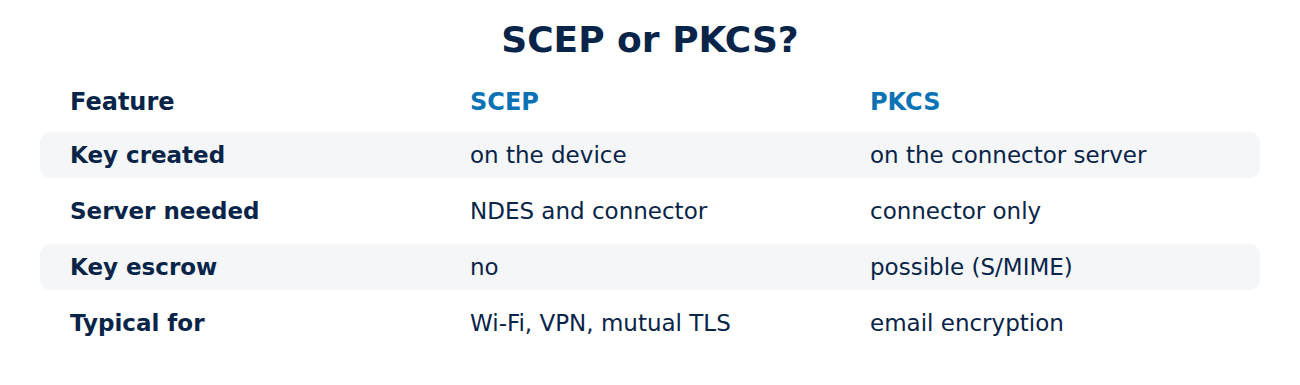
- SCEP is the better choice for device sign-in to Wi-Fi, VPN and web services: the key is created on the device, on Windows in the TPM if required.
- PKCS fits when the key has to be held centrally, above all for email encryption, or when you do not want to run NDES.
- For some special cases, such as Apple devices without user affinity, SCEP is the only route.
Microsoft now also offers Cloud PKI, a CA as a service that serves SCEP straight from the cloud. That removes the need for your own NDES server and connector.
Apple: ACME with device attestation
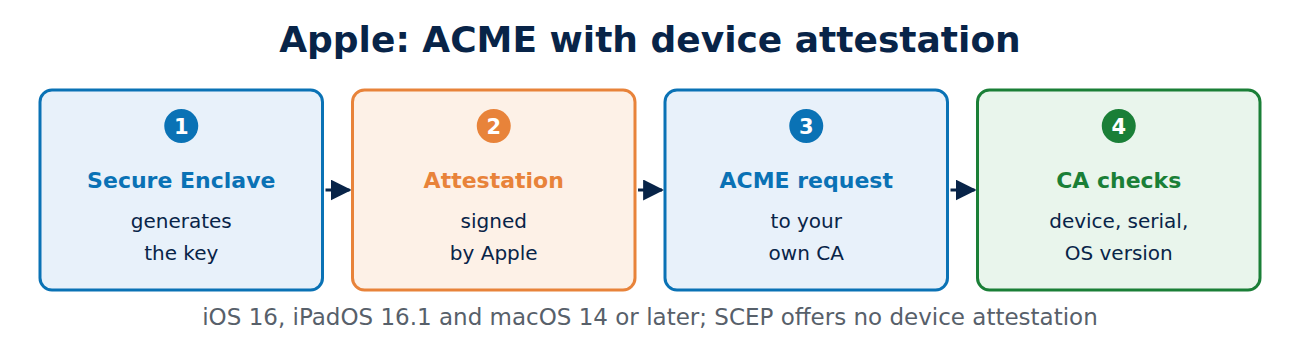
Since iOS 16 and macOS 13, Apple has supported an ACME payload for certificates. With the HardwareBound option, the Secure Enclave generates the key pair, and the private key cannot be exported. With Managed Device Attestation (iOS 16, iPadOS 16.1 and macOS 14 or later), the device also supplies evidence signed by Apple’s own certificate authority: serial number, device identifier and operating system version demonstrably come from genuine Apple hardware. The CA can thus check that the request really comes from the managed device and not from an attacker who intercepted an SCEP challenge. Apple requires ACME for device attestation; with SCEP it is not available. The ACME protocol is covered in ACME in depth.
Android: keys in the Keystore
Android Enterprise stores certificate keys in the Android Keystore, on many devices in a dedicated security chip (StrongBox) or in an isolated environment (TEE). With key attestation, the device can prove that a key was generated in that hardware. Intune supports SCEP and PKCS profiles for Android Enterprise, and Wi-Fi profiles then point to the issued certificate.
Windows: mind strong mapping
Since strong certificate mapping (KB5014754) became mandatory, domain controllers check whether a certificate contains the account’s SID. MDM certificates often lack it, because it is not the enterprise CA that builds the name from Active Directory. The fixes:
- SCEP: add a Subject Alternative Name of type URI with the variable OnPremisesSecurityIdentifier in Intune. This puts a URI of the form tag:microsoft.com,2022-09-14:sid:S-1-5-21-… into the certificate.
- PKCS: the Intune Certificate Connector (version 6.2406.0.1001 or later) can add the SID extension itself once a registry value enables it.
The change only applies to newly issued certificates. The background is in how to secure AD CS.
Frequently asked questions
What happens to the certificate when a device is removed from MDM?
The MDM deletes the profile and the certificate with it. Whether it is also revoked depends on the settings and the CA; Intune can have SCEP and PKCS certificates revoked with supported CAs.
Do I have to distribute the root certificate separately?
Yes, always first. SCEP and PKCS profiles refer to the trusted certificate profile.
Are PKCS certificates less secure?
The key is generated on a server and transferred. That is an extra risk worth taking for email encryption, but usually not for sign-in certificates.
Can I use Let’s Encrypt for device certificates?
No. Since 2026, certificates from public web CAs such as Let’s Encrypt no longer carry the client authentication purpose, so device certificates come from your own CA; see how to run a private certificate authority.
Conclusion
In MDM, two profiles always go together: the trusted certificate profile with the root certificate and a certificate profile. SCEP creates the key on the device and suits Wi-Fi and VPN, while PKCS delivers centrally generated keys for email encryption. Apple goes furthest with ACME and device attestation, and on Windows the SID belongs in the certificate. More guides in the hub Certificates, PKI and encryption.
Sources and further reading
- Certificates in Microsoft Intune (Microsoft)
- PKCS certificate profiles in Intune (Microsoft)
- Managed device attestation for Apple devices (Apple)
- Verify hardware-backed key pairs with key attestation (Android Developers)


















Recent Comments