
“Sign in with Google”, an app that may read your calendar, one service calling another’s API: behind all of these are OAuth 2.0 and OpenID Connect. OAuth governs who may access what, and OpenID Connect adds who someone is. Both work with tokens, usually sent as signed JSON Web Tokens (JWTs), whose keys a service publishes as a JWKS. This guide explains the roles, the main flow with PKCE, how a JWT is built, how a service checks the signature, and real values from Google.
The roles in OAuth 2.0
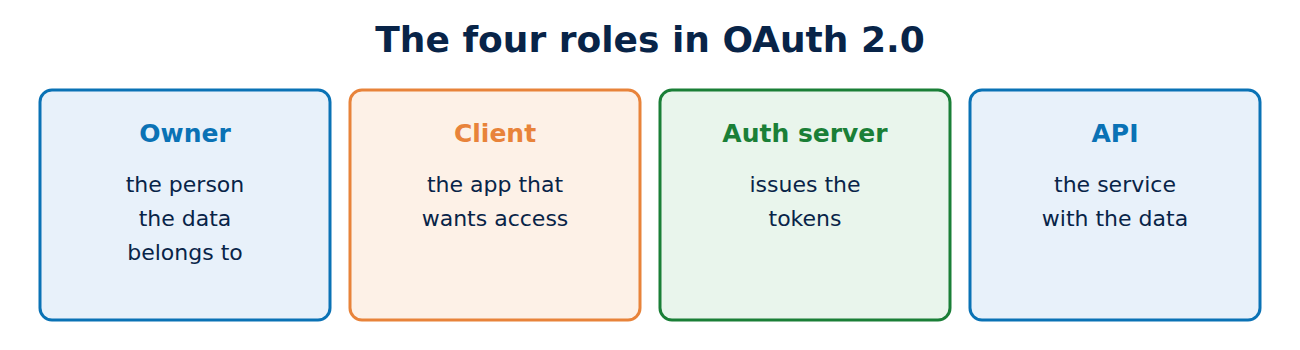
OAuth 2.0 (RFC 6749, 2012) has four parties:
- Resource owner: the person the data belongs to, such as the owner of a calendar.
- Client: the application that wants access, such as a scheduling app.
- Authorisation server: the service you sign in to and that issues tokens, such as Google, Microsoft Entra ID or your own server such as Keycloak.
- Resource server: the API holding the data.
The core idea: the app never gets your password, only an access token with limited rights (scopes) and a short lifetime. Often there is also a refresh token, which the app later uses to get a new access token without the person signing in again.
The authorisation code flow with PKCE
The recommended flow for web and mobile apps:
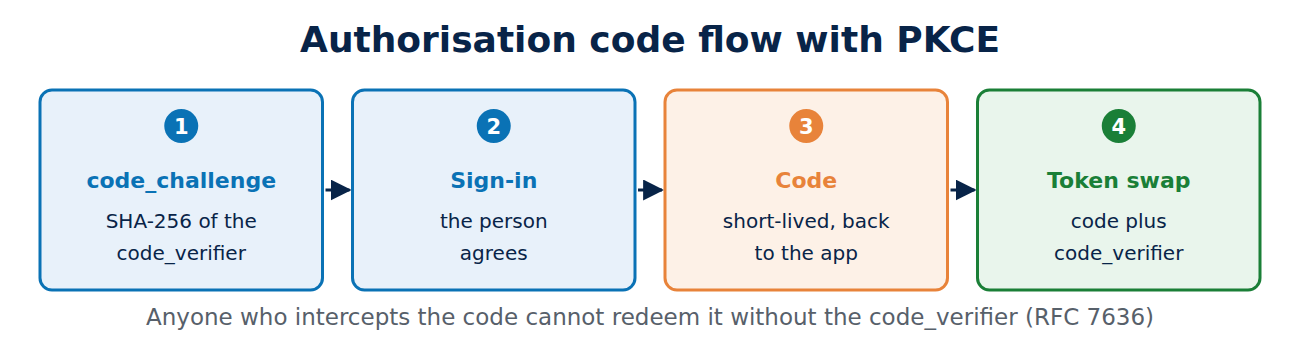
- The app generates a random value (code_verifier) and sends its SHA-256 hash (code_challenge) along when it redirects the browser to the sign-in service.
- The person signs in there and agrees to the access.
- The sign-in service redirects back to the app with a short-lived authorisation code.
- The app swaps the code for tokens, presenting the original code_verifier as it does so.
That final step is PKCE (Proof Key for Code Exchange, RFC 7636). Anyone who intercepts the code on the way cannot redeem it without the code_verifier. The security best practice RFC 9700, published in January 2025, requires PKCE for public clients such as apps and recommends it for all. The older implicit flow, which put the token straight into the browser’s address bar, and handing passwords to the app (the password grant) should no longer be used. The coming OAuth 2.1 brings these rules together. For an introduction to tokens and signatures, see digital signatures.
For services with no person involved there is the client credentials flow, and for TVs and devices without a keyboard the device flow (RFC 8628), where you confirm a code on your phone.
OpenID Connect: who is signed in?
OAuth alone only says that the app may access something, not who the person is. OpenID Connect (OIDC, 2014) therefore adds an ID token: a JWT with details such as issuer (iss), user identifier (sub), the intended app (aud), expiry (exp) and optionally name and email address. Every OIDC provider publishes its settings at a fixed address, the discovery document. Google’s returned this on 7 November 2026:
curl https://accounts.google.com/.well-known/openid-configuration
"issuer": "https://accounts.google.com"
"jwks_uri": "https://www.googleapis.com/oauth2/v3/certs"
"id_token_signing_alg_values_supported": ["RS256"]
"code_challenge_methods_supported": ["plain", "S256"]
How a JWT is built
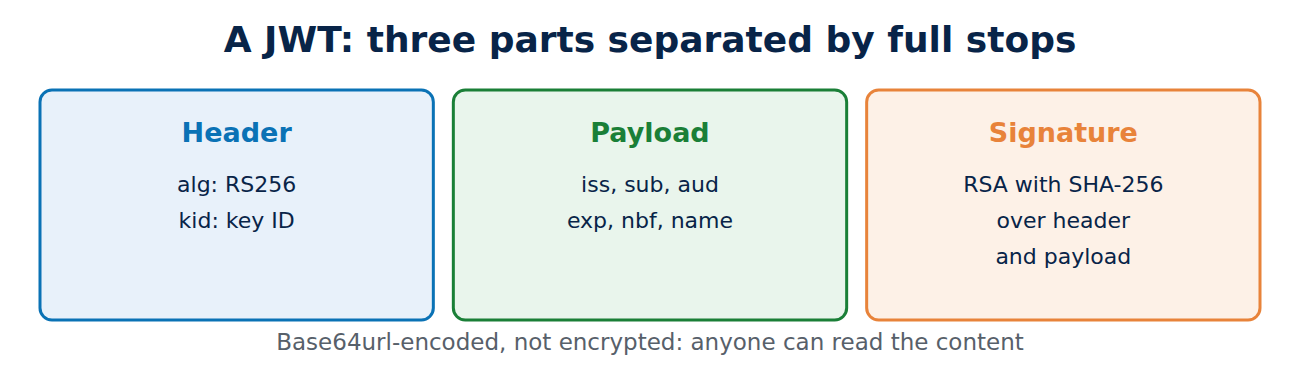
A JWT (RFC 7519) consists of three base64url-encoded parts separated by full stops: header, payload and signature. A shortened example:
eyJhbGciOiJSUzI1NiIsImtpZCI6Ijk0M2EzYTVkN2Q5MSJ9.eyJpc3MiOiJodHRwczovL2FjY291bnRzLmdvb2dsZS5jb20iLC4uLn0.SIGNATURE
Header:  {"alg":"RS256","kid":"943a3a5d7d91"}
Payload: {"iss":"https://accounts.google.com", ...}
The header names the algorithm (here RSA with SHA-256) and the key ID, kid. The signature covers header and payload and is made with the issuer’s private key. Anyone can read the content, because it is only encoded, not encrypted. So never put secrets in a JWT. For the RSA side see RSA vs AES.
Checking the signature with JWKS
A service that receives a token fetches the issuer’s public keys from the JWKS (JSON Web Key Set, RFC 7517) and picks the key with the matching kid. On 7 November 2026, Google’s set held two 2,048-bit RSA keys for RS256. Two keys are normal: during a key change, old and new are valid at the same time. A correct check covers:
- The signature, with the key for that kid and only with the expected algorithm. A token with alg “none”, or any algorithm other than the expected one, is rejected.
- Issuer (iss) and audience (aud): the token must come from the expected provider and be meant for exactly this app.
- Time: exp (expiry) and, if present, nbf (not before).
Unlike on the web, there is usually no certificate chain behind this: you trust the key because it came over HTTPS from the right address; see how the certificate chain of trust works. Some providers also include an X.509 certificate in the JWKS (the x5c field).
Binding tokens to the client
A stolen access token can be used by whoever holds it (a bearer token). Two extensions bind it to a key held by the client: mutual TLS (RFC 8705) links the token to the client certificate, and DPoP (RFC 9449) to a key with which the client signs every request. More on client certificates in what is mutual TLS.
Frequently asked questions
Is OAuth a sign-in method?
Not on its own. OAuth grants access rights; signing in with an identity comes from OpenID Connect, which is built on OAuth.
Where should a web app store tokens?
Ideally on the server, not in browser storage. Many designs use a back end that holds the tokens and gives the browser only a session cookie.
How long does an access token last?
Usually minutes to an hour. Refresh tokens last longer and should be replaced each time they are used.
Is OAuth 2.1 finished?
No, it is still an IETF draft. Its key rules are already in RFC 9700, though.
Conclusion
OAuth 2.0 gives apps limited access through tokens, and OpenID Connect adds identity with an ID token. The secure default is the authorisation code flow with PKCE. JWTs are signed, not encrypted, and the receiver checks signature, issuer, audience and expiry using keys from the JWKS. More guides in the hub Online security and privacy.
Sources and further reading
- RFC 6749: The OAuth 2.0 Authorization Framework (IETF)
- RFC 9700: Best Current Practice for OAuth 2.0 Security (IETF)
- OpenID Connect Core 1.0 (OpenID Foundation)
- RFC 7519: JSON Web Token (JWT) (IETF)











Recent Comments