
Passwords can be guessed, phished and passed on. A key on a smart card, by contrast, never leaves the card, and using it takes both the card and a PIN. Staff at government departments, banks and hospitals have signed in this way for decades; NHS staff in England, for example, use smartcards to reach national NHS systems. This guide explains how a smart card works, what the US PIV standard sets out, how Windows sign-in with a certificate works, how Microsoft Entra ID checks certificates without extra sign-in servers, and where smart cards stand next to passkeys.
What is inside a smart card
A smart card is a tiny computer with a processor, memory and a cryptographic engine. It holds one or more key pairs with certificates. The card generates the keys itself and computes signatures internally; the private key cannot be read out. Each operation is unlocked with the PIN. After a few wrong attempts, often three, the card locks itself and can only be unlocked with a second code (PUK) or by the issuing office. That makes a smart card a possession and knowledge factor at once; see how to set up two-factor authentication. USB tokens such as the YubiKey that emulate a smart card work on the same principle.
PIV: the US government standard
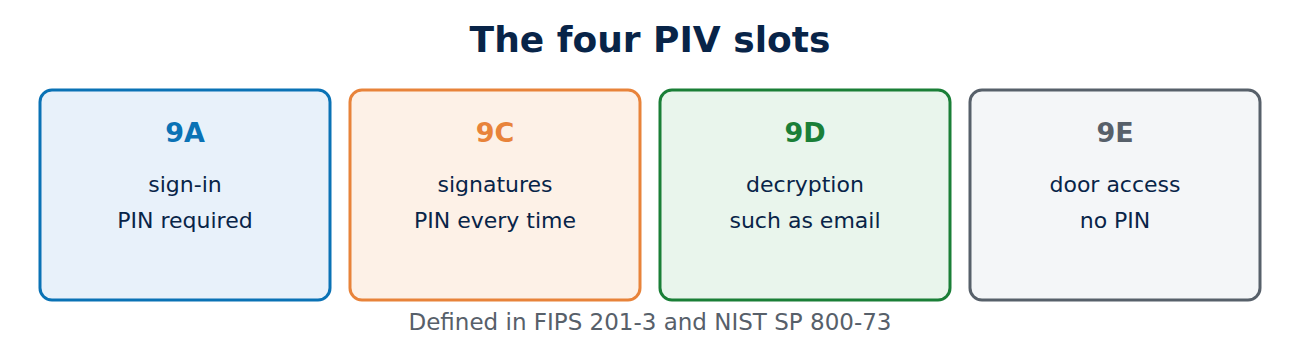
The US standard FIPS 201 (currently version 201-3 from 2022) defines Personal Identity Verification, or PIV. Every US federal agency issues PIV cards to its staff. The interface (NIST SP 800-73) defines fixed slots:
- 9A, PIV Authentication: sign-in to computers and web services, PIN required.
- 9C, Digital Signature: signing documents and emails, PIN for every signature.
- 9D, Key Management: decryption, for example of emails.
- 9E, Card Authentication: door access without a PIN.
Because many vendors implement PIV, organisations outside the US use the format too. A YubiKey with the PIV function can be set up like this (values as examples):
ykman piv access change-pin
ykman piv keys generate --algorithm ECCP256 9a pubkey.pem
ykman piv certificates request --subject "CN=Jane Smith" 9a pubkey.pem request.csr
ykman piv certificates import 9a jane.pem
Change the PIN, PUK and management key first, because the factory settings are well-known defaults. The request then goes to the organisation’s CA; for CSRs see how to create a private key and CSR.
Windows sign-in with a smart card
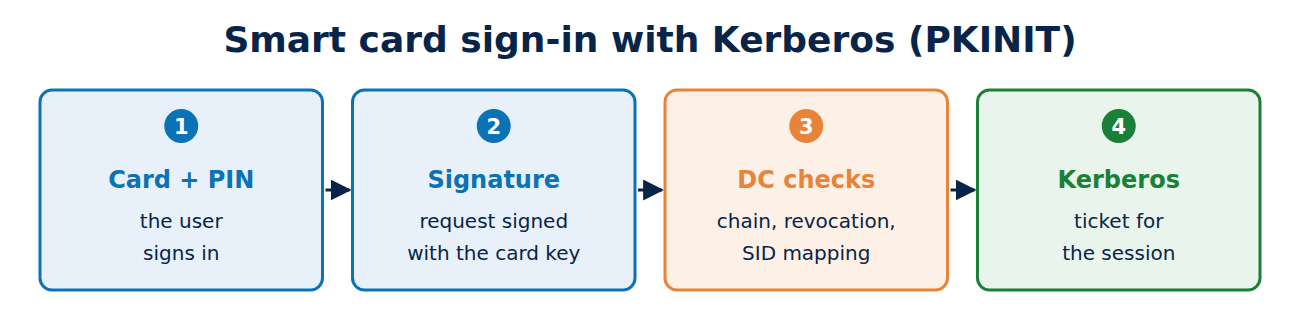
In an Active Directory domain, sign-in uses Kerberos with PKINIT (RFC 4556):
- The user inserts the card and enters the PIN.
- The computer sends the certificate to the domain controller and signs the request with the card’s key.
- The domain controller checks the chain, revocation status and the smart card logon purpose, and maps the certificate to an account.
- It then issues a Kerberos ticket that the user works with.
Since strong mapping (KB5014754) became mandatory, the certificate must contain the account SID or be mapped in another secure way; details in how to secure AD CS. Administrators can also set smart card is required on an account, after which password sign-in is no longer possible at all. The certificates usually come from templates on the organisation’s CA; see Windows certificate autoenrolment.
Entra ID: certificates in the cloud
For Microsoft 365 and other cloud services, using smart cards used to require a separate sign-in server (AD FS). Microsoft Entra ID now checks X.509 certificates itself, which Microsoft calls certificate-based authentication (CBA):
- The administrator uploads the organisation’s CA certificates to Entra ID.
- For revocation checks, the CA’s revocation list must be reachable from the internet.
- Rules decide which certificate field matches which user, such as the UPN or serial number, and whether the sign-in counts as one factor or two.
With a card or token, CBA counts as phishing-resistant multi-factor sign-in, because the key only answers the genuine service over a verified TLS connection. For revocation see how certificate revocation works.
Smart card, Windows Hello or passkey?
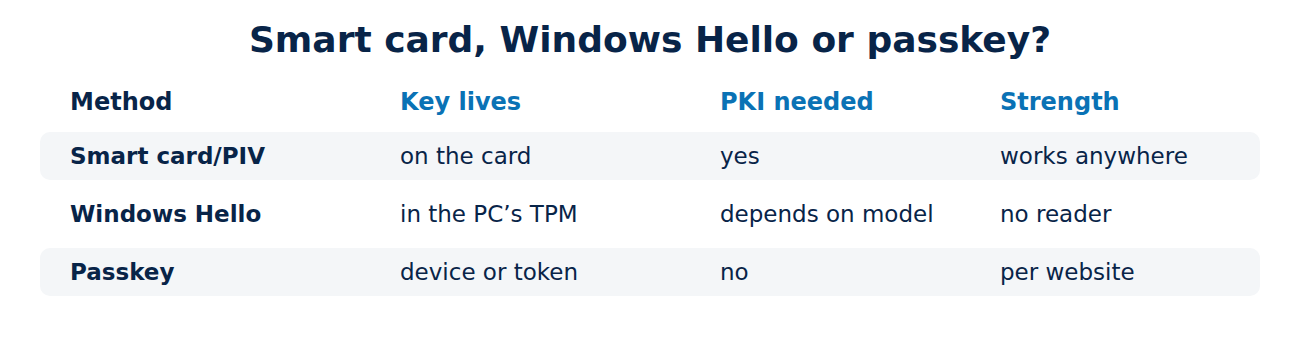
- Smart card and PIV: well established, usable on other people’s computers, one card for doors, PC and signatures. The downside: card readers, issuing and replacing cards take effort.
- Windows Hello for Business: the key lives in the computer’s TPM and is unlocked with a PIN or face. No card reader, but tied to the device.
- Passkeys (FIDO2): a key per website, without certificates or PKI. For most web services the simplest phishing-resistant option; see passkeys explained and how to use a security key.
Many organisations combine them: smart cards for highly sensitive accounts and signatures, passkeys and Windows Hello for everyday work.
Frequently asked questions
Is a UK passport or driving licence a smart card for signing in?
No. The chip in a passport only stores identity data for border checks, and photocard driving licences have no chip at all. They are not designed for computer sign-in.
What happens if I lose the card?
The issuing office revokes the certificate and issues a new card. Without the PIN a finder can do nothing with it, and after a few attempts it locks itself.
Can I use a smart card with a smartphone?
Yes, over NFC or USB-C, for example with a YubiKey. Entra ID supports CBA on iOS and Android as well.
Do I need my own CA for smart cards?
As a rule, yes; see how to run a private certificate authority.
Conclusion
A smart card keeps the private key safely in hardware and releases it only with a PIN. PIV defines fixed slots for sign-in, signatures and encryption, Windows signs users in through Kerberos and PKINIT, and Entra ID now checks certificates itself. For web services without a PKI, passkeys are often simpler. More guides in the hub Certificates, PKI and encryption.
Sources and further reading
- FIPS 201-3: Personal Identity Verification (NIST)
- RFC 4556: PKINIT (IETF)
- Microsoft Entra certificate-based authentication (Microsoft)
- ykman PIV commands (Yubico)















Recent Comments