
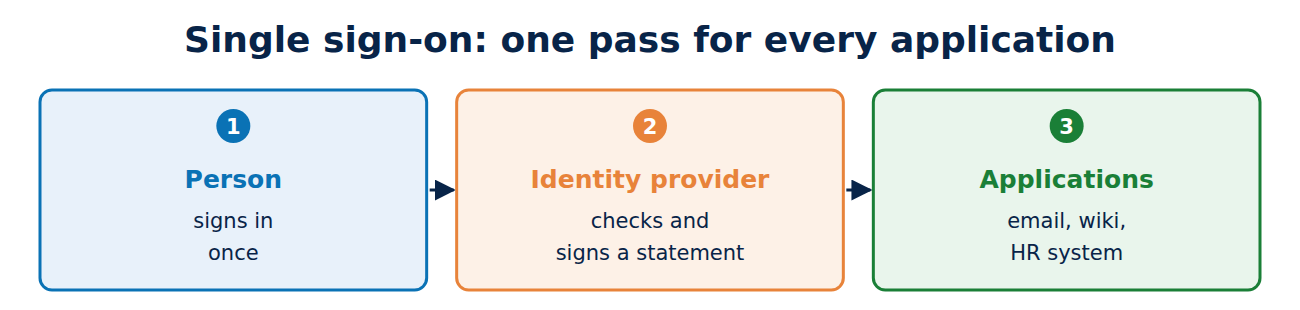
Sign in once, then use email, the HR system, the wiki and the ticket system without five passwords: that is single sign-on (SSO). Behind it sits a central identity provider that every application trusts. Two standards share the field: the older SAML 2.0, with signed XML documents, and the younger OpenID Connect, with JSON Web Tokens. This guide explains how SSO works, how SAML and OpenID Connect differ, the role certificates play, what federation means and which risks to know about.
The principle: one pass for every application
SSO has two sides:
- Identity provider (IdP): checks the person, for example with a password and second factor, and issues a signed statement. Examples: Microsoft Entra ID, Okta, Google Workspace, Keycloak, or Shibboleth at universities.
- Application (service provider, SP, or relying party): trusts that statement and lets the person in without a password of its own.
The advantage: one strong sign-in method, such as a passkey or smart card, protects every application at once; see smart cards and certificate-based authentication. When someone leaves, IT disables a single account. The drawback: the identity provider becomes the most valuable target on the network.
SAML 2.0: signed XML assertions
SAML 2.0 (Security Assertion Markup Language) was approved by OASIS in 2005 and is widespread in companies and universities. The typical flow, started by the application (SP-initiated):
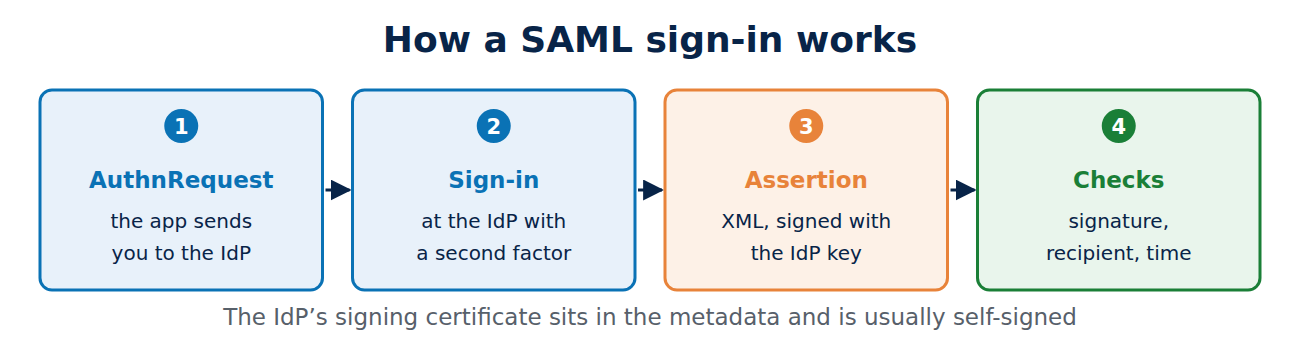
- The person opens the application. The application sends the browser to the IdP with a request (AuthnRequest).
- The IdP signs the person in and creates an assertion: an XML document with name, attributes such as groups, validity period and recipient.
- The IdP signs the assertion with its private key (XML Signature) and sends it to the application through the browser as a form post.
- The application checks the signature, recipient and time, and starts a session.
The two sides exchange metadata in advance: an XML file with addresses and the IdP’s signing certificate. That certificate is usually self-signed and valid for several years. The application does not check a chain to a root CA; it trusts exactly that certificate. When it expires, every sign-in fails until the application knows the new one. A change therefore has to be planned: add the new certificate to the metadata, update every application, then switch over. For expiry monitoring see how to manage certificate expiry.
OpenID Connect: JSON instead of XML
OpenID Connect builds on OAuth 2.0 and delivers an ID token as a JSON Web Token. The flow resembles SAML (redirect to the provider, return with a code), but the tokens are more compact, and the application fetches the public keys automatically from the provider’s JWKS, which makes key changes easier. The details are in OAuth 2.0 and OpenID Connect explained.
SAML or OpenID Connect?
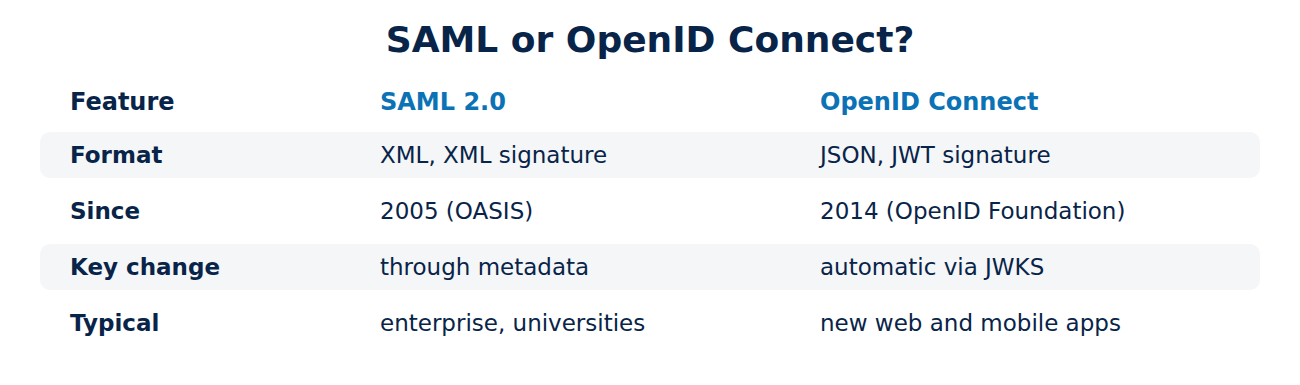
- Format: SAML uses XML with XML signatures, OpenID Connect uses JSON with JWT signatures.
- Where it is used: SAML is at home in older enterprise applications and university federations. OpenID Connect is the standard for new web and mobile apps and for APIs.
- Apps and APIs: together with OAuth, OpenID Connect provides access tokens for APIs; SAML is not designed for that.
- Key changes: automatic through JWKS with OpenID Connect, through metadata with SAML, often by hand.
- Complexity: XML signatures are hard to verify correctly, which has led to many security holes.
Most identity providers speak both, so an organisation can choose per application. For new projects, OpenID Connect is usually the better choice.
Federation: trust across organisations
With federation, applications trust not just their own IdP but the IdPs of many organisations. A UK example is the UK Access Management Federation, run by Jisc: students and staff sign in with their university account to publishers, libraries and services at other institutions. Through eduGAIN, such federations are connected worldwide. They are built on shared metadata that the federation operator signs and distributes. Alongside sign-in, organisations often need accounts created and removed automatically; the standard for that is SCIM (RFC 7644).
Risks with SSO
- Stolen signing key: anyone who holds the IdP’s private key can issue assertions for any user. This attack is called Golden SAML and played a part in the SolarWinds attack in 2020. The key therefore belongs in an HSM; see what is an HSM.
- Faulty signature checks: in XML signature wrapping, an attacker moves parts of the document so that the application checks one signed section but reads another. Only a proven library protects against mistakes like this.
- Long sessions: SSO sessions often last many hours, so stolen session cookies are valuable; see how to spot a phishing email.
- Signing out: central sign-out (single logout) often only works partly in practice.
Frequently asked questions
Is “Sign in with Google” single sign-on?
Yes, in a simple form. Google is then the identity provider, usually through OpenID Connect.
Does SAML need a certificate authority?
No. The signing certificate is usually self-signed; it is trusted because it is listed in the metadata.
Is SSO more secure than separate passwords?
Yes, provided the central sign-in is strong, for example with a passkey or smart card, and the IdP is well protected.
What is the difference between SSO and a password manager?
A password manager fills in many different passwords. With SSO there is only one sign-in; see the best password managers.
Conclusion
Single sign-on brings sign-in together at one identity provider that every application trusts. SAML 2.0 uses signed XML assertions and certificates from metadata, OpenID Connect uses signed JSON tokens with keys from the JWKS. The most important thing to protect is the identity provider’s signing key. More guides in the hub Online security and privacy.
Sources and further reading
- Assertions and Protocols for SAML V2.0 (OASIS)
- OpenID Connect Core 1.0 (OpenID Foundation)
- UK Access Management Federation (Jisc)
- RFC 7644: SCIM Protocol (IETF)
















Recent Comments