
Encryption is only as good as the handling of its keys. Anyone encrypting databases, backups and cloud storage has to decide where the keys live, who may use them, when they are changed and how they are destroyed. That is the job of a key management service (KMS). This guide explains key hierarchies and envelope encryption with an example you can try, key rotation, the BYOK and HYOK models in the cloud, and making data unreadable by deleting its key.
Why keys need managing
An AES key is only 32 bytes long, yet it may protect terabytes of data. If it sits next to the data, say in a configuration file on the same server, the encryption achieves little. A KMS therefore separates keys from data and provides:
- Secure storage, usually in a hardware security module (HSM) that the master key never leaves unencrypted; see what is an HSM,
- Access rules: which service may use which key for what,
- Logging: every use is recorded,
- Lifecycle: create, rotate, disable, delete.
Envelope encryption: keys inside keys
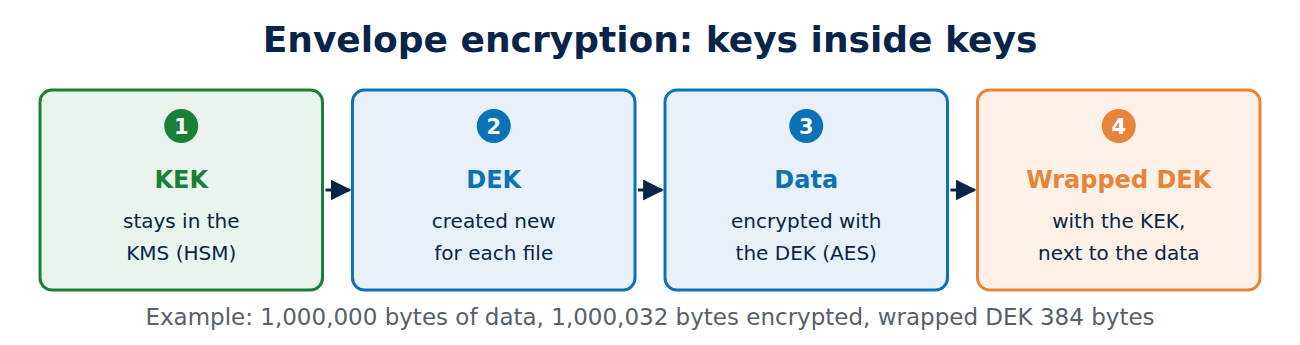
A KMS does not encrypt the terabytes itself; that would be far too slow. It works with a hierarchy:
- A master key (key encryption key, KEK) stays inside the KMS.
- Each file or block of data gets its own data key (data encryption key, DEK).
- The DEK encrypts the data quickly with AES, directly on the server.
- The KEK encrypts (wraps) the DEK. Only the wrapped DEK is stored, alongside the data.
- To decrypt, the server sends the wrapped DEK to the KMS, gets the DEK back, decrypts the data and forgets the DEK again.
The image of a sealed envelope gave the method its name. The following OpenSSL example shows the principle; an RSA key pair stands in for the KEK and a 1,000,000-byte file for the data (run on 7 November 2026):
openssl genpkey -algorithm RSA -pkeyopt rsa_keygen_bits:3072 -out kek.key
openssl pkey -in kek.key -pubout -out kek-pub.pem
openssl rand -base64 32 > dek.txt
openssl enc -aes-256-cbc -pbkdf2 -in data.bin -out data.enc -pass file:dek.txt
openssl pkeyutl -encrypt -pubin -inkey kek-pub.pem -pkeyopt rsa_padding_mode:oaep -pkeyopt rsa_oaep_md:sha256 -in dek.txt -out dek.wrapped
shred -u dek.txt
The wrapped DEK is 384 bytes, exactly one RSA-3072 block. The encrypted file grows by only 32 bytes (salt and padding). To decrypt, the private KEK unwraps the DEK, and the DEK decrypts the file. In a real KMS a call such as AWS’s GenerateDataKey handles the first steps, returning the DEK once in plain form and once wrapped. For the difference between RSA and AES see RSA vs AES.
The benefit of the hierarchy: the valuable master key never leaves the HSM, and a stolen wrapped DEK is useless without access to the KMS.
Rotating keys
Each key should only be used for new data for a limited time. The US standards body NIST calls this the cryptoperiod (SP 800-57). Reasons to change keys include limiting how much data one key protects, limiting the damage if a theft goes unnoticed, and requirements in standards such as PCI DSS. A KMS makes rotation easy:
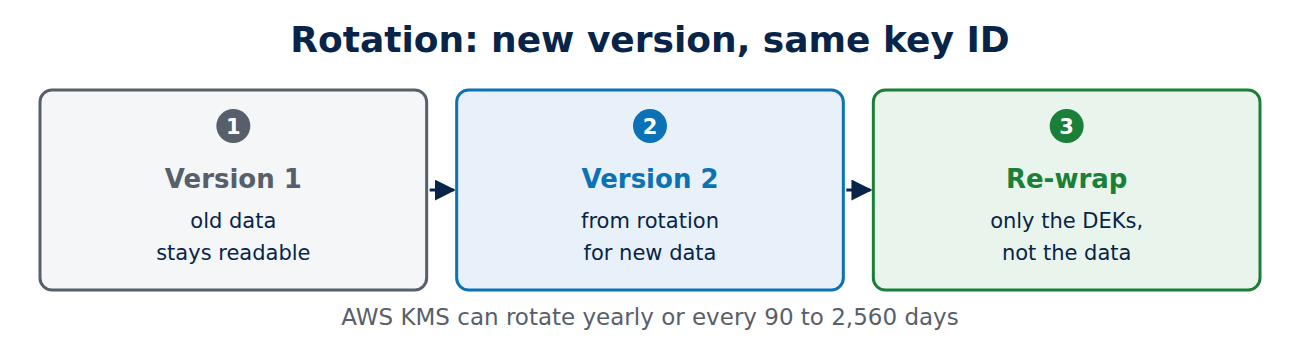
- New version: the KMS creates new key material under the same key ID. New data uses the new version, while old data stays readable with the old one.
- Automatic: AWS KMS can rotate yearly or at any interval you choose between 90 and 2,560 days.
- Re-wrapping: because only DEKs are wrapped, a KEK change does not mean re-encrypting the data, only re-wrapping the small DEKs.
The same principle applies to certificate keys; see how to manage certificate expiry.
BYOK and HYOK: who owns the key?
In the cloud, the question is whether the provider controls the keys:
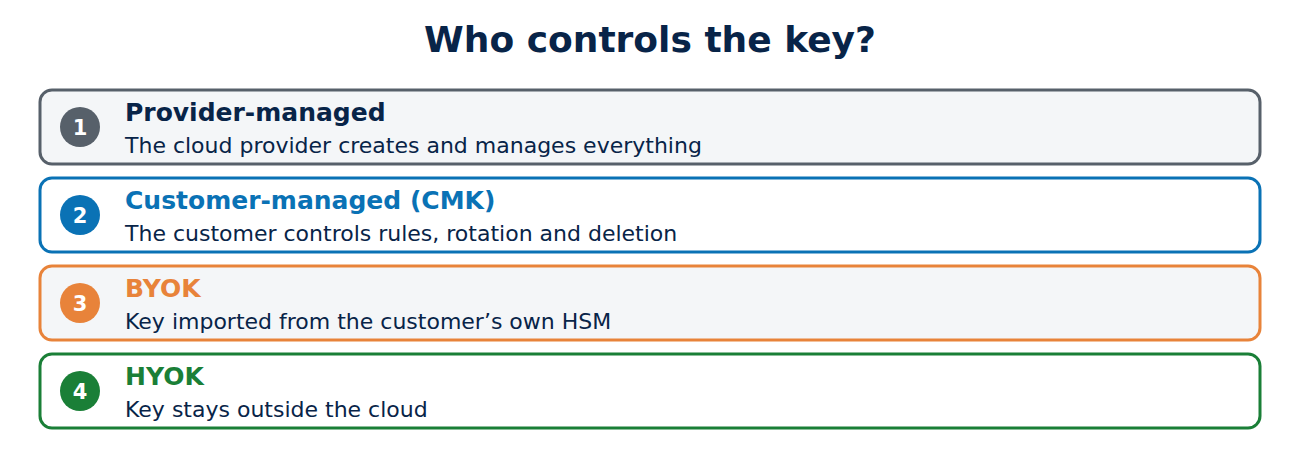
- Provider-managed: the cloud provider creates and manages everything. Simplest, but the provider could in theory gain access.
- Customer-managed (CMK): the customer controls rules, rotation and deletion in the provider’s KMS.
- BYOK (bring your own key): the customer generates the key in their own HSM and imports it, encrypted, into the KMS, and can delete it there at any time.
- HYOK (hold your own key): the key stays outside the cloud in the customer’s external key store, and every decryption asks it first. This gives the most control, for example for data that must stay under a particular jurisdiction, but also more work and another point of failure: if the external store is unreachable, the service stops.
Deleting data by deleting the key
Deleting data completely from backups, replicas and archives is hard. Encryption offers another way: delete the key, and all the data encrypted with it becomes unreadable. This crypto-shredding is used, for example, to destroy a customer’s data when a contract ends. Because it is final, a KMS builds in a waiting period; with AWS KMS it is 7 to 30 days. On backups in general, see how to back up Windows 11.
Frequently asked questions
Is a KMS the same as a password vault?
Not quite. A vault such as HashiCorp Vault stores secrets like passwords and API keys and hands them out. A KMS never hands out its master key, but performs operations with it. Many products can do both.
Do I need a KMS for disk encryption at home?
No. There, the TPM plays the part of the key store; see how to encrypt your laptop.
What is KMIP?
An open OASIS standard through which storage systems, databases and backup software talk to a KMS.
How often should I rotate?
A year is a common value for master keys. More important than the exact number is that rotation runs automatically and has been tested.
Conclusion
A KMS keeps keys apart from data: the master key stays in the HSM, data keys encrypt the data and are stored wrapped. Rotation creates new versions without re-encrypting, BYOK and HYOK give customers more control, and deleting a key makes data permanently unreadable. More guides in the hub Certificates, PKI and encryption.
Sources and further reading
- NIST SP 800-57 Part 1 Rev. 5: Recommendation for Key Management (NIST)
- AWS KMS cryptography essentials (AWS)
- Rotate AWS KMS keys (AWS)
- Envelope encryption (Google Cloud)



















Recent Comments