
A contract is signed electronically in 2026, the signer’s certificate expires in 2028, and in 2035 there is a dispute. Is the signature still worth anything? Yes, if it was done properly: with a trusted timestamp and embedded validation data. This guide explains what an RFC 3161 timestamp is, how to request and check one with OpenSSL (with real replies from DigiCert and FreeTSA), why signatures stay valid after the certificate expires, and what long-term validation (LTV) means for PDFs.
The problem: certificates expire
A digital signature links a document to the signer’s certificate; see digital signatures. A validator asks: was the certificate valid and unrevoked when the document was signed? To answer, it needs two things it does not have on its own:
- A reliable time. The time the signing program writes into the signature comes from the signer’s computer and can be set to anything.
- The revocation status at the time. Once a certificate expires, it drops off revocation lists and OCSP services stop answering for it; see how certificate revocation works.
Timestamps and long-term validation solve both.
What an RFC 3161 timestamp is
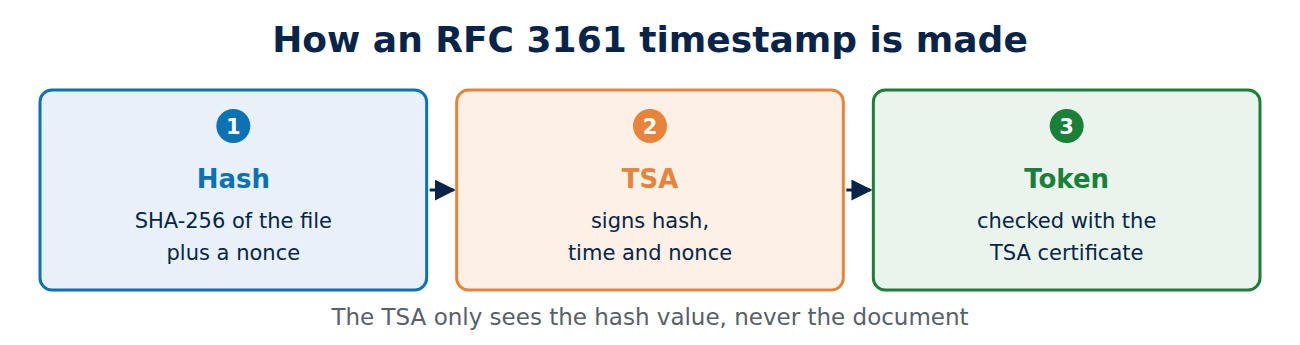
A time stamping authority (TSA) confirms with its signature: this hash value existed at this moment. The TSA never sees the document itself, only its hash. The protocol has been standardised as RFC 3161 since 2001:
- The client calculates the hash, for example with SHA-256, and sends it with a random number (nonce) to the TSA.
- The TSA replies with a timestamp token: hash, time, serial number, policy and nonce, signed with a certificate that carries the “Time Stamping” purpose.
- Anyone checking the token later compares the hash with the document and verifies the TSA’s signature.
Trying it with OpenSSL
The following commands were run on 7 November 2026. First, create the request for a file:
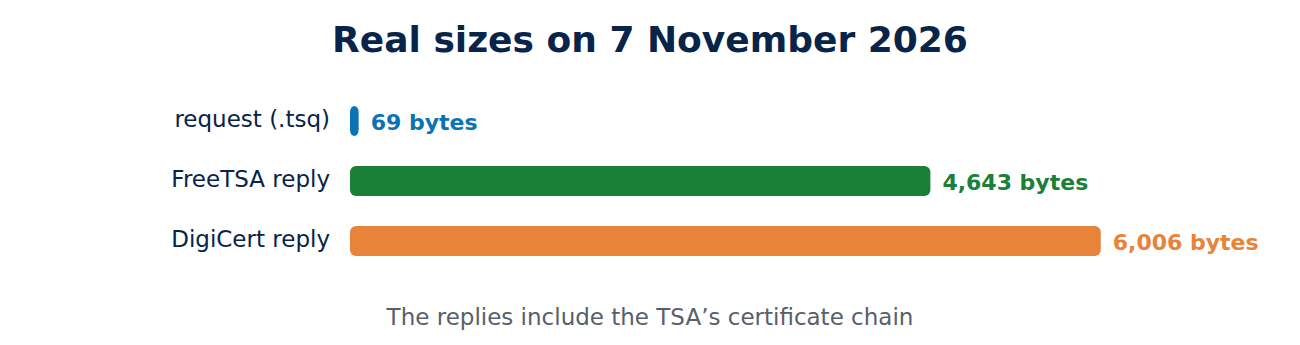
openssl ts -query -data contract.pdf -sha256 -cert -out request.tsqThe request is just 69 bytes. Then send it to a public timestamp service, here DigiCert’s:
curl -H "Content-Type: application/timestamp-query" --data-binary @request.tsq http://timestamp.digicert.com -o reply.tsr
openssl ts -reply -in reply.tsr -text
The reply was 6,006 bytes, because it includes the TSA’s certificate chain. It reported status “Granted”, hash algorithm sha256 and the time “Nov 7 16:23:40 2026 GMT”. It was signed by the certificate “DigiCert SHA256 RSA4096 Timestamp Responder 2026 1”, valid from 5 August 2026 to 4 November 2037, with Time Stamping as its purpose, marked critical. Checking it against the included chain and the system’s root store:
openssl ts -verify -in reply.tsr -queryfile request.tsq -CAfile /etc/ssl/certs/ca-certificates.crt
Verification: OK
The same hash sent to FreeTSA, a free service based in Germany, produced a 4,643-byte reply with the same second. For root stores see what is a root store.
Why signatures stay valid
With a timestamp, the question changes. Instead of “is the certificate valid today?” it becomes: “was the certificate valid at the time of the timestamp?” Code signing relies on the same principle: a program signed in 2026 can still be installed in 2030, long after the signing certificate expired; see how code signing works. The timestamp must be created shortly after the signature, so signing programs fetch it straight away.
Long-term validation for PDF: PAdES and LTV
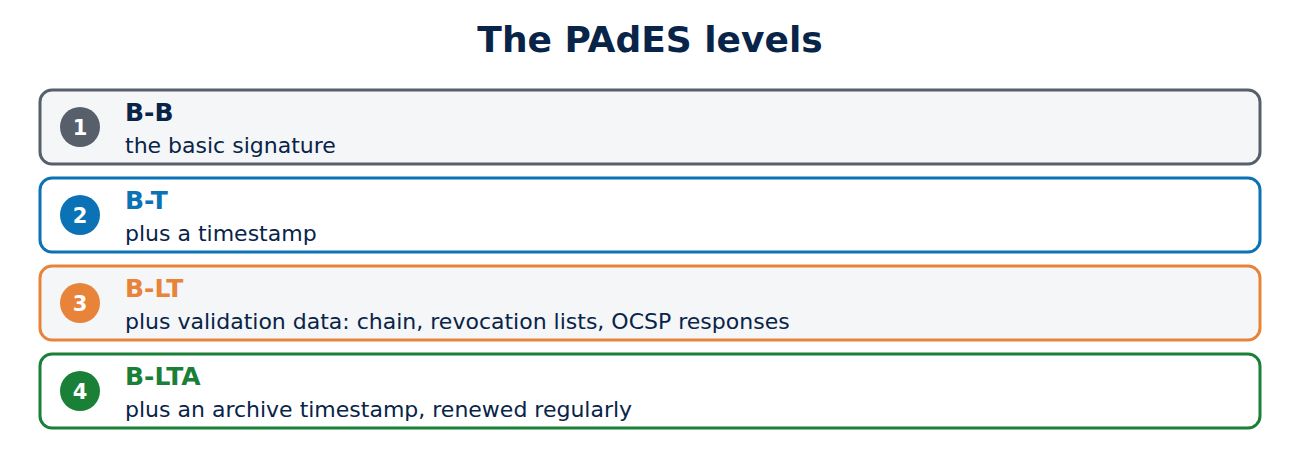
For PDF documents, the European standard PAdES (ETSI EN 319 142) sets out how signatures remain verifiable over the long term. It has levels that build on each other:
- B-B: the basic signature.
- B-T: plus a timestamp.
- B-LT: plus all the validation data inside the document: certificate chain, revocation lists or OCSP responses from the time of signing. Adobe calls this “LTV enabled”.
- B-LTA: plus a document timestamp over everything. Before its certificate expires or its algorithms weaken, a new one is added on top, and so on, like the rings of a tree.
That way a signature can be checked even after decades, even if the CA no longer exists. XAdES is the counterpart for XML and CAdES for any data.
Qualified timestamps under eIDAS and UK eIDAS
EU law, and the UK’s retained version known as UK eIDAS, recognise qualified timestamps from audited trust service providers. In court they carry a presumption that the date and time are accurate and that the data has not changed since. For invoice archives, contracts and official records this is the usual route. The EU publishes its qualified providers in trusted lists, and the UK keeps its own trusted list, with the Information Commissioner’s Office as the supervisory body.
Frequently asked questions
Does a timestamp cost anything?
Public services from CAs such as DigiCert or Sectigo, and FreeTSA, are free. Qualified timestamps usually cost a small fee each or a subscription.
Does the TSA see my document?
No, only the hash value. The content cannot be worked out from it.
What happens if SHA-256 is broken one day?
Before that, you add a new archive timestamp with a stronger algorithm over the document. That is exactly what the B-LTA level is for.
How can I tell in Adobe Reader whether a signature is LTV enabled?
The signature panel then states that the signature is LTV enabled and the validation data is embedded.
Conclusion
An RFC 3161 timestamp proves that a hash value existed at a given moment, signed by an independent service. With it and embedded validation data, a signature stays valid long after the certificate has expired, and PAdES B-LTA renews that protection over decades. More guides in the hub Certificates, PKI and encryption.
Sources and further reading
- RFC 3161: Time-Stamp Protocol (TSP) (IETF)
- openssl-ts (OpenSSL documentation)
- ETSI EN 319 142-1: PAdES digital signatures (ETSI)
- FreeTSA (FreeTSA)













Recent Comments