
Certificates used to be a once-a-year chore: buy one, install it, set a calendar reminder and hope the person who owns the reminder is still around next year. That model is over. Public TLS certificates may now live at most 200 days, from March 2027 only 100, and from March 2029 only 47 days. Let’s Encrypt already offers six-day certificates and moves its default from 90 to 64 days in February 2027. Public certificates no longer work as client certificates, and post-quantum certificates are on the horizon. This guide describes what state-of-the-art certificate lifecycle management looks like at the end of 2026: fully automatic issuance and renewal, new keys every time, delivery before anything expires, monitoring that notices what the automation missed, and an architecture that can switch CA or algorithm without a project. It builds on the basics in how to manage certificates and avoid expiry outages and goes into the detail that matters when you run hundreds or thousands of certificates.
What changed in 2025 and 2026
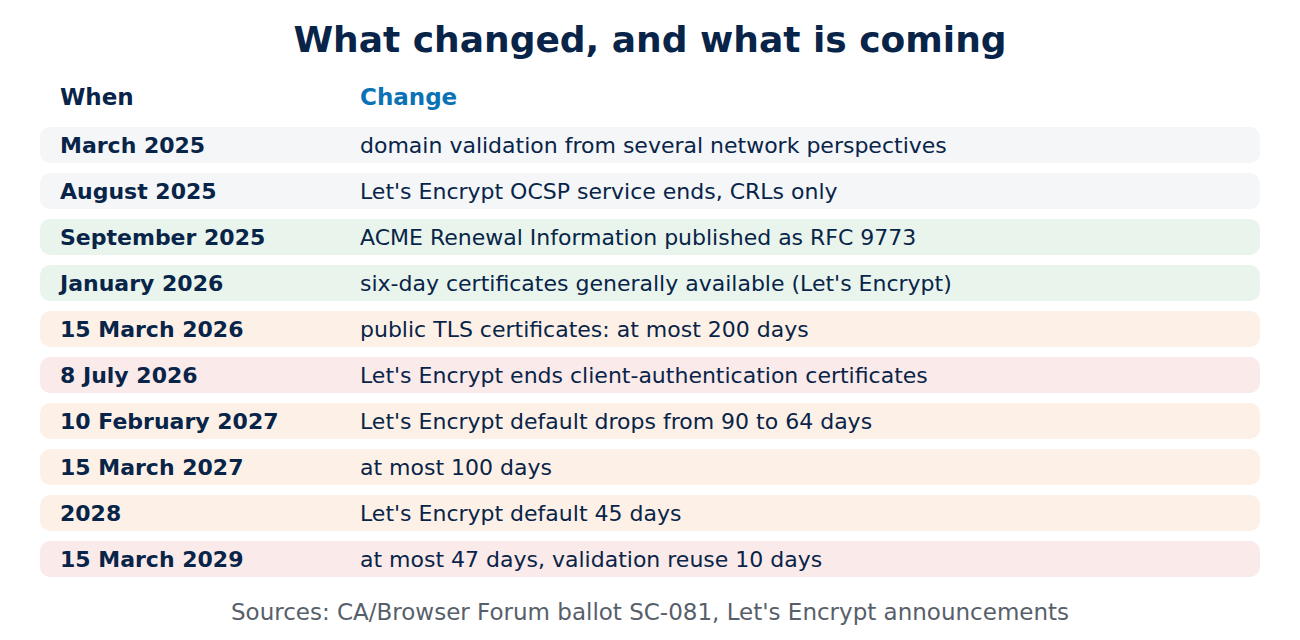
The rules for public certificates changed more in these two years than in the decade before. The milestones that shape a modern setup:
- Shorter lifetimes, fixed by vote: in April 2025 the CA/Browser Forum adopted ballot SC-081, which cut the maximum validity of public TLS certificates from 398 days to 200 days on 15 March 2026, to 100 days on 15 March 2027 and to 47 days on 15 March 2029. The time a CA may reuse a domain validation shrinks in step, to 10 days in 2029; see why certificate lifetimes are getting shorter.
- Validation from several places: since March 2025 public CAs must confirm domain control and CAA records from several network perspectives (multi-perspective issuance corroboration), which makes hijacking a single network path useless.
- Renewal hints from the CA: ACME Renewal Information (ARI) was published as RFC 9773 in September 2025. The CA tells each client when to renew, and can bring that moment forward before a mass revocation.
- Choice of lifetime: Let’s Encrypt lets clients pick a profile. Six-day certificates (160 hours) became generally available in January 2026, the 45-day “tlsserver” profile followed in May 2026, and the default drops from 90 to 64 days on 10 February 2027 and to 45 days in 2028.
- The end of OCSP at Let’s Encrypt: its OCSP service reached end of life in August 2025; revocation is published through CRLs, which browsers distribute in compressed form; see how certificate revocation works.
- Server-only certificates: Chrome’s root programme moves public TLS hierarchies to server authentication only. Let’s Encrypt stopped issuing certificates with the client-authentication purpose in 2026 and retired its temporary “tlsclient” profile on 8 July 2026. Client certificates now belong in private PKIs; see what is mutual TLS.
- Persistent DNS validation: ballot SC-088 (October 2025) allows a DNS record that names the ACME account once, instead of a fresh TXT record for every validation. The IETF specification, dns-persist-01, was still a draft, and CA support was only starting.
- Post-quantum groundwork: RFC 9881 (October 2025) defines ML-DSA signatures in X.509 certificates, and Chrome and Cloudflare tested Merkle Tree Certificates in 2026 as the likely way to bring post-quantum signatures to the web without huge handshakes; see what are post-quantum certificates.
What “state of the art” means
A modern setup is not a product. It is a set of properties that a mature setup has, whichever tools deliver them:
- No human in the renewal path: every certificate is requested, validated, installed and activated by software. People set policy and handle exceptions.
- Short-lived by default: the shortest lifetime the system can sustain, because a short lifetime limits the damage of a stolen key and makes revocation less important.
- A new key every time: renewal means a new key pair, generated where it is used, ideally in hardware that cannot export it.
- Renewal guided by the CA: clients follow ARI windows instead of fixed dates, so the CA can spread load and pull renewals forward in an emergency.
- Delivery before need: the new certificate is in place, tested and active well before the old one expires, including on devices that are offline for days.
- Complete inventory and independent monitoring: you know every certificate, its owner and its expiry, and a separate system checks what is actually served.
- Crypto agility: switching CA, key type or signature algorithm is a configuration change, not a migration project.
The lifecycle, step by step
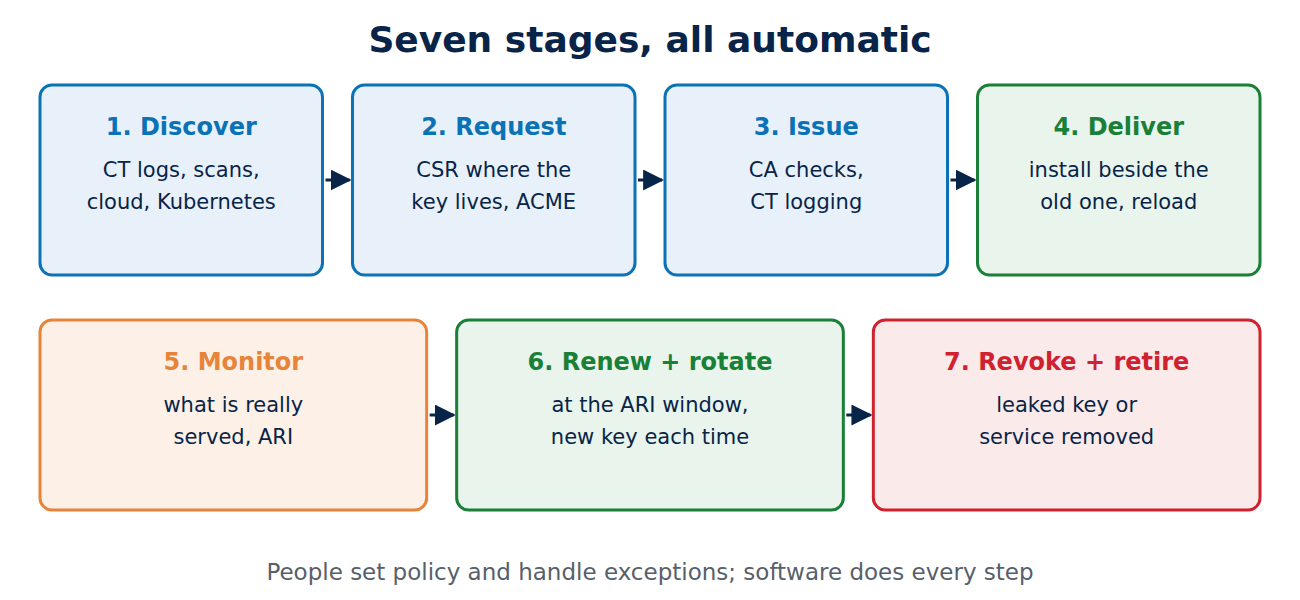
Every certificate passes through the same stages. What changes in a modern setup is that each stage is automatic and observable.
1. Discover
You cannot manage what you do not know. Discovery combines several sources: the certificates your CAs issued, Certificate Transparency logs for your domains (every public certificate is logged; see what is Certificate Transparency), network scans of your address ranges and ports, cloud provider inventories (load balancers, CDNs, API gateways), Kubernetes secrets, Windows certificate stores and the configuration of appliances. The result is one inventory with an owner for every certificate. Certificates without an owner are the ones that expire unnoticed.
2. Request and validate
The request is generated where the key lives. For public certificates the standard is ACME (RFC 8555): the client proves control of the name with an HTTP, DNS or TLS-ALPN challenge, and the CA issues; see the ACME protocol explained and ACME in depth. Policy is enforced at this step: allowed names, key types, lifetimes and which CA may issue for which domain, backed by CAA records in DNS; see CAA, DNSSEC and DANE.
3. Issue
The CA signs and logs the certificate. For public CAs this includes the multi-perspective checks and CT logging. For private CAs, the state of the art is an issuing CA whose key sits in an HSM, an offline root, and the same automation protocols as the public world; see how to run a private certificate authority and what is an HSM.
4. Deliver and deploy
The certificate and chain reach every place that needs them: web servers, load balancers, CDNs, containers, devices. Modern setups install the new certificate next to the old one, check it, and only then switch, with a reload rather than a restart.
5. Monitor
A separate check looks at what is actually served on each endpoint: expiry, chain, name, key type, and whether the CA has suggested an early renewal.
6. Renew and rotate
Renewal starts automatically at the time the CA suggests, or at about two thirds of the lifetime, with a new key. Failures alert long before the deadline.
7. Revoke and retire
When a key leaks or a service is decommissioned, the certificate is revoked and removed from the inventory. With short lifetimes, revocation is less critical, but the process still has to work for the cases where days matter.
The reference architecture
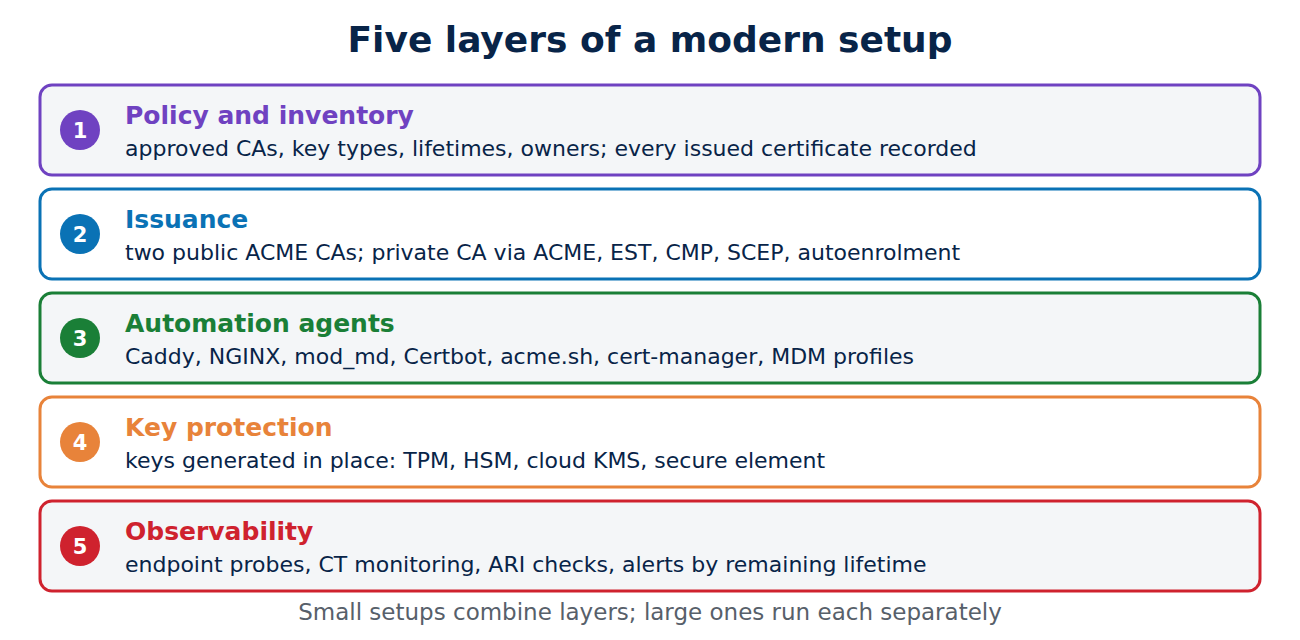
A state-of-the-art setup has five layers. Small organisations may collapse some of them into one tool; large ones run each separately.
Policy and inventory
One place defines the rules and holds the inventory: which CAs are approved, which key types and lifetimes are allowed, who owns which names, and how many days before expiry an alert is raised. Commercial certificate lifecycle management platforms do this, as do inventory scripts that feed a database. What matters is that issuance tools read the policy, and that every issued certificate lands in the inventory automatically.
Issuance
- Public certificates come from at least two ACME CAs. If one has an outage or must revoke en masse, clients switch to the other without new code.
- Private certificates come from your own CA through the protocol each client speaks: ACME for servers and workloads, EST or CMP for devices and industrial equipment, SCEP for MDM-managed phones and laptops, and Windows autoenrolment in Active Directory; see what is SCEP, what is EST and what is CMP.
- Workloads in Kubernetes and service meshes get identities that live hours, not months, from cert-manager or a SPIFFE implementation; see workload identity with cert-manager and SPIFFE.
Automation agents
Something on or near every endpoint requests and installs certificates. Modern web servers do this themselves: Caddy has always had ACME built in, Apache has mod_md, and NGINX gained a native ACME module in 2025. Elsewhere an ACME client such as Certbot, acme.sh or win-acme runs on a schedule. In Kubernetes, cert-manager watches Certificate resources and keeps secrets fresh. On managed devices the MDM profile handles SCEP or ACME; see certificates on managed devices.
Key protection
Keys are generated on the system that uses them and, where it matters, never leave hardware: TPMs on servers and laptops, HSMs or cloud KMS for CAs and high-value services, secure elements on phones. The automation only ever handles certificate signing requests and public certificates.
Observability
Independent of the automation, a monitor checks every endpoint, watches CT logs for unexpected certificates in your names, and queries ARI for each certificate. Its alerts are written as a fraction of the lifetime (for example “less than a third of the lifetime left”), not as a fixed number of days, so they stay meaningful as lifetimes shrink.
Renewal done right
Renew by the CA’s clock: ARI
With ARI, the client asks the CA for a suggested renewal window for each certificate and renews at a random moment inside it. We queried Let’s Encrypt’s ARI endpoint for the certificates of our own three blogs:
www.techcrates.com: issuer YE1 (Let's Encrypt), lifetime 90 days, 49 days left
  ARI suggested window 2026-12-02 21:48 .. 2026-12-04 16:59 UTC
  window start = day 59.1 of 90 (66 %)
www.techuni.de:            window starts at day 59.1 of 90 (66 %)
www.studentlifeonline.org: window starts at day 59.1 of 90 (66 %)
The CA suggests renewing after two thirds of the lifetime, with a window of about two days, so not every client in the world arrives at once. If the CA had to revoke these certificates early, it would move the window into the past, and every ARI-aware client would renew at its next check, before the revocation. That is exactly the scenario that hurt in July 2024, when DigiCert had to revoke more than 83,000 certificates within 24 hours because of a validation bug, and many customers had no automation ready.
Our own server, by the way, uses Certbot 2.9.0 from the distribution, which predates ARI support (added in Certbot 4.1.0) and renews 30 days before expiry. For 90-day certificates that lands on day 60, close to the ARI window, but it would not react to an early-renewal signal. Updating the client is on our own list.
Renew at two thirds, with margin for failures
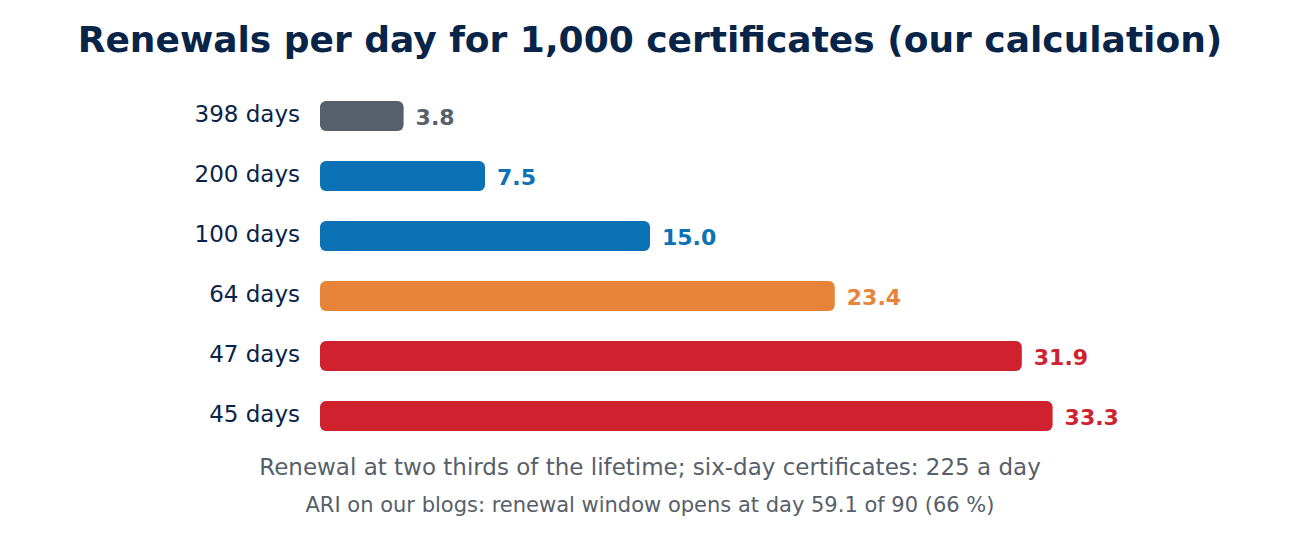
Without ARI, the rule of thumb is to renew when two thirds of the lifetime have passed. That leaves a third of the lifetime to notice and fix a failed renewal. Hard-coded values are the classic trap: a script that renews “every 60 days” works for 90-day certificates and silently fails with 64-day ones. Let’s Encrypt explicitly asks operators to search cron jobs and runbooks for numbers like 60, 80 or 83. Our calculation shows how the workload grows as lifetimes shrink:
lifetime                           renew at day   renewals/year   per 1,000 certificates
398 days (until March 2026)            265.3            1.4          1,376 a year  (3.8 a day)
200 days (since March 2026)            133.3            2.7          2,738 a year  (7.5 a day)
100 days (from March 2027)              66.7            5.5          5,475 a year (15.0 a day)
 64 days (Let's Encrypt, Feb 2027)      42.7            8.6          8,555 a year (23.4 a day)
 47 days (from March 2029)              31.3           11.6         11,649 a year (31.9 a day)
 45 days (Let's Encrypt, 2028)          30.0           12.2         12,167 a year (33.3 a day)
  6 days (160 hours)                     4.4           82.1         82,125 a year  (225 a day)
An organisation with 1,000 certificates goes from about four renewals a day to more than thirty. That is trivial for software and impossible for people with tickets and spreadsheets.
Make failures loud and early
- Retry with backoff, and alert after a few failed attempts, not only when expiry is near.
- Test against staging: Let’s Encrypt’s staging environment issued 64-day certificates from October 2026, so clients could be tested before the production change.
- Watch rate limits: renewals of the same set of names are exempt from some limits, but a broken client that keeps requesting new certificates can still lock itself out.
- Keep a second CA configured so a CA outage does not block renewals for days.
Delivery in advance and in time
Getting a certificate is only half the job. The new certificate must be active everywhere before the old one expires, without an outage in between.
Overlap instead of a hard switch
The old certificate stays valid until it expires, so there is always an overlap. A good deployment uses it: install the new certificate and key alongside the old ones, run a check (does the chain build, does the name match, does the key fit), then switch atomically, for example by moving a symbolic link or updating a secret, and reload the service gracefully. Web servers such as NGINX and Apache reload certificates without dropping connections; Kubernetes ingress controllers pick up changed secrets on their own.
Push to everything that terminates TLS
In real networks one certificate often lives in several places: two web servers, a load balancer, a CDN, a monitoring probe. The state of the art is one of two patterns. Either each place requests its own certificate (simplest, and each has its own key), or one central system obtains the certificate and pushes it, through APIs, to every endpoint in a defined order, checking each one. Copying files by hand to “the other server” is where renewals get lost.
Devices that are not always online
A laptop on holiday, a sensor that wakes up once a day or a machine in a factory network cannot renew at the last minute. Their certificates renew early, typically after half of the lifetime, and the device keeps the old certificate until the new one has been tested. EST and CMP were designed for this, with re-enrolment that uses the existing certificate to authenticate the request. Very short lifetimes are only sensible for systems that are always connected.
Clocks and validity windows
Short-lived certificates make clock errors visible. A device whose clock is a few hours behind rejects a certificate that is valid “from now”. CAs therefore backdate the start of validity slightly, and modern setups keep clocks synchronised and alert on drift. Six-day certificates leave little room for a device that boots with a wrong time.
Trust stores move too
Roots and intermediates change: Let’s Encrypt introduced its Generation Y hierarchy in 2025 and 2026, and our own certificates already come from its YE1 and YE2 intermediates. Clients that pin an intermediate, or ship their own outdated trust store, break when that happens. State-of-the-art clients trust roots, not intermediates, take the chain from the server, and update their trust stores with the operating system.
Keys: rotate every time
A renewal that keeps the old key renews the paperwork, not the security. If the key leaked, the attacker still has a valid certificate after renewal. The modern default is a new key pair with every certificate. Certbot creates a new key by default, and cert-manager changed its default rotation policy to “Always” in version 1.18 (2025), so a reissue now also means a new private key.
Where keys are especially valuable, they are generated inside hardware and never leave it: a TPM on a server, a cloud KMS or an HSM for a CA, the secure element of a phone. ACME, EST and CMP all work with keys that stay in hardware, because the client only ever sends a certificate signing request.
Private PKI: the same automation inside the network
Most certificates in a company are not public at all: internal web applications, VPN gateways, Wi-Fi with 802.1X, device identities, service-to-service mTLS. The new rules for public certificates do not apply to them, but the same practices do.
- ACME internally: private CAs such as step-ca, EJBCA or the PKI engines of Vault and OpenBao speak ACME, so the same clients work inside and outside.
- Devices and machines: EST and lightweight CMP (RFC 9483) suit routers, industrial controllers and IoT devices, often bootstrapped from a manufacturer certificate that proves which device is asking; see IoT device identity with IDevID and Matter.
- Managed endpoints: Intune and Apple MDM deliver certificates through SCEP or ACME, with Apple’s managed device attestation proving the key sits in the device’s secure hardware.
- Windows: autoenrolment from AD CS remains the workhorse, configured through templates; see Windows certificate autoenrolment.
- Client certificates: since public CAs no longer issue certificates with client authentication, mTLS clients need a private CA. That is a good thing: the private CA can be restricted with name constraints, and nobody outside your organisation can obtain a certificate from it.
- Lifetimes: private CAs can go shorter than public ones where every client renews automatically, for example days for workloads and weeks for servers, and longer only where a device cannot renew often.
Revocation in a short-lived world
Revocation was always the weak point of PKI. Online checks (OCSP) leak browsing data and fail open when the responder is down. The current approach:
- CRLs, which public CAs must publish, collected by browser vendors and shipped in compact form: Chrome uses CRLSets for important revocations, and Firefox turned on CRLite, which covers all revocations in a few megabytes, for desktop users from version 137 in 2025.
- Short lifetimes as the real fix: a six-day certificate that leaks is useless within days, whether or not anyone checks revocation.
- Readiness for mass revocation: an incident at a CA can mean thousands of certificates revoked within 24 hours or five days, depending on the reason. ARI plus automation turns that from a crisis into a routine renewal.
- A key-compromise runbook: who revokes, how the new key is deployed, which secrets have to change as well. Practise it before you need it.
Monitoring and inventory that keep up
Automation fails quietly: a DNS API token expires, a firewall rule blocks the HTTP challenge, a container is rebuilt without its secret. Independent monitoring catches that.
- Endpoint checks: probe every TLS endpoint regularly for expiry, chain, name and key type, and alert when less than a third of the lifetime remains, plus a hard alarm a few days before expiry.
- CT monitoring: subscribe to Certificate Transparency monitoring for your domains, so a certificate you did not request, from any CA, raises an alert.
- ARI checks: query the CA’s renewal window for each certificate; a window in the past means renew now.
- Ownership: every alert goes to the owning team, not a general mailbox.
- Cryptographic inventory: record key types, sizes and signature algorithms as well, the basis for the post-quantum migration; this is often called a cryptographic bill of materials.
Crypto agility and post-quantum
The next big change is the move to post-quantum cryptography. Key exchange has already moved: browsers and servers negotiate hybrid ML-KEM key exchange by default, protecting traffic against later decryption. Certificates are harder, because post-quantum signatures are large. RFC 9881 defines ML-DSA for X.509, and private PKIs can test it today. For the public web, Chrome has said it does not plan to add classic X.509 certificates with post-quantum signatures to its root store for now and is exploring Merkle Tree Certificates instead; Cloudflare’s 2026 experiment with Chrome served them to real traffic, and a separate quantum-resistant root programme is planned from 2027.
For a lifecycle setup, this means: make sure your tools can handle new key types and certificate formats, keep the inventory of algorithms current, and avoid hard-coded assumptions such as “certificates are RSA-2048” or “chains have three certificates”. A setup that already renews everything automatically every few weeks can switch algorithm with the next renewal.
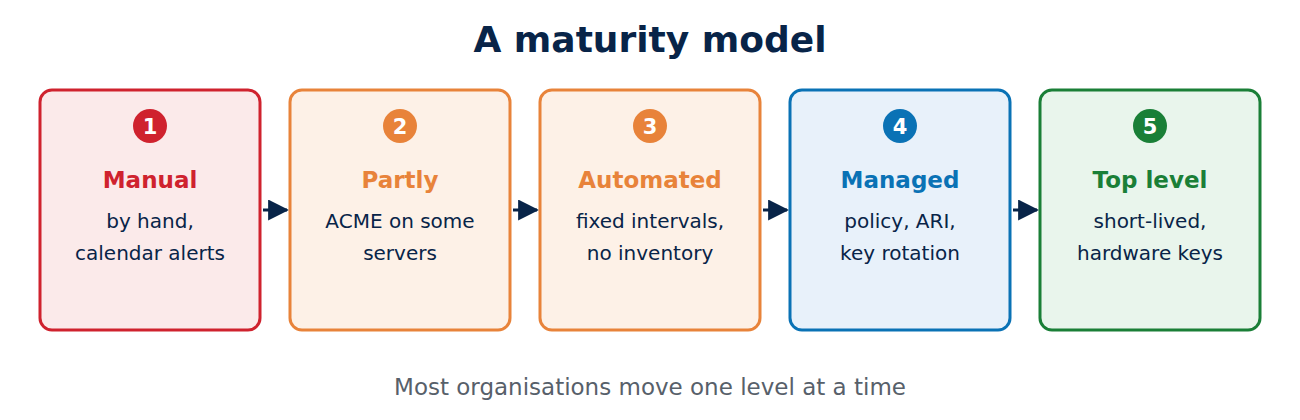
A maturity model
Where does your setup stand? The levels below describe the usual path.
- Manual: certificates bought and installed by hand, expiry tracked in calendars. Outages are a matter of time.
- Partly automated: ACME on some web servers, the rest manual. Inventory is a spreadsheet.
- Automated issuance: every certificate renews automatically, but with fixed intervals, no central inventory and monitoring by expiry date only.
- Managed: central policy and inventory, ARI-aware clients, a second CA, independent monitoring, new keys on every renewal, private PKI with the same automation.
- State of the art: short lifetimes everywhere they are sustainable, keys in hardware, delivery tested before activation, mass-revocation drills, CT monitoring, a cryptographic inventory and the ability to change CA or algorithm without a project.
A checklist for the next twelve months
- Find every certificate: CT logs, scans, cloud inventories, Kubernetes, Windows stores.
- Give every certificate an owner and an alert route.
- Replace fixed renewal intervals with ARI or “two thirds of the lifetime”.
- Test your clients against 64-day and 45-day certificates in staging.
- Move client certificates (mTLS) to a private CA.
- Turn on key rotation for every renewal.
- Configure a second ACME CA and test switching.
- Monitor endpoints independently of the automation, with alerts based on remaining lifetime.
- Write and rehearse a mass-revocation and key-compromise runbook.
- Record algorithms and key sizes as the start of your post-quantum plan.
Frequently asked questions
Do internal certificates also have to follow the 47-day rule?
No. The CA/Browser Forum rules bind publicly trusted CAs. Private CAs set their own lifetimes, but the same automation is the best practice, and many organisations choose short lifetimes internally as well.
Is ACME only for Let’s Encrypt?
No. ACME is an IETF standard used by many public CAs, including commercial ones with external account binding, and by private CAs such as step-ca, EJBCA and the PKI engines of Vault and OpenBao.
Should I use six-day certificates?
Only where renewal is fully automatic and the system is always online. They remove most of the need for revocation, but leave little time to fix a failed renewal. For most servers, 45 or 64 days with ARI is a good balance today.
What is the difference between renewal and rotation?
Renewal gets a new certificate; rotation replaces the key pair. The state of the art does both every time.
Do I need a commercial lifecycle management platform?
Not necessarily. Small setups manage well with ACME clients, cert-manager, a monitoring tool and a simple inventory. Platforms pay off when you have many teams, CAs and certificate types and need central policy and reporting.
How do I handle appliances that cannot run an ACME client?
Use a central system that obtains the certificate and pushes it through the appliance’s API, or put a reverse proxy in front that handles TLS. Ask vendors for ACME support when you renew contracts.
Conclusion
State-of-the-art certificate lifecycle management at the end of 2026 means that no person sits in the renewal path: certificates are discovered, requested, validated, issued, delivered and renewed by software, with a new key each time, guided by the CA’s ARI window and checked by independent monitoring. Our own certificates showed the pattern: 90-day Let’s Encrypt certificates whose ARI window opens at two thirds of the lifetime. As lifetimes fall to 100 days in 2027 and 47 days in 2029, the work grows from a few renewals a day to dozens for every thousand certificates, which only automation can absorb. Private PKIs, client certificates and the coming post-quantum switch all benefit from the same foundation. More in the hub Certificates, PKI and encryption.
Sources and further reading
- Ballot SC081v3: Introduce Schedule of Reducing Validity and Data Reuse Periods (CA/Browser Forum)
- RFC 9773: ACME Renewal Information (ARI) Extension (RFC Editor)
- RFC 8555: Automatic Certificate Management Environment (ACME) (RFC Editor)
- Decreasing Certificate Lifetimes to 45 Days (Let’s Encrypt)
- Profiles (Let’s Encrypt)
- Ballot SC-088v3: DNS TXT Record with Persistent Value DCV Method (CA/Browser Forum)
- CRLite: Fast, private, and comprehensive certificate revocation checking in Firefox (Mozilla Hacks)
- Release 1.18 (cert-manager)
- RFC 9881: Algorithm Identifiers for ML-DSA (RFC Editor)
- DigiCert mass-revoking TLS certificates due to domain validation bug (BleepingComputer)











Recent Comments